38
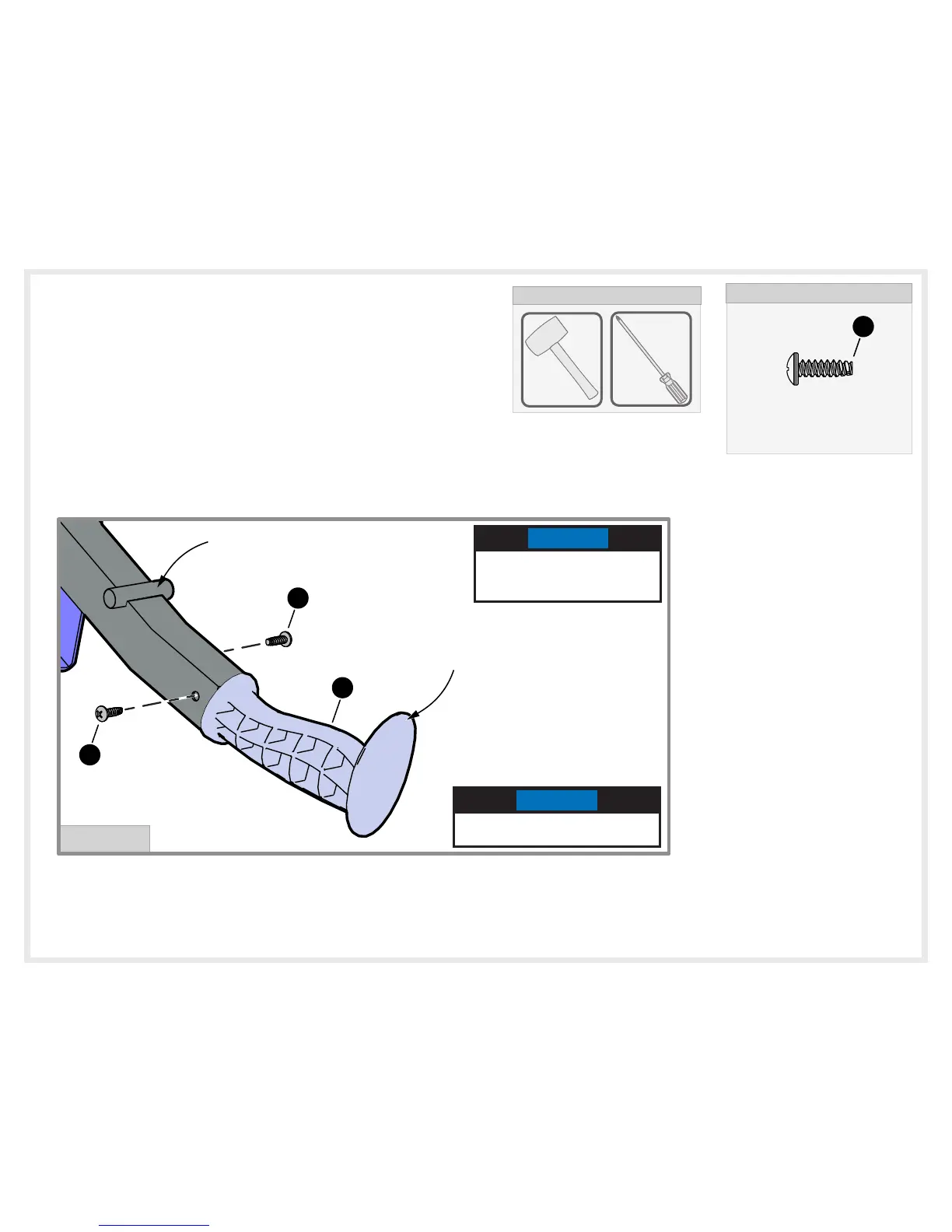
39. Insert Actuator Grip (#31) into Actuator bar until
the handle is flush with the Actuator bar, then line
up the holes in the grip with the holes in the
actuator bar and secure with two Screws (#32) as
shown in Detail A. DO NOT overtighten screws.
HARDWARE NEEDED
#10-14 X 0.63 TRILOBULAR SCREW
1B-7084-00
32
(QTY. 2)
DETAIL A
HOLE IS HIGHER ON
THIS SIDE OF HANDLE
AND ACTUATOR BAR
32
31
32
LONGER LIP OF GRIP
PIN IN ACTUATOR BAR
NOTE
Longer Lip of the Actuator
Grip and the pins in Actuator
bar are on the same side.
NOTE
If needed use a rubber mallet to
tap the Grip into the Actuator bar.
Phillips
TOOLS NEEDED
Rubber
Mallet


 To Next Page