1
WOR
K
I
N
G
DE
L
A
Y
I
N
G
U
N
U
S
U
A
L
DELA
Y
UNDELAY
8%
10%
888
DIG
ITAL
TECH-S
YST
E
M
I
NPU
T V
OL
TA
GE
8
8
8
D
I
GITAL
TE
C
H-
S
Y
ST
E
M
O
U
TP
U
T V
OL
T
A
G
E
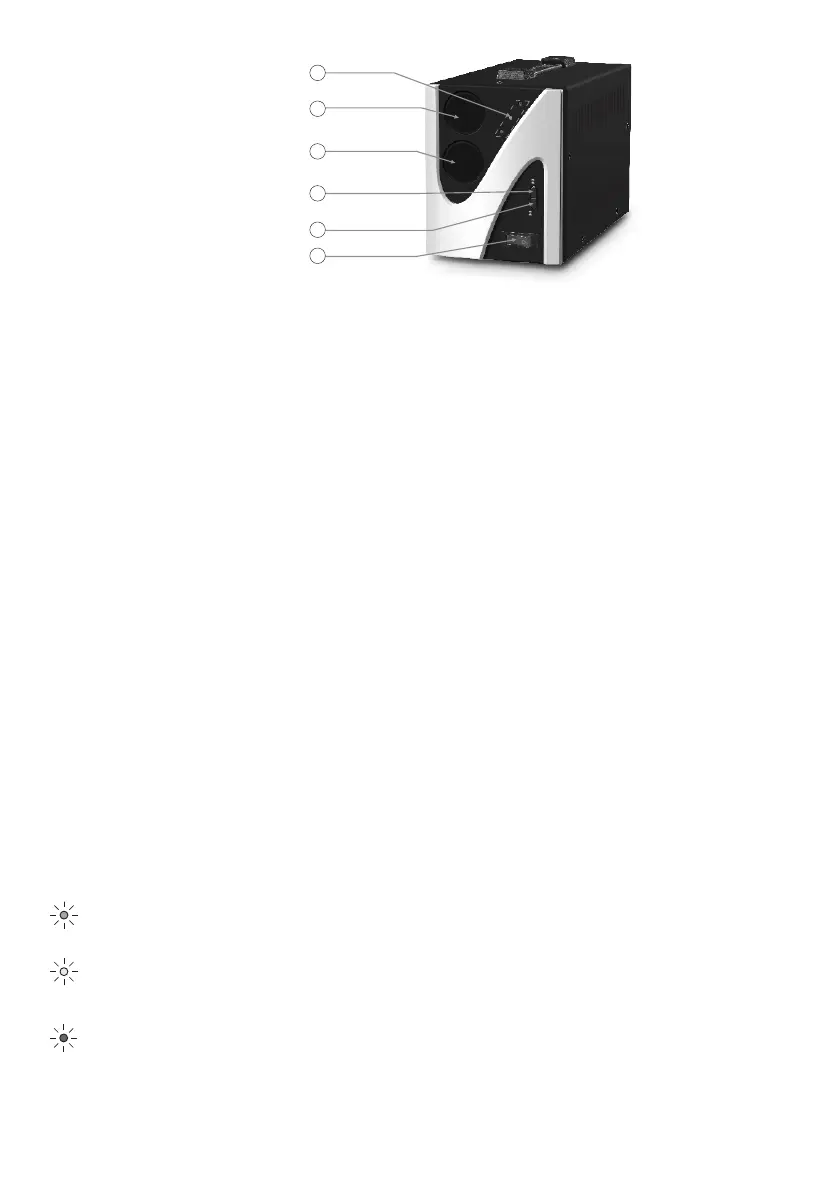
01
02
Input meter
Output meter
03
LED indicators
05
Delay selector
06
On/Off
04
Precision selector
01 - Input meter - displays input voltage
02 - Output meter
- when you power on the AVR, it will display the delay time counting down. Default
delay time is 6 sec. Press the delay selector to switch it to 120 sec.
- after delay time counting down is finished it will display normal output voltage. If
output voltage is constant, it will display 230V, if output voltage varies it will display 204 V ~
236 V - precizion 8%, 198 V ~ 242 V - precizion 10%.
- when you press the delay selector, the meter will display current delay time (6 or
120 sec) for 3 sec, then it will return to display output voltage.
- when you press precizion selector the meter will display "PCL" when precizion is
set to 10% and "PCH" when precizion is set to 8%.
If input voltage si higher than 255V for more than 3 sec, the meter will display "H"
intermittently, and if it’s lower than 180V for 1 sec, it will display "L" intermittently.
03 - Precizion selector - default setting is 10%. Press precizion selector to switch to 8%.
04 - Delay selector - if the AVR is used for refrigeration systems please use a delay time, to
minimize possible damage of compressor motor. if you don’t want to use a delay, set the
selector to the "UNDELAY" position.
05 - On/Off button - use to turn on or off the AVR.
06 - LED indicators
WORKING
DELAYING
UNUSUAL
It lights on when input voltage exceeds 255+/-5V. In this case it will enter high
voltage protection and the AVR will cut output voltage. When input voltage return to
normal, the AVR will return to normal functioning.
When it’s on, shows that the AVR is on.
Blinks during delay time, then it goes out.


 To Next Page
 Loading...