EN
5
INSTALLATION
Before installation, rst check that the device has not been damaged during transportation.
Battery connection:
- Remove the covers of the external battery terminals
- Connect the battery to the polarity: the red cable at the battery terminal (+); the black cable to
the battery terminal (-)
NOTE: For user safety please use insulating tape on the battery connections before using the
device
INSTRUCTIONS FOR USE
ATENTION:IT IS MANDATORY THAT YOU TURN ON DEVICE AFTER PROCEDURE:
Turn on device: after you have plugged the power plug of the UPS into a 230V outlet, press and hold the power button to
turn on the device.
Turn o device: long press the shut down button to turn o the device.
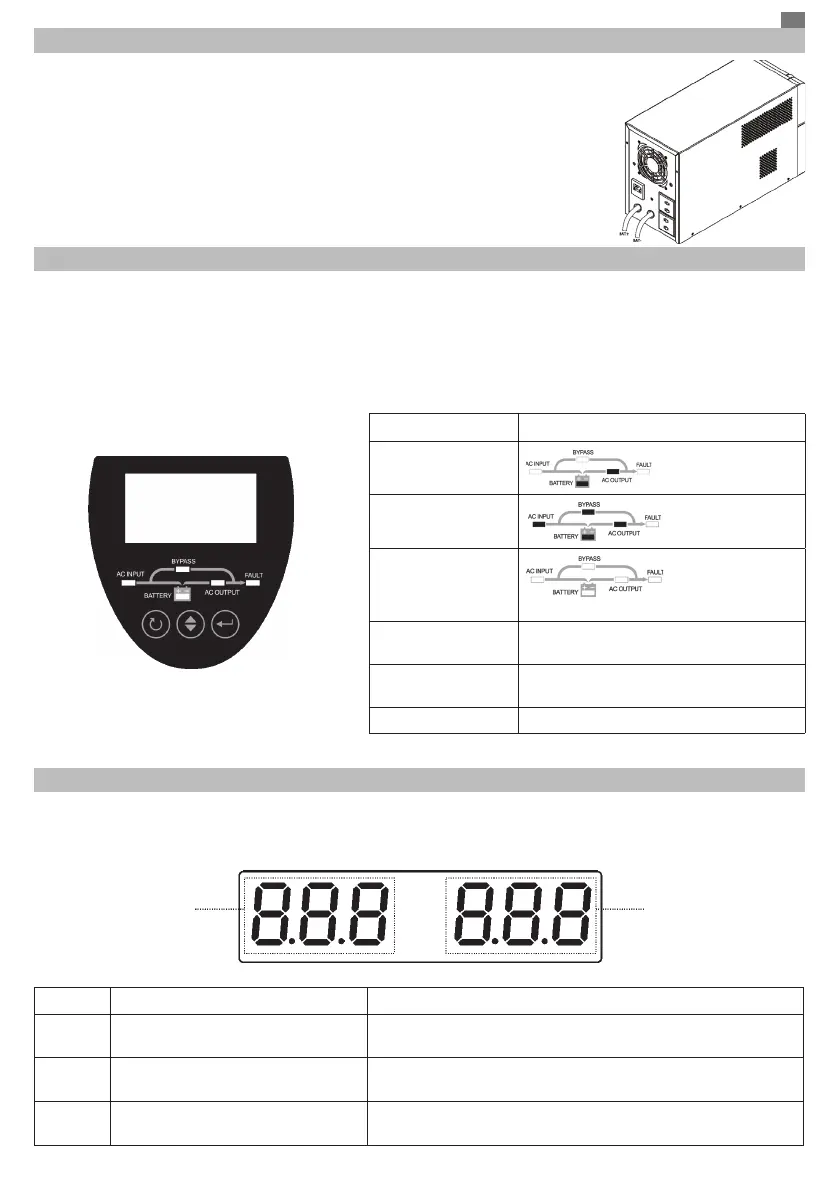
The front panel contains an LCD screen and several LEDs that show how the device works.
Led indicators
Messages
Backup mode
Line mode
Charger mode
All LEDs are o.
Low battery voltage
warning
Buzzing every 2 seconds and red LED
blinking
Overload warning
Buzzing every 2 seconds and red LED
blinking
Fault mode Buzzing continuously and red LED is on
SETTINGS
Press the “ENTER” button for 2 seconds to enter the device setting mode. Press the “ENTER” button again to select the
desired setting option. Press the “SEL” button to change a parameter. Long press the “ESC” button to exit the setting mode.
All changes will take eect after the device restarts.
Option Description Values
04
Frequency signal 50 Hz (default) / 60 Hz
13
Bulk current 10 ~ 30A (default value 10A)
17
Absorption charge
voltage
13.8 ~ 14.5 V (default value 14.1 V)
Option Value


 To Next Page