- 9 -
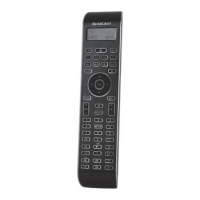
AV button g
Switch to the AV input.
Mute switching h
Switch sound on/o.
VOL+/— buttons j
Set volume (Volume).
MENU button k
Access the menu of the controlled device.
OK button l
You can conrm a menu selection with the OK
button.
FAV/EPG button 1(
Press the FAV/EPG button to access your
previously programmed favourite station.
To access the EPG function of the target
device first press briefly the S button r.
BDA_SFB 10.1 B2 - IAN-93436_gb.indd 9 01.11.2013 11:25:04


 To Next Page