Introduction
9
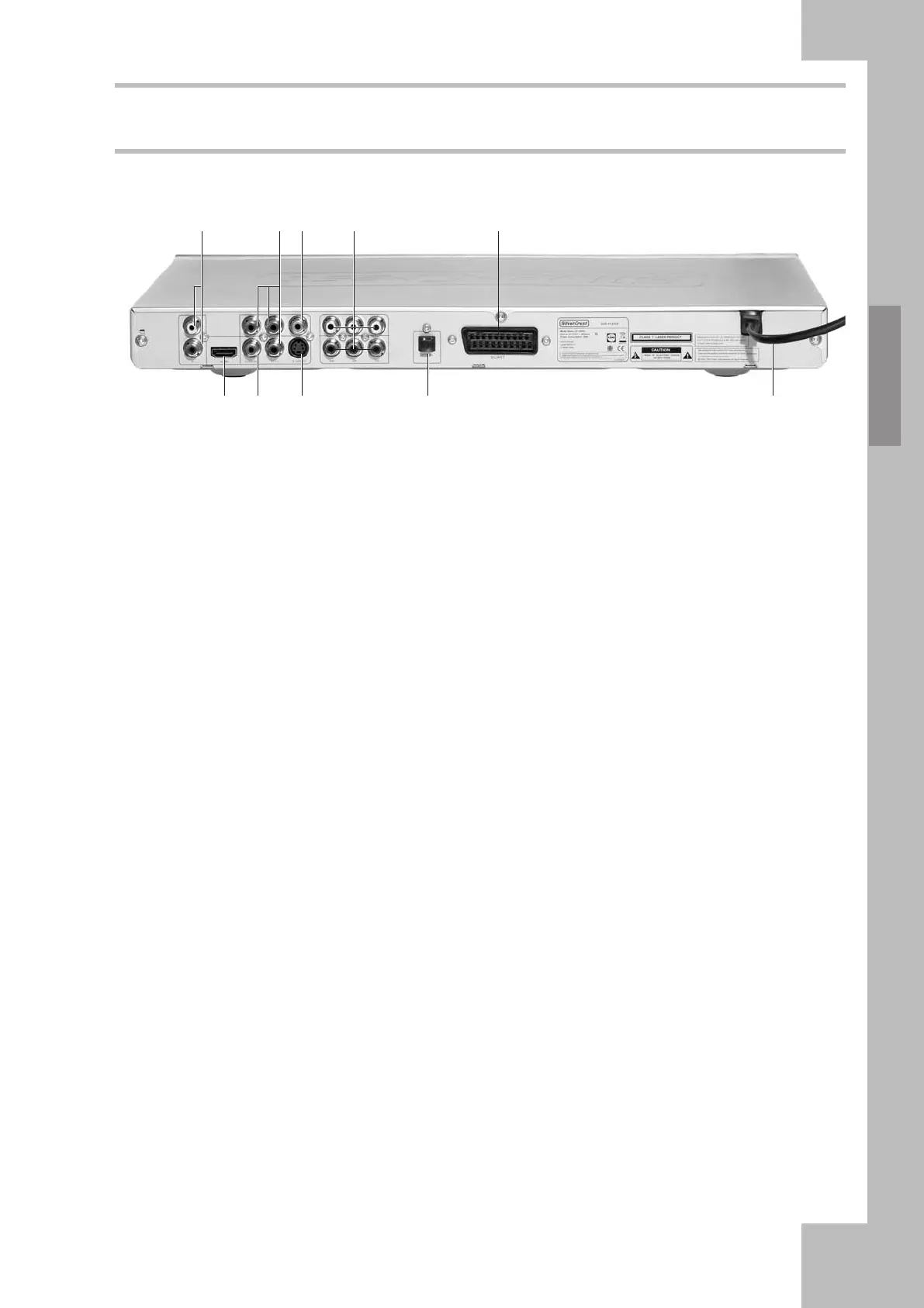
Back Panel
1. Analogue AUDIO L/R
Analogue 2-channel audio output (white/red
ports) to connect a TV set, A/V receiver,
beamer or stereo equipment.
2. YCbCr/YPbPr
High-end Video Out port for connecting to the
Component input of a TV, A/V receiver or a
beamer via a YCbCr cable. Please note that
progressive scan output (P-Scan) is only
possible via the Component output connector.
3. VIDEO
Composite Video output (yellow port) to
connect to a TV set or A/V receiver with
FBAS/Composite Video input via an audio/
video cable.
4. 5.1 Analogue Audio Output
Analogue 5.1 channel audio outputs to
connect to the 5.1 input of an A/V receiver or
an active 5.1 multi-channel speaker system.
5. RGB / SCART
To connect to a TV set featuring a 21-pin
SCART input port. This connection allows the
output of both the audio and video signals.
6. HDMI
Digital audio/video output for connecting to
the HDMI input of a screen or projector. This
connection type offers the highest possible
picture quality.
7. Digital Coaxial Audio Output
To connect to a digital audio device such as an
A/V receiver to obtain digital multi-channel
sound. Please note that the amplifier or A/V
receiver must be Dolby Digital, MPEG and/or
PCM-compatible (for more information,
please read the User’s Manual of your A/V
receiver or amplifier).
8. S-VIDEO
S-Video output to connect to a TV set or A/V
receiver with S-Video input via an S-Video
cable. You can use the S-Video output instead
of the video output to achieve better picture
quality.
9. Digital Optical Audio Output
To connect to a digital audio device such as an
A/V receiver to obtain digital multi-channel
sound. Please note that the amplifier or A/V
receiver must be Dolby Digital, MPEG and/or
PCM-compatible (for more information,
please read the User’s Manual of your A/V
receiver or amplifier).
10. Power cord
To connect to the electrical wall outlet (230
V).
➊ ➋➌ ➍ ➎
➏➐ ➑ ➒ ➓



 To Next Page