DV-5000HD The Menus
English - 35
The Menus
The camcorder uses different menus that offer multiple settings under
each operating mode. Furthermore there is a main menu allowing you to
set the preferences for your camcorder.
The Main Menu
Press the mode selector button [12] as many times as necessary to
display the menu
Setup (see also page 20 - Switching the Operating
Mode
).
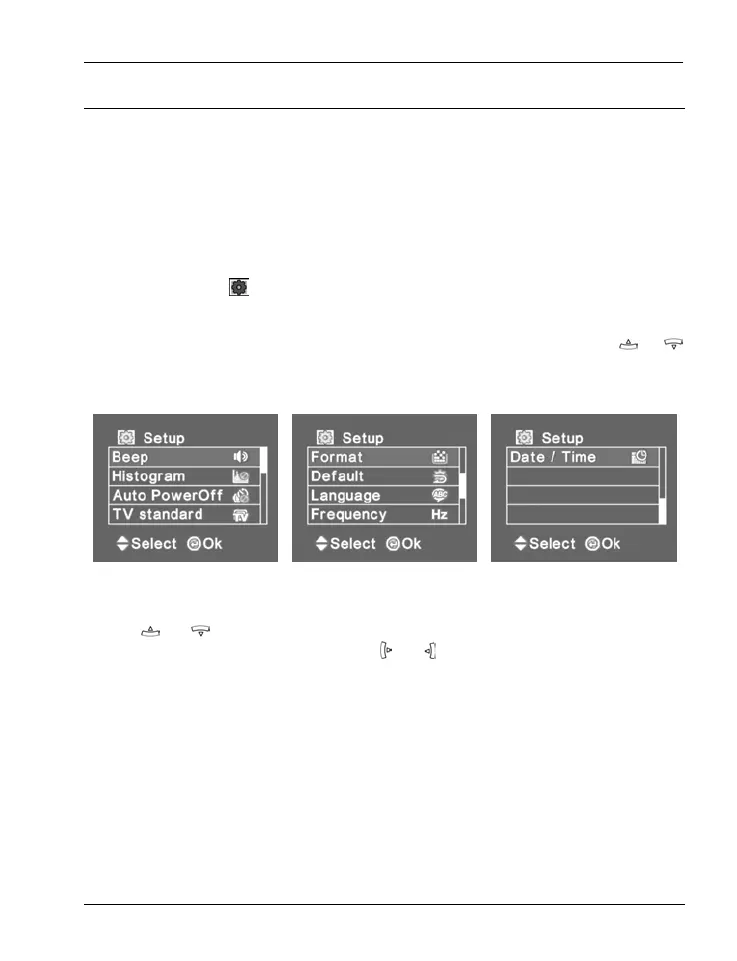
This menu consists of three pages that you can open by pressing or
on the four-way button [6].
Main Menu 1 Main Menu 2 Main Menu 3
Press
or on the four-way button [6] to select an option and then
press the shutter button [7]. Press
or on the four-way button [6] to
select the desired value and then press the shutter button [7] to confirm.
In the following we describe the available options:
Beep
Here you can determine if a sound is output when pressing any button.



 To Next Page