EasyManua.ls Logo

Silvercrest TS 53BC - Page 65

Silvercrest TS 53BC
Print Icon
To Next Page IconTo Next Page
To Previous Page IconTo Previous Page
Loading...
63 GB/IE
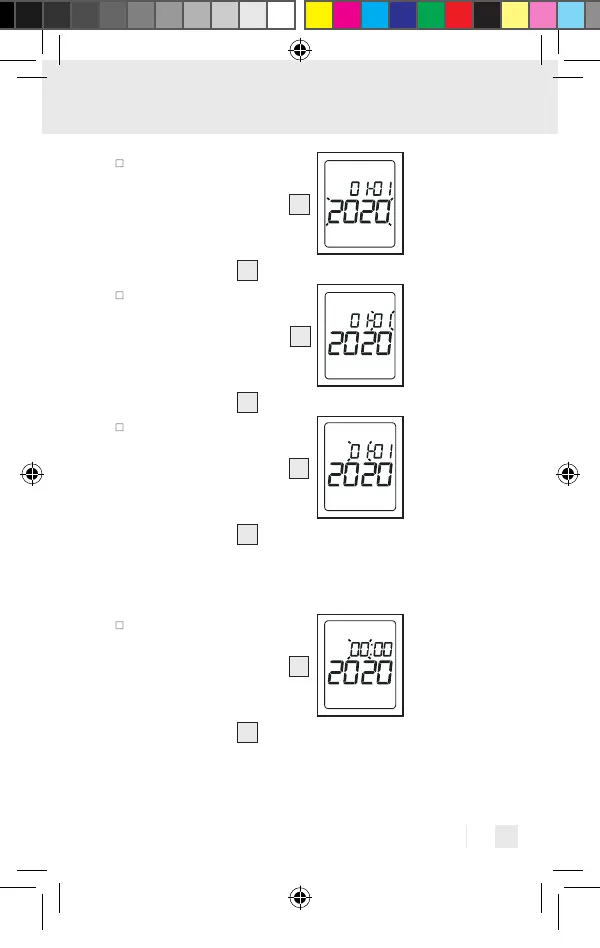
The year display will
flash on the display.
Using the SET button
6
select the current year.
Confirm by pressing the
MEM button
7
.
The month display will
flash on the display.
Using the SET button
6
select the current month.
Confirm by pressing the
MEM button
7
.
The day display will
flash on the display.
Using the SET button
6
select the current day.
Confirm by pressing the
MEM button
7
.
Note: If the 12-hour time format has been con-
figured, the positions for the month and day will
be reversed.
The hour display will
flash on the display.
Using the SET button
6
select the current hour.
Confirm by pressing the
MEM button
7
.
437990_2304_V2.0_silv_Multifunktionsthermometer_Content_OS.indd 63437990_2304_V2.0_silv_Multifunktionsthermometer_Content_OS.indd 63 15.06.23 14:2215.06.23 14:22

Related product manuals