8
GB
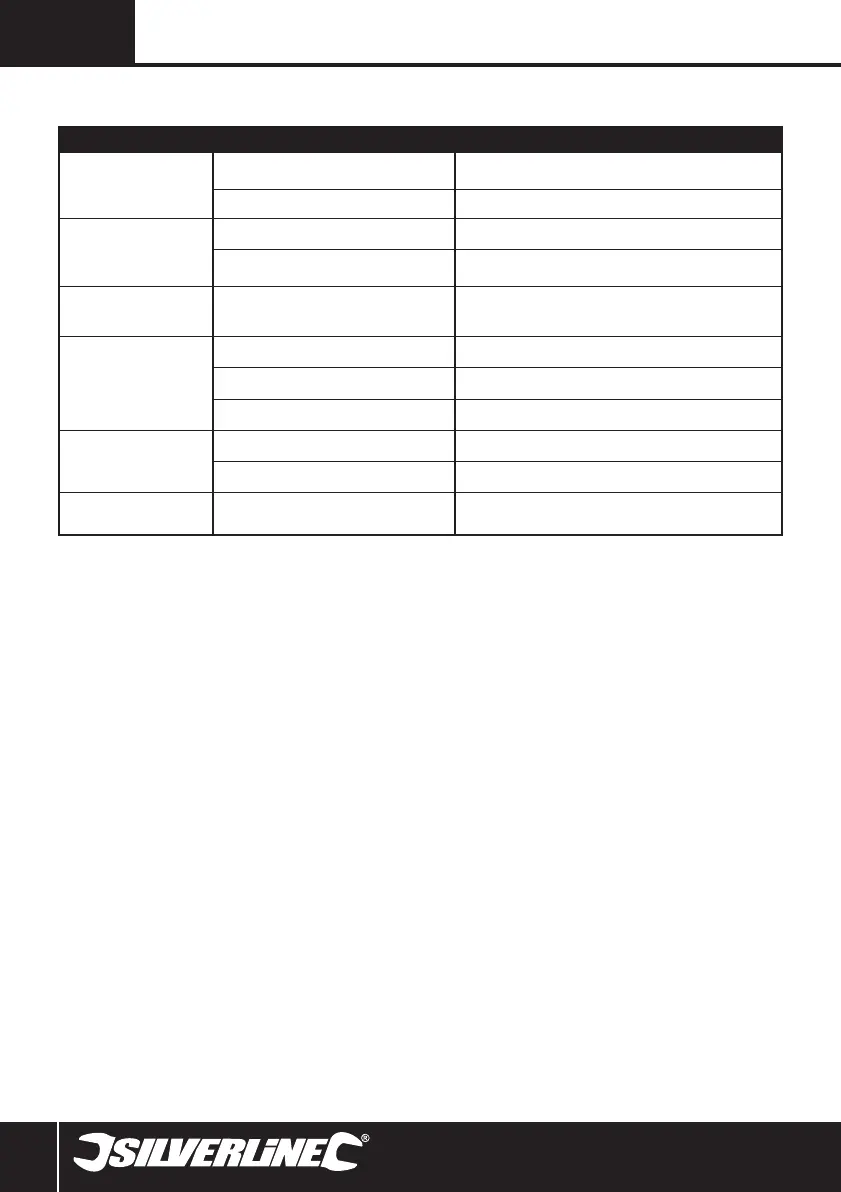
Problem Possible cause Solution
Red LED (16) and Green LED (15)
do not illuminate to indicate the
battery is charging correctly
Battery (10) not correctly connected to Battery
Charger (13)
Clean battery socket of charger and battery contacts and fully slide on to
Battery Charger so it clicks in a locked position
Battery Charger not powered Recheck mains connection
Battery pack has low capacity
Battery not being fully charged Do not remove Battery until a full charge is indicated
Battery pack has been charged over 100 times and
capacity has started to reduce
This is normal for battery packs. Contact your Silverline dealer to purchase a
replacement battery pack
Drill cannot be switched on
(Trigger Switch (11) does not
move)
The Forward/Reverse Switch (7) may be in the middle
(‘locked’) position
Slide the Forward/Reverse Switch either to the left or right
Drill does not start when Trigger
Switch is depressed
Battery completely discharged Recharge Battery or replace with a fully charged Battery
Defective Battery Replace Battery
Tool defective Contact your Silverline dealer or authorised service centre
Screws do not reach deep
enough into the workpiece
Not enough torque; torque clutch setting too low Choose a higher torque setting
Low battery voltage Recharge battery or replace with a fully charged battery
Screws are driven too deep into
the workpiece surface
Too much torque; torque clutch setting too high Choose a lower torque setting
Troubleshooting
521457_Z1MANPRO1.indd 8 08/11/2016 11:00



 To Next Page