Front Panel Storage
10
Indicator Status
FS204
FS208
FS212
* When B4 switch is turned to OFF position, the HDD accessing function is disable. In this case, the front accessing LED is displayed
in solid blue only and that means it is with the power ON function only but without blinking accessing signal.
* When B4 switch is turned to OFF position, the HDD accessing function is disable. In this case, the front accessing LED is displayed
in solid blue only and that means it is with the power ON function only but without blinking accessing signal.
* When B4 switch is turned to OFF position, the HDD accessing function is disable. In this case, the front accessing LED is displayed
in solid blue only and that means it is with the power ON function only but without blinking accessing signal.
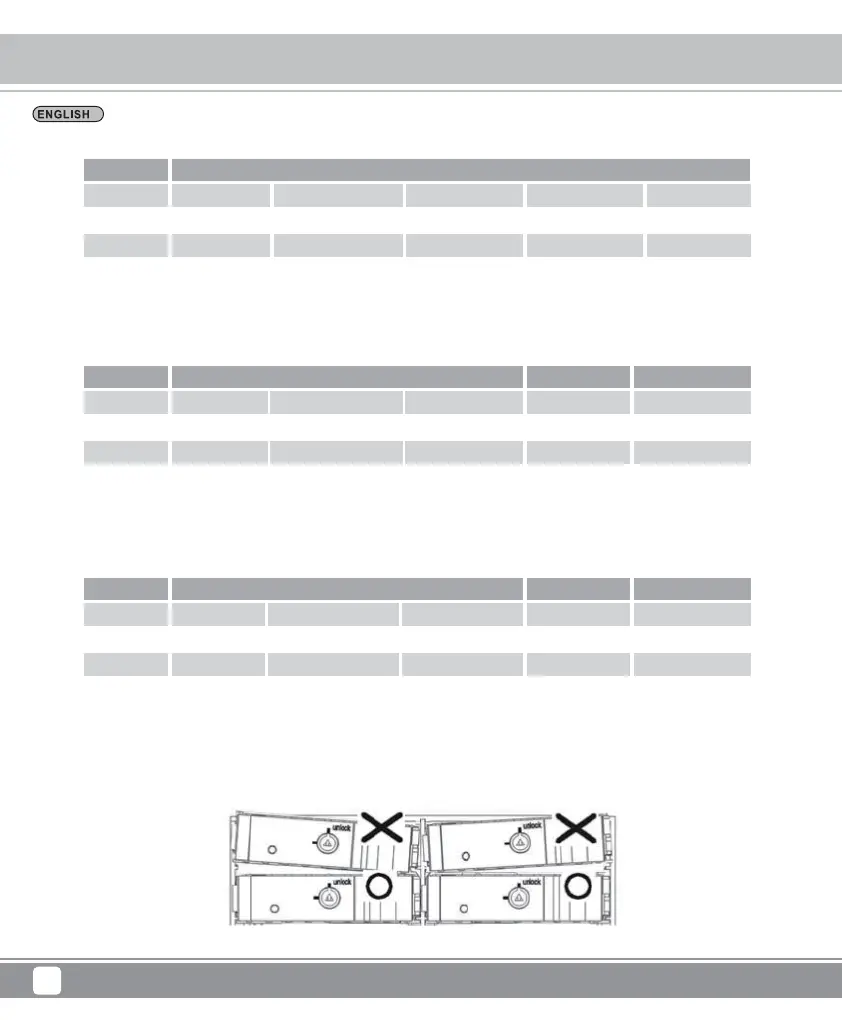
Note: Don’t tilt the tray when inserting it.
LED
State
Color
Blink
HDD in
Blue
x
HDD Access
Purple
o
B4 turn OFF
A1
Fan failure
Red
o
A3
Overheating
Red
o
A4
Blue
x
LED
State
Color
Blink
HDD in
Blue
x
HDD Access
Purple
o
B4 turn OFF
A1
Fan failure
Red
o
A3
Overheating
Red
o
A4
Blue
x
LED
State
Color
Blink
HDD in
Blue
x
HDD Access
Purple
o
B4 turn OFF
A1
Overheating
Red
o
Fan failure
Red
o
Blue
x



 To Next Page