TS11-C
Treasure Series
System Setup
64
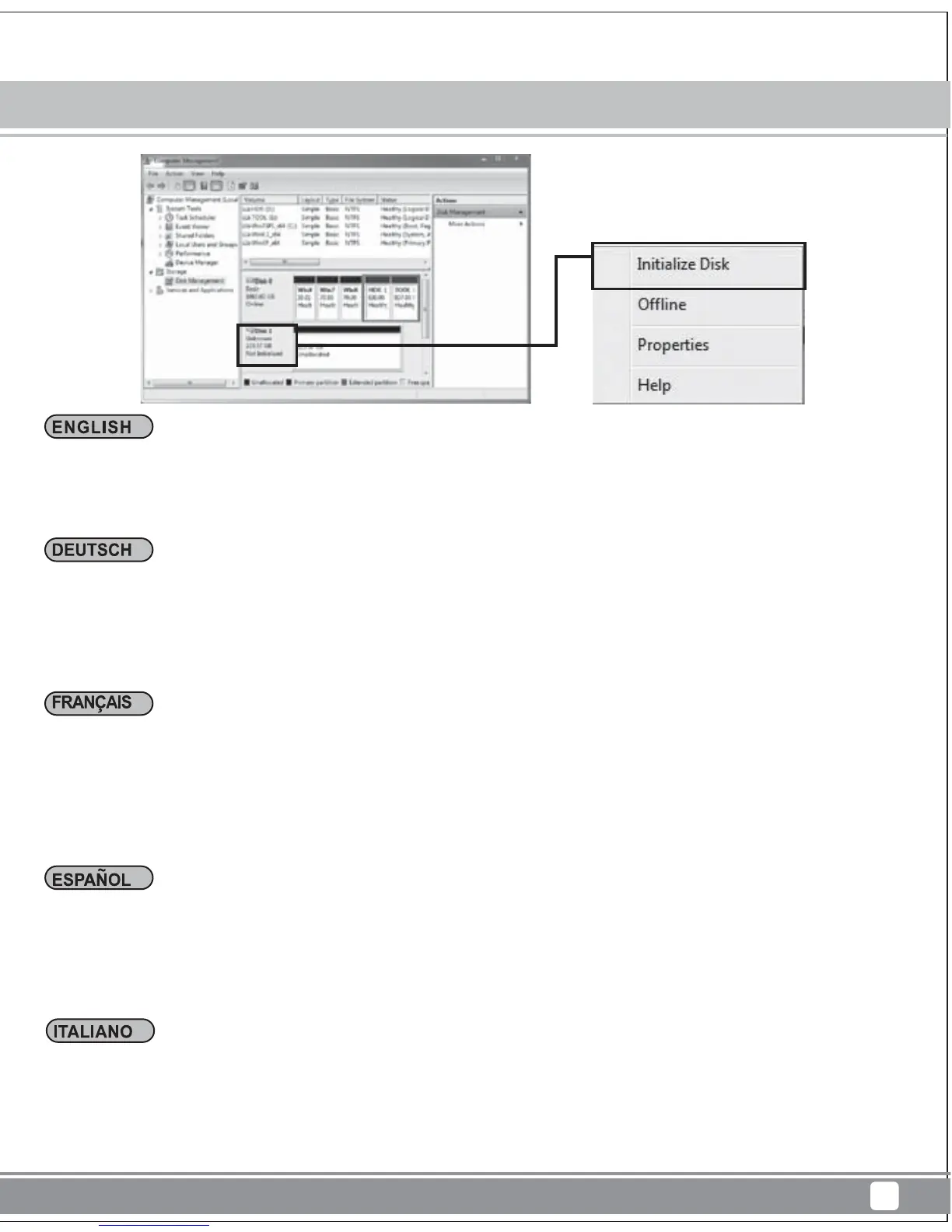
Wählen Sie im Fenster „Computer Management (Computerverwaltung)“ die Option „Disk Management
(Datenträgerverwaltung)“.
Der Datenträger wird als „Not initialized (Nicht initialisiert)“ angezeigt. Klicken Sie mit der rechten
Maustaste und wählen Sie „Initialize Disk (Datenträger initialisieren)“.
ns la fenêtre « Computer Management (Gestion de l'ordinateur) », sélectionnez « Disk Management
(Gestionnaire de disque) ».
Il signale le disque comme « not initialized (non initialisé) ». Veuillez faire un clic droit et sélectionner
« Disk initialization (Initialisation du disque) ».
En la ventana de “Administración de equipos”, seleccione “Administración de discos”
Mostrará el disco como “no inicializado”. Por favor, haga clic con el botón derecho y seleccione
“Inicialización del disco”
In the "Computer Management" window, select "Disk Management."
It will show disk drive as "not initialized". Please Right-click and select "Disk initialization."
Nella finestra " Computer Management (Gestione computer) " selezionare" Disk Management
(Gestione disco)."
Le unità disco saranno visualizzate come " not initialized (non inizializzato)". Fare clic col tasto destro
del mouse e selezionare " Disk initialization (Inizializzazione disco)".



 To Next Page