14
| 14 16
Device page
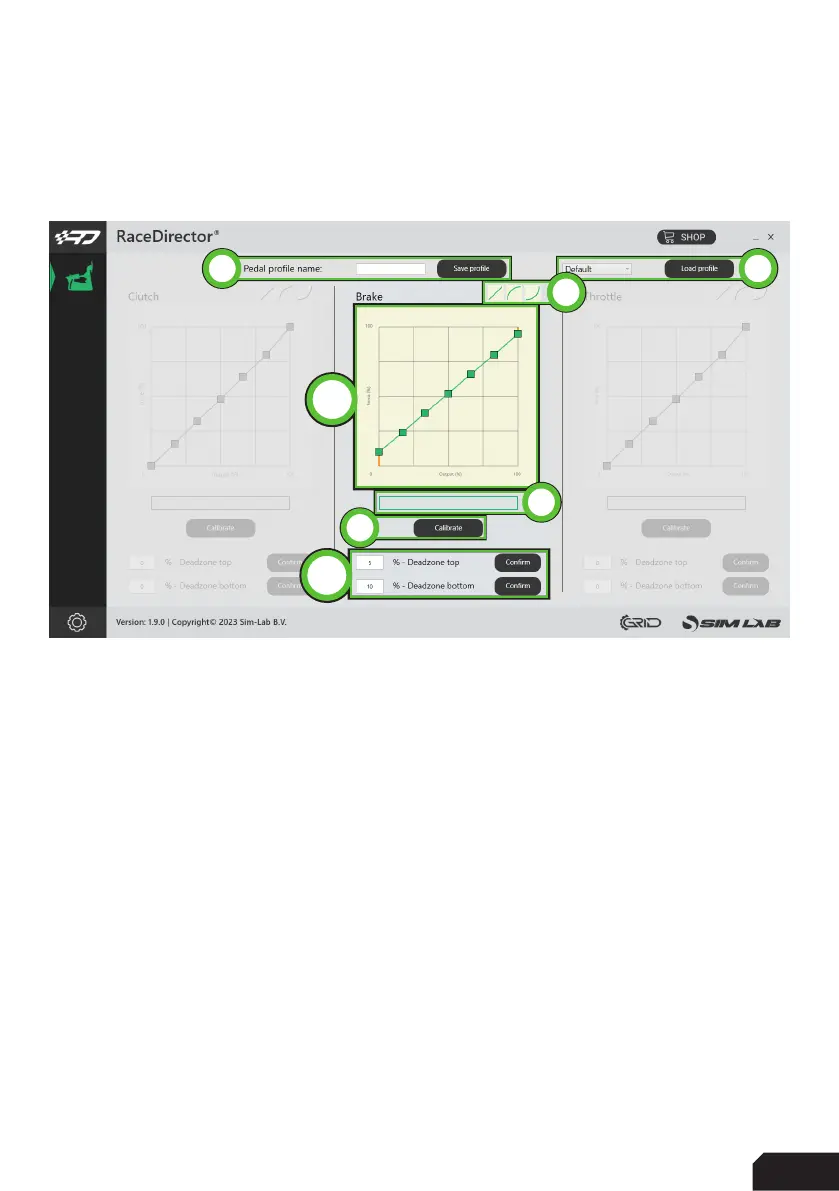
The device page for the pedals allow you to calibrate (1), adjust the input curves (2)
and adjust deadzones (3). We will focus on the middle colum in this example, as their
functionality is identical:
Calibration
- Press ‘Calibrate’ (1) for the device to enter calibration mode.
- Press the pedal to the maximum travel or force, press ‘Finish calibration’ when
done.
- We advise to dial some deadzone (3) on both sides of the spectrum. This way
when you’re not touching a pedal, it can’t provide an unwanted input.
- The percentages are using the calibrated range. We advise to keep these in the
single digits.
Input curve adjustment
Adjusting the input curves (2) is as easy as moving points on a line. You can
manipulate a maximum of 5 points per graph. By manually moving/overriding the
‘input slider’ (4) you can see how the curve affects your input.
By pressing ‘save profile’ (5) you can save all settings.
By pressing ‘load profile’(6) you can load a settings file you previously configured.
We supply some presets (7), which come with RaceDirector by default.
6
2
4
1
3
7
5


 To Next Page