ALARM TIME SETTINGS
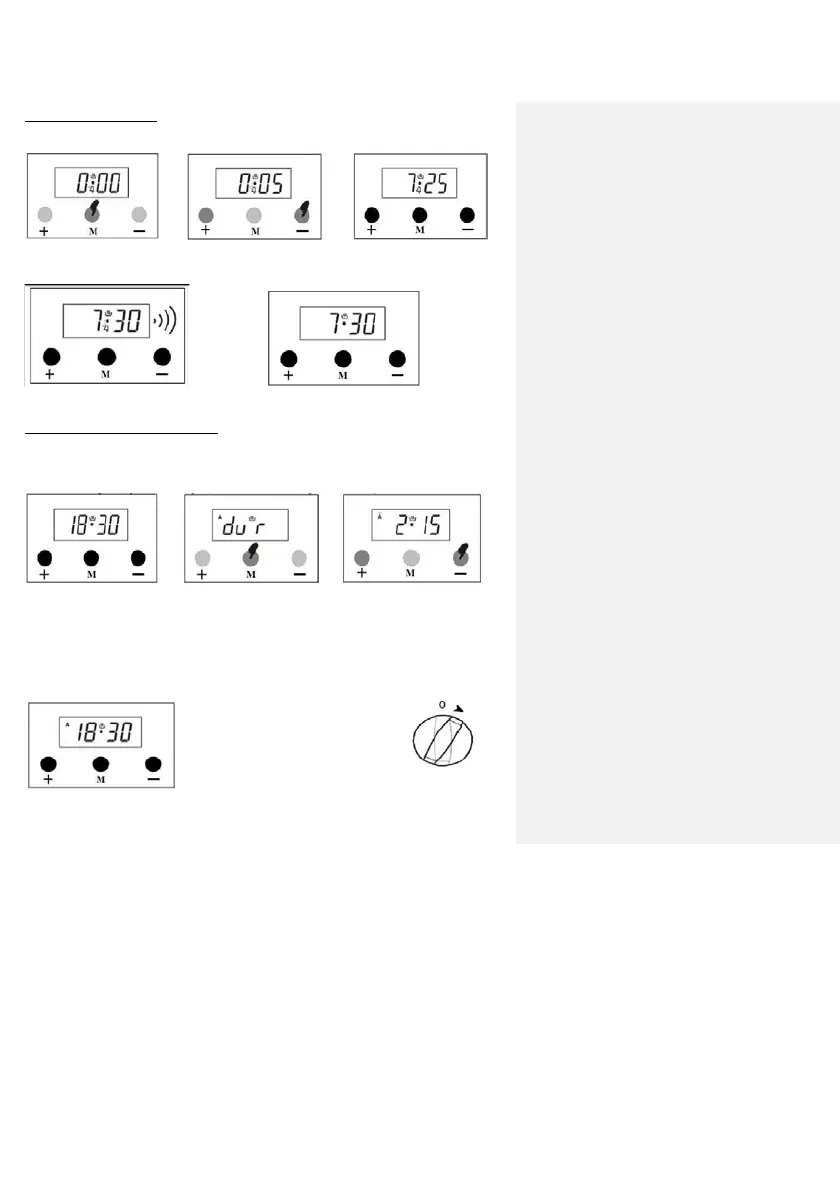
Using this function, you can set your alarm clock to go off at the desired time.
1) Select the setting mode 2) Set the time using 3) In a few seconds, the
CANCELLING THE ALARM
1) Alarm starts to go off
2) You can cancel the alarm by pressing
AUTOMATIC COOKING PROGRAM
If you start to cook the food you put into the oven immediately, you only need to
enter the cooking time. Example: We put the food we want to cook in the oven,
and we want to cook it for 2 hours and 15 minutes.
1) Now, it is 18:30 2) Enter the cooking time
setting mode by
pressing
‘M’ button twice.
3)
Set the time using the
keys + or -.
The oven clock is programmed to cook
your meal for 2 hours and 15 minutes
starting from now. Make sure you set
the other control buttons on the oven
to the desired cooking functions and
temperature.
4)
In a few seconds, the
screen will show the time and
cooking program selected.
Note: You can cancel the cooking program by switching to Manual Mode when setting
the cooking program or when
13


 To Next Page
 Loading...