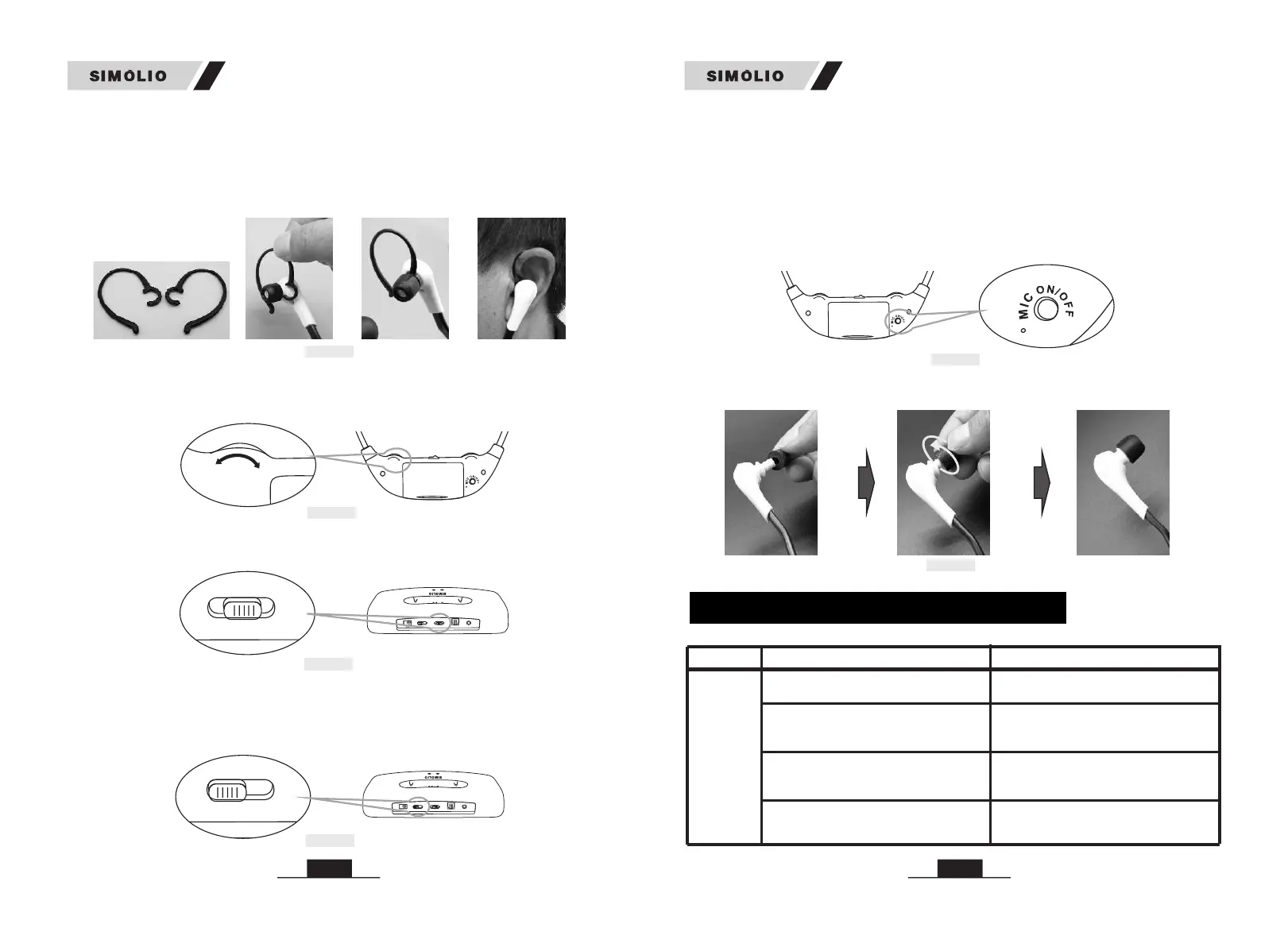
Fig 6-2
Hanger loops
3)Balance Control: If the hearing abilities of two ears are not the same, you can
rotate the BAL dial on the headset for right/left volume adjustment so that you
hear equally well with both ears.
4) Tone Control: Select the TONE (TREBLE/NORMAL/BASS) at the rear of
transmitter to find the best feature, make sure you can hear the TV voice clearly.
DC 5V
OPTICAL IN
BASS
TREBLE
NORMAL
STEREO
TONE
MONO
OFF
OFF/ON
POWER IN
OPTICAL IN
Fig 6-3
Fig 6-4
1716
6) Personal Sound Amplifier Function: while listening wirelessly, press the
MIC ON/OFF button at the rear of the headset, the personal sound amplifier
indicator will be solid red, you can clearly hear what people’s talking to you
nearby. Press the MIC button again or switch off the headset and then on, it will
be back to wireless listening, the personal sound amplifier indicator will be off,
and the working indicator will be solid green. But if you press the MIC ON/OFF
button by chance when listening wirelessly, the volume will be low with the
ambient noise will be occurred.
Fig 6-7
7) Ear tips Replacement as shown in Fig 6-7
5) Mono/Stereo Option: You can switch to STEREO for enjoying Hi-Fi sound
quality music or select MONO for enjoying more clear TV dialogues. If, despite a
correct balance adjustment, you can hear the sound only with one ear: Set the
STEREO/MONO switch on the transmitter to MONO.
DC 5V
OPTICAL IN
BASS
TREBLE
NORMAL
STEREO
TONE
MONO
OFF
OFF/ON
POWER IN
OPTICAL IN
T
REB
L
E
S
T
ER
E
O
MO
N
O
O
FF
OFF
/O
N
Fig 6-5
Fig 6-6
2) Hanger Loops Installation (if necessary)
You can attach the hanger loops (purchase separately) to the headset to help you
better adapt to the weight of the under-chin headset. (Ref. Fig 6-2)
• Hook the decompression hanger loops on each side of the headset.
• Put the hanger loops on the ears, rotate them to best fit yourself.
TROUBLESHOOTING
Phenomena Causes Solutions
The transmitter is not connected well.
Make sure the AC adapter and the
audio cable of the transmitter are
plugged in place.
Switch to MONO or STEREO to power
the transmitter on.
The transmitter is not powered on.
The connection between the transmitter
and the audio source is wrong.
Make sure the connection is correct and
in place between the transmitter and the
audio source.
The analog audio cable is plugged into
the AUDIO IN jack of the transmitter
when connecting with the optical cable.
Unplug the analog audio cable from
the transmitter.
Part 1
Headset
doesn’t
work, or
no voice
received
SM-823D Pro SM-823D Pro



 To Next Page