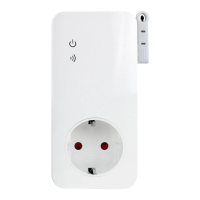
The SimPal-S460 is a 4G LTE power socket designed for remote control of electrical devices and outlets via SMS or a dedicated mobile app. It integrates power monitoring, temperature sensing, and alarm functions, making it a versatile device for home or office use.
Function Description:
The SimPal-S460 operates with a 4G LTE SIM card, allowing users to remotely manage the power supply to connected appliances. It features a power meter function that monitors power consumption and loading, sending SMS alerts if consumption is abnormal. The device also includes a built-in power capacitor and temperature sensor, enabling it to function as an alarm during power failures or temperature deviations. All services and functions rely on the 4G network and a SIM card.
Important Technical Specifications:
- Input Power Plug: 110~250V/50HZ, compatible with CEE 7/7 hybrid Schuko/French/American/Australia plug types.
- Output Power Outlet: 110~250V/50HZ, 230V/30A (for 30 seconds), 16A for long-duration use, compatible with CEE7/4 German "Schuko"/French/American/Australia outlet types.
- Operating Temperature: -10℃ to +35℃.
- Store Temperature: -20℃ to +50℃.
- Relative Humidity: 10-90%, without condensation.
- Communication Protocols: GSM PHASE 2/2+ (including data operation).
- Data Interface: GSM SIM 1.8V/3.0V socket.
- Max Loading: 16A, 3500W.
- Temperature Sensor Range: -10℃ to 50℃.
- 4G LTE Working Band: Cat1, LTE FDD: B1, B3, B5, B7, B8, B20; LTE TDD: B40; UMTS: B2/B4/B5.
Usage Features:
The SimPal-S460 offers a range of control and monitoring features:
- Remote Control: Power output can be switched ON/OFF via SMS commands or through the "GSM Socket" mobile app (available on Google Play and Apple App Store).
- User Authorization: There are two levels of user control:
- Master-user: Only one Master can be registered, having full authorization to use all features and settings of the SimPal-S460. The Master's mobile number must be stored in the socket's memory.
- Users: Up to four Users can be registered, with authorization to use most commands but not to register other Users or reset factory settings. Unregistered mobile numbers have no control over the socket.
- SMS Command Format: All SMS commands follow the format
#code#content#, with a maximum of sixteen digits allowed for phone numbers. No spaces are allowed within commands, and the "#" symbol is mandatory.
- Installation: Requires a GSM SIM card with Caller ID Presentation activated and PIN code deactivated. The SIM card is inserted into the side slot, and the GSM antenna is screwed onto its connector. A temperature sensor can be inserted into the I/O port.
- Power On: After plugging into an AC power socket, the GSM LED will flash slowly, then breathe slowly, indicating successful registration with the GSM network. The default power output is OFF.
- Manual Control: The M button on the device can be pressed for about one second to switch the socket output ON or OFF.
- Delay Control: The socket output can be set to delay switching ON/OFF for a specified period (1-720 minutes). This function deactivates if the socket status is manually changed or if schedule/temperature control is activated.
- Schedule Control: Three independent schedules can be set for automatic ON/OFF switching based on time and day. WorkDay parameters allow for single days or combinations (e.g., 1234 for Monday-Thursday). StartTime and EndTime are 4-digit (hh:mm) values. Schedule control is temporarily deactivated if the socket status is manually changed.
- Temperature Control: With the external temperature sensor inserted, the socket's power output can be automatically controlled based on ambient temperature. It operates in warming mode (turns ON when temperature is below a low-temp threshold, OFF when above a high-temp threshold) or cooling mode (turns ON when temperature is above a high-temp threshold, OFF when below a low-temp threshold). Temperature control checks every minute and overrides manual power status changes.
- Temperature Alarm: A temperature range can be pre-set. If the ambient temperature falls outside this range, the SimPal-S460 will send an SMS alarm message.
- Power Loading Alarm: Monitors connected appliance power consumption and can report daily, weekly, or monthly. An alarm can be set to trigger an SMS when power loading goes out of or back into a pre-set range (0-3500W). The alarm is active only when the power is ON.
- SMS Notifications:
- M Button Press: Default SMS notification to Master and Users when the M button is pressed to change power status (can be enabled/disabled).
- Power Failure: Default SMS notification to Master and Users when main power supply is lost or restored (can be enabled/disabled).
- General SMS Notification: Sends alerts for power lost/restore, temperature alerts, or other information to Master and all Users by default (settings can be changed).
- Calling Control: Master and User numbers can call the SimPal-S460 to switch power output. By default, there is no SMS reply when calling to switch power (can be enabled/disabled). Any number calling control can also be enabled/disabled.
- Check Status: Master or User can send an SMS to check the operating status, which includes current power output (ON/OFF) and temperature. It also indicates if the socket is under "delay control" (D), "temperature control" (T), or "schedule control" (S).
- Weak GSM Signal Notification: The socket can send an SMS notification if the GSM signal strength becomes too weak (can be enabled/disabled).
Maintenance Features:
- Resetting the Socket: All programmed settings, including user numbers, timing parameters, and temperature parameters, can be reset to their original factory values. This can be done by pressing the side M button for 10 seconds or by the Master sending a specific SMS command (
#08#1234#). This feature is useful if settings are incorrect or malfunctions occur.
- Power Consumption Data: Power consumption data is lost when the device reboots and will recalculate from the beginning upon power restoration.

 Need help?
 General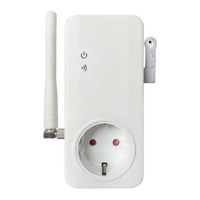

 To Next Page