Operating Mode cont’d.,
Once the room humidity reaches 5 RH% below the user
setpoint, the compressor and fan will be turned off sequen-
tially. The compressor and fan will be turned on again when
the humidity in the room is 3 RH% above the setpoint.
Auto-Pause Function
By pressing both ‘UP’ and ‘DOWN” arrows simultaneously
for 3 seconds, the control will enter Pause mode. When
activated the entire LCD display will flash, compressor & fan
will be turned off sequentially. The control will stay in this
condition for 60 minutes and then resume to normal opera-
tion, or the power button can be pressed again to resume
the operation sooner.
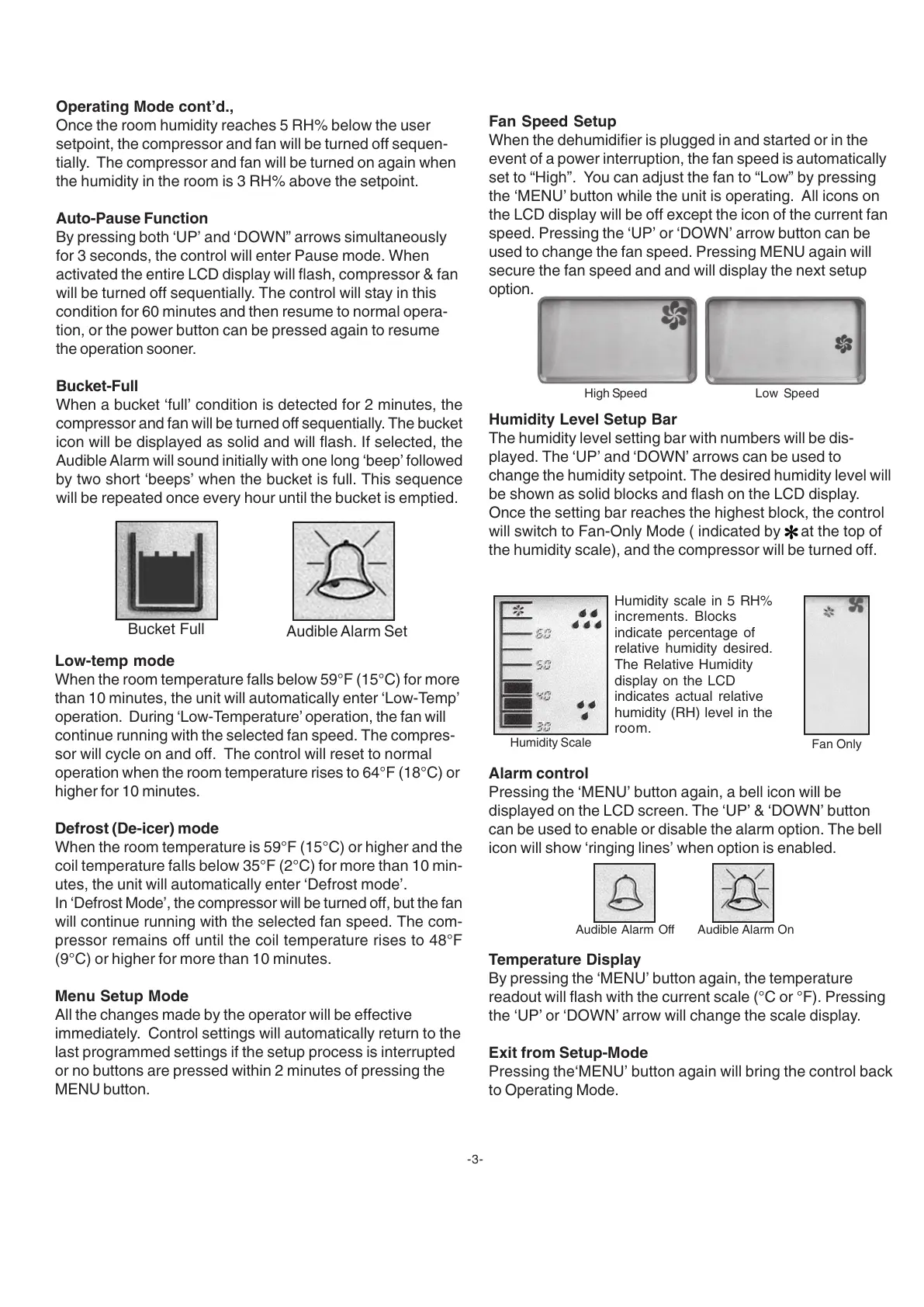
Bucket-Full
When a bucket ‘full’ condition is detected for 2 minutes, the
compressor and fan will be turned off sequentially. The bucket
icon will be displayed as solid and will flash. If selected, the
Audible Alarm will sound initially with one long ‘beep’ followed
by two short ‘beeps’ when the bucket is full. This sequence
will be repeated once every hour until the bucket is emptied.
-3-
Bucket Full
Audible Alarm Set
Low-temp mode
When the room temperature falls below 59°F (15°C) for more
than 10 minutes, the unit will automatically enter ‘Low-Temp’
operation. During ‘Low-Temperature’ operation, the fan will
continue running with the selected fan speed. The compres-
sor will cycle on and off. The control will reset to normal
operation when the room temperature rises to 64°F (18°C) or
higher for 10 minutes.
Defrost (De-icer) mode
When the room temperature is 59°F (15°C) or higher and the
coil temperature falls below 35°F (2°C) for more than 10 min-
utes, the unit will automatically enter ‘Defrost mode’.
In ‘Defrost Mode’, the compressor will be turned off, but the fan
will continue running with the selected fan speed. The com-
pressor remains off until the coil temperature rises to 48°F
(9°C) or higher for more than 10 minutes.
Menu Setup Mode
All the changes made by the operator will be effective
immediately. Control settings will automatically return to the
last programmed settings if the setup process is interrupted
or no buttons are pressed within 2 minutes of pressing the
MENU button.
Fan Speed Setup
When the dehumidifier is plugged in and started or in the
event of a power interruption, the fan speed is automatically
set to “High”. You can adjust the fan to “Low” by pressing
the ‘MENU’ button while the unit is operating. All icons on
the LCD display will be off except the icon of the current fan
speed. Pressing the ‘UP’ or ‘DOWN’ arrow button can be
used to change the fan speed. Pressing MENU again will
secure the fan speed and and will display the next setup
option.
Humidity Level Setup Bar
The humidity level setting bar with numbers will be dis-
played. The ‘UP’ and ‘DOWN’ arrows can be used to
change the humidity setpoint. The desired humidity level will
be shown as solid blocks and flash on the LCD display.
Once the setting bar reaches the highest block, the control
will switch to Fan-Only Mode ( indicated by
at the top of
the humidity scale), and the compressor will be turned off.
Alarm control
Pressing the ‘MENU’ button again, a bell icon will be
displayed on the LCD screen. The ‘UP’ & ‘DOWN’ button
can be used to enable or disable the alarm option. The bell
icon will show ‘ringing lines’ when option is enabled.
Temperature Display
By pressing the ‘MENU’ button again, the temperature
readout will flash with the current scale (°C or °F). Pressing
the ‘UP’ or ‘DOWN’ arrow will change the scale display.
Exit from Setup-Mode
Pressing the‘MENU’ button again will bring the control back
to Operating Mode.
Audible Alarm Off Audible Alarm On
Humidity scale in 5 RH%
increments. Blocks
indicate percentage of
relative humidity desired.
The Relative Humidity
display on the LCD
indicates actual relative
humidity (RH) level in the
room.
High Speed Low Speed
Humidity Scale
Fan Only


 To Next Page
 Loading...