EasyManua.ls Logo

Simplicity RT-SR50 - Using Your Remote Control

Simplicity RT-SR50
16 pages
Print Icon
To Next Page IconTo Next Page
To Previous Page IconTo Previous Page
Loading...
User guide - Simplicity remote RT-SR50
7
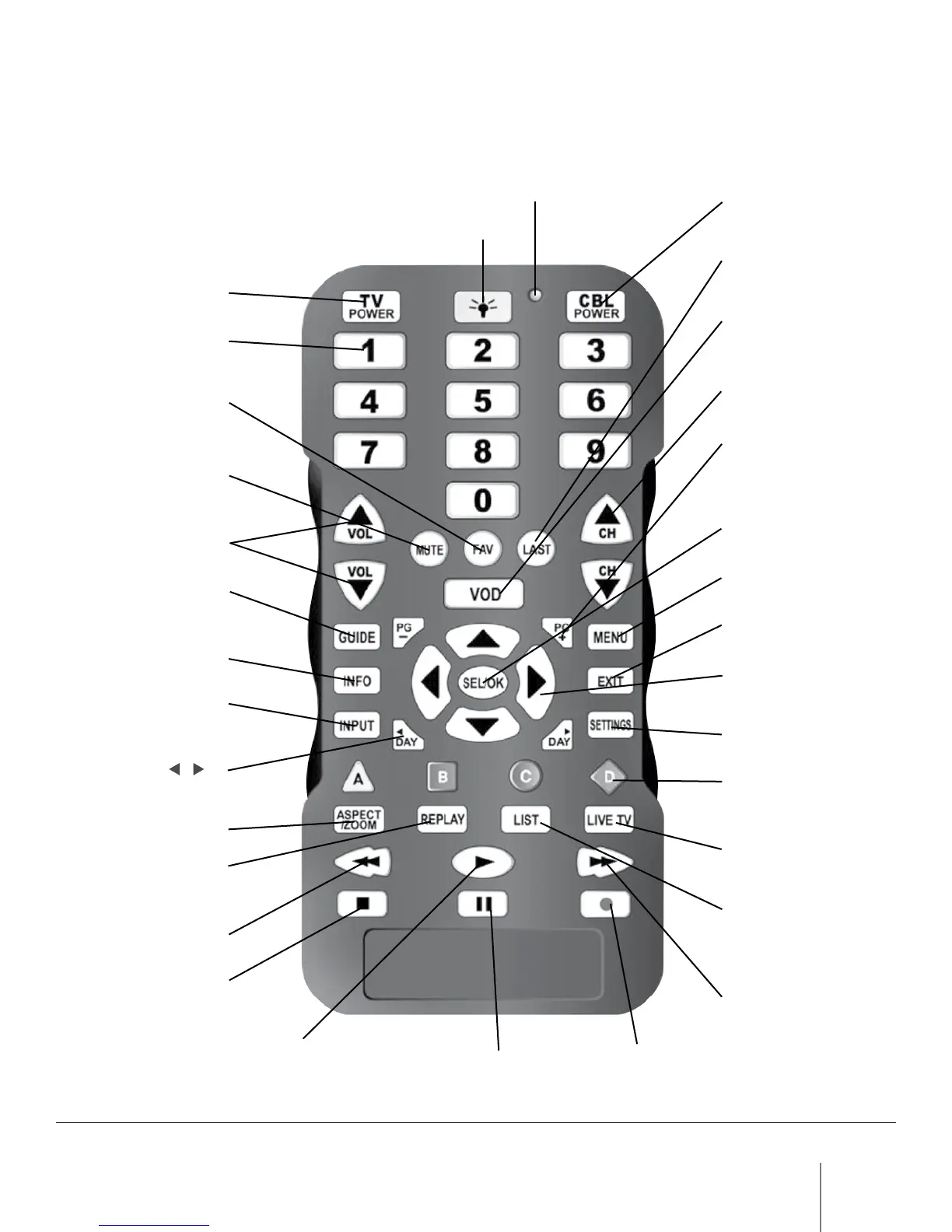
The operation of each button on your Simplicity remote control is as follows:
Indicator Light
Terminal power on/off
Recall last channel
Channel up/down
Video on demand
programming
(may vary with models)
Page up/down in
program guide,
interactive screens
Display application
menu
Exit/hide interactive
screens
Navigate through
program guide,
interactive screens
Display terminal
settings
On-screen decision
buttons
Return to live TV
programming
Listing of recorded
programs
(maybe labeled
differently on some models)
DVR fast foward
(3 speeds)
DVD recordDVD pause
Select on-screen/
highlighted choice
Illuminates backlighting
TV power on/off
Enter channel numbers
Recall favorite channels
Mute volume
Increase or decrease
volume
Display Program Guide
Display channel
information
Change input source
of TV or CBL device
Day
/ in
Program Guide
Change picture size
Replay previous few
seconds of a recorded
DVR program
DVR rewind (3 speeds)
DVR stop
DVR play
15. Using your remote control