Assembly
Step 4. Propellers ( Diagram 4)
Assembly
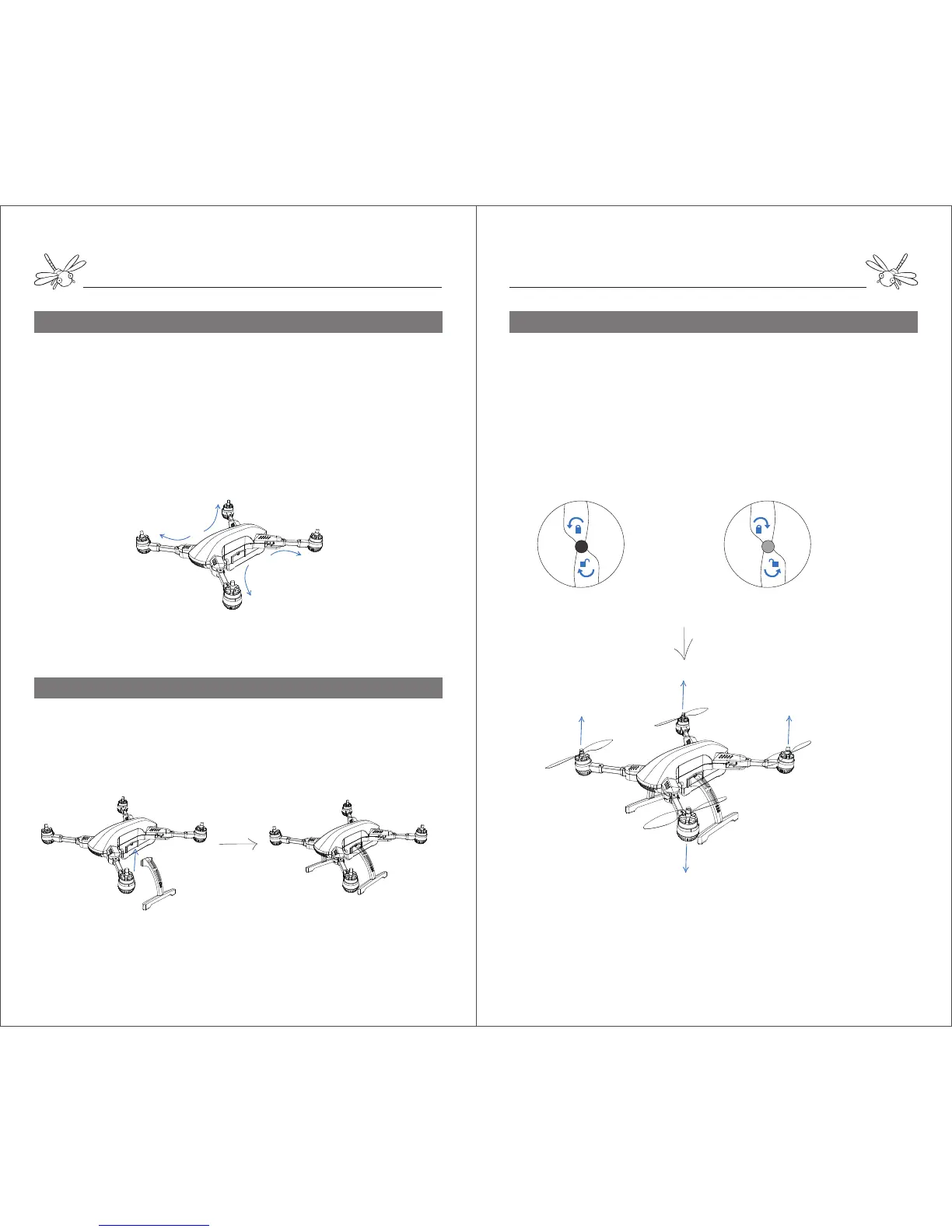
Step 2. Unfold the Aircraft ( Diagram 2)
Diagram 2:
Diagram 3:
landing gears
Step 3. Landing Gears (Diagram 3)
front arm
front arm
rear arm
rear arm
Push down the spring button under the motor arm and slowly twist
the arm till the end.
The arm will be locked in place with a click.
Unfold the rear arms before unfold the front arms.
To fold the aircraft, push down the spring button and twist the
arms in the reverse order.
Match the landing gears with the gear mounts and push up into
place.To dismount the gears, just pull them down smoothly.
Black Motor
Silver Motor
Black Motor
Silver Motor
Black cap propellers Silver cap propellers
lock
unlock
lock
unlock
Diagram 4:
Notes: Make sure the propellers are tightened on the right motors before fly otherwise the
aircraft may crash.
Attach the silver cap propellers onto the silver motors and secure
them by spinning clockwise.
Attach the black cap propellers onto the black motors and secure
them by spinning counter-clockwise. Arrows around the propeller
cap indicate the directions of tightenning and loosening.
To release the propellers from motors, just spin in the opposite
direction.


 To Next Page
 Loading...