Assembly
Assembly
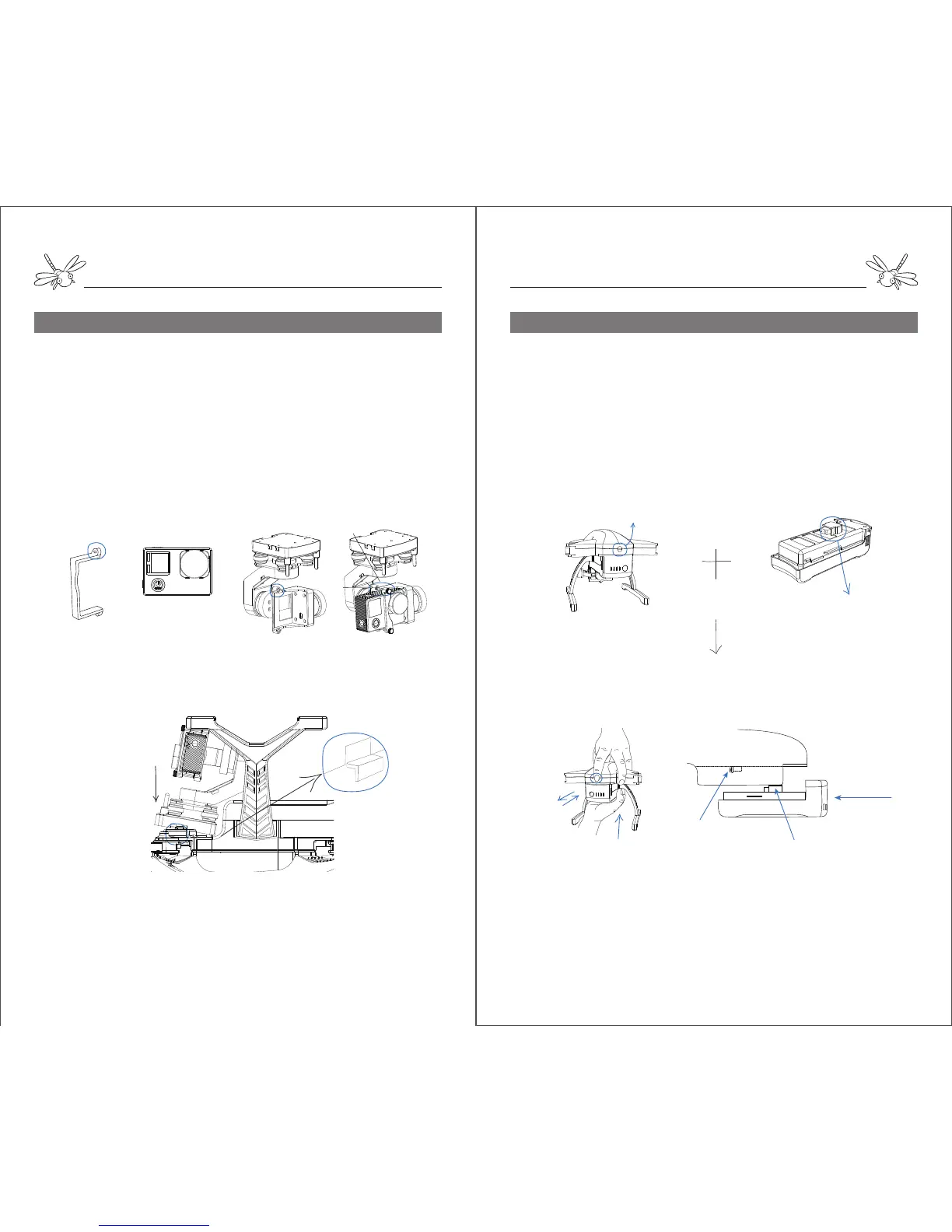
Step 5. Gimbal & Camera (Diagram 5) Step 6. Battery ( Diagram 6)
Camera strap Camera Gimbal Screw
Notes: Do not install or remove gimbal while the aircraft is powered on. Otherwise, the
gimbal will be damaged.
Diagram 5:
Unscrew the camera strap from gimbal.
Attach the camera into the gimbal frame ( the camera lens is on
the right).
Fasten the camera strap with the screw.
Fit the gimbal board under the airframe.
Slide the gimbal board into the mount, match the opening of
gimbal board with the mount screw hole and hold in place with
screw.
Diagram 6:
Notes: Do not install or remove battery while it is power on. Otherwise, the battery will be
damaged.
Do not force the battery into airframe if it gets stuck. Wiggle the battery a few times until
the battery plug goes into the PCB slot.
airframe
PCB Slot
Battery Plug
Push
Spring Button battery
Gesture to install or remove battery
battery plug
Pull up the spring button at the airframe tail.Align the battery
with the airframe, match the battery plug with the PCB slot and
slide the battery into the airframe until it is locked with a click.
To remove the battery, pull up the spring button first and pull out
the battery.
Gimbal Mount
Gimbal Board


 To Next Page
 Loading...