1/4
Technical data
1
Wiring
2
Example of installation (wire section : 0,75mm
2
)
Wiring of a single-phase motor Wiring of a safety edge
Wiring of lighting or sign (230V - 500W max.)
Wiring of photo-cells
Wiring of sequential control switches
- Power supply voltage: 230Vac 50 Hz.
- Fuse: 250V 6,3AT with timeout
- Max motor power: 230Vac 1200W.
- Protection rating: IP 44.
- Ambient operating T°: -15°C à +55°C.
- Radio frequency: 433,42MHz
- Accessory power supply: 24Vcc (direct).
- Resistance values for resistive sensor bar: From 5 to 14 KOhm
- Maximum current for accessories (cells, keypads, loops,
sensor bar, etc…): 0.33A i.e. 8W max. or 13W intermittent
(orange light 10W + accessories 3 W).
- Orange light: 24V, 10W max ou 230V 40W max
- Area lighting: 230Vac, 500W.
- Auxiliary output: Contact NO, 250Vac 500W.
- Operating class: 1, the ground must be connected.
- Box dimension: 150 x 150 x 40 mm
Apply the electric installation standards, as well as the
following points:
- Switch off the mains before any intervention.
- Use flexible cables.
- Connect the ground cables.
- After installation, no traction must be applied to the
terminal strips.
* Possibility of wiring a second photocell between terminals 14
and 17.
- The RSA Hz PRO receiver is used to control an industrial or commercial door fitted with a 230V motor with built-in endstops using TSAHz 2 channels
and TSAHz 4channels transmitters and Simu Hz transmitters. Different safety and signaling systems can be connected to the RSA Hz PRO (safety edge,
photocells, flashlights,area lighting).
- This product complies with recognized technical standard and safety regulation. When carrying out wiring and installation work, always refer to current
standards. This contributes to implementing installations complying with the standard “safety in using motorised doors” NF EN 12453. RSA Hz PRO
must be installed indoor with a motor equipped by a manual override system.
- Any assistance required on automation components must be carried out by qualified technician.
Key switch (outdoor) Button switch (indoor)
Photo-cells*
Safety edge
Single-phase motor
Orange flashing light and / or aera lighting
Safety
brake
3x1,5mm
2
MOTOR
Safety brake
Resistive safety edge
Optical safety edge
WHITE (-)
P5=04
NC NC NC NO
P5=03
BROWN (+)
GREEN (SEC)
Receiver cell
3-4:NO
3-5:NF
24V 24V
Transmitter cell
Pull the antenna wire through the right-hand wire grommet
Universal key switch
(outdoor)
Button switch
(indoor)
S.A.S. au capital de 5 000 000 ! - Z.I. Les Giranaux - BP71 - 70103 Arc-Les-Gray CEDEX - RCS GRAY B 425 650 090 - SIRET 425 650 090 00011 - n° T.V.A CEE FR 87 425 650 090
Hereby SIMU declare that this equipment “RSA Hz PRO” is in compliance with the essential requirements and other relevant provisions of directive1999/5/EC.
A declaration of conformity is available at the web adress: www.simu.fr - Usable in UE, CH
GB RSA Hz PRO
Radio receiver for rolling garage door
5064942C
Read carefully these instructions before any use.

 Need help?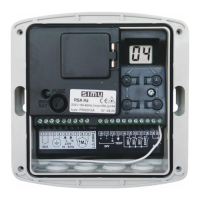

 To Next Page
 General