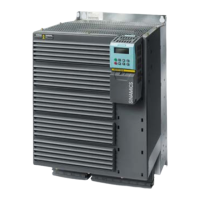
SINAMICS G120
Standard inverters 0.37 kW to 250 kW (0.5 hp to 400 hp)
SINAMICS G120 standard inverters
4/9
Siemens D 11.1 · 2009
4
■
Design
Supplementary system components
The following supplementary system components are available
for the SINAMICS G120 standard inverters:
Intelligent Operator Panel IOP
The IOP supports both entry-level personnel and drive experts.
Thanks to the large plain text display, the menu prompting and
the Application Wizards, it is easy to commission, diagnose and
locally control standard drives.
Operator Panel BOP (not for CU230P-2 Control Units)
The Basic Operator Panel BOP can be plugged onto the Control
Unit and can be used to commission drives, monitor drives in
operation and input individual parameter settings. The BOP also
provides a function to quickly copy parameters.
MMC memory card (not for CU240E Control Units)
The parameter settings for an inverter can be stored on the MMC
memory card. When service is required, e.g. after the inverter
has been replaced and the data have been downloaded from
the memory card the drive system is immediately ready for use
again. The associated slot is located on the top of the Control
Unit.
CM240NE chemical industry module
Inverters for 400 V / 500 V and 690 V are required in the chemical
industry that meet the special demands and requirements of this
industry sector. The essential requirements and demands of the
chemical industry are fulfilled using the SINAMICS G120 series
of inverters supplemented by the CM240NE chemical industry
module (with ATEX-certified PTC evaluation and a NAMUR termi-
nal strip).
PC Inverter Connection Kit
For controlling and commissioning an inverter directly from a PC
if the appropriate software (STARTER commissioning tool) has
been installed.
The STARTER commissioning tool on DVD is included in the PC
Inverter Connection Kit.
Brake Relay
The Brake Relay allows the Power Module to be connected to an
electromechanical motor brake, thereby allowing the motor
brake to be driven directly by the Control Unit.
Safe Brake Relay
The Safe Brake Relay allows the Power Module to be connected
to an electromechanical motor brake, allowing the brake to be
directly and safely controlled from the Control Unit in accor-
dance with EN 954-1 Category 3 and IEC 61508 SIL 2.
Adapter for mounting on DIN rails
The adapter for mounting on DIN rails can be used to mount in-
verters of the sizes FSA and FSB on DIN mounting rails (2 units
with a center-to-center distance of 100 mm).
Shield Connection Kit
The Shield Connection Kit makes it easier to connect the shields
of supply and control cables, offers mechanical strain relief and
thus ensures optimum EMC performance.
Shield Connection Kit for CU240S and CU230P-2
The Shield Connection Kit offers optimum shield connection and
strain relief for all signal and communication cables. It includes
a matching shield bonding plate and all of the necessary con-
necting and retaining elements for mounting.
Spare parts
Spare Parts Kit for CU240
The kit includes a replacement cover for the terminals, a suitable
shield bar for the CU240E Control Unit including screws, re-
placement connector for the CU240S Control Unit, protective
element of the MMC card slot and screws to attach the shield
bonding plate of the CU240S Control Unit.
Terminal Cover Kit
The kit includes a replacement cover for the terminals. The kit can
be ordered for PM240 Power Modules, frame sizes FSD, FSE and
FSF, as well as for the PM260, frame size FSF.
PM260 replacement connector
This spare part includes a connector for the input and output sides
for the PM260 Power Module, frame size FSD.
SINAMICS G120 PM240 FSGX replacement door
A complete replacement door can be ordered for the PM240
Power Module, frame size FSGX.
Replacement fan
The Power Module fans are designed for extra long service life.
Replacement fans can be ordered for special applications.
■
Configuration
The following electronic configuring and engineering tools are
available for the SINAMICS G120 standard inverters:
Selection guide, SD Configurator
More than 100000 products with approximately 5 million possi-
ble product versions from the area of drive technology are listed
in the interactive Catalog CA 01 – the Offline Mall from Siemens
IA&DT. In order to make it easier to select the optimum motor
and/or inverter from the wide range of Standard Drives, the SD
Configurator was developed, which is integrated as “Selection
guide” in this catalog on the DVD together with the selection and
engineering tools.
Online SD Configurator
In addition, the SD Configurator can be used in the Internet with-
out requiring any installation. The SD Configurator can be found
in the Siemens Mall under the following address:
http://www.siemens.com/dt-configurator
SIZER configuration tool
The SIZER PC tool makes it easy to configure the SINAMICS and
MICROMASTER 4 drive family. It provides support when selec-
ting the hardware and firmware components necessary to imple-
ment a drive task. SIZER supports the configuration of the com-
plete drive system, from simple single-motor drives up to
complex multi-axis applications.
STARTER commissioning tool
The STARTER commissioning tool is used to commission, opti-
mize and diagnose drives in a menu-prompted fashion. In
addition to SINAMICS drives, STARTER is also suitable for
MICROMASTER 4 units and the frequency converters for the
distributed I/O SIMATIC ET 200S FC and
SIMATIC ET 200pro FC.
Drive ES engineering system
Drive ES is the engineering system used to integrate the com-
munication, configuration and data management functions of
Siemens drive technology into the SIMATIC automation world
easily, efficiently and cost-effectively. The STEP 7 Manager user
interface forms the basis. Various software packages are avail-
able for SINAMICS:
Drive ES Basic, Drive ES SIMATIC and Drive ES PCS 7.


 To Next Page
 Loading...