EasyManua.ls Logo

Singer 251-2 - The Oil Pump Assembly; Removing the Oil Pump; Replacing the Oil Pump

Singer 251-2
44 pages
Print Icon
To Next Page IconTo Next Page
To Previous Page IconTo Previous Page
Loading...
From the library of Superior Sewing Machine & Supply LLC - www.supsew.com
31
THE
OIL PUMP
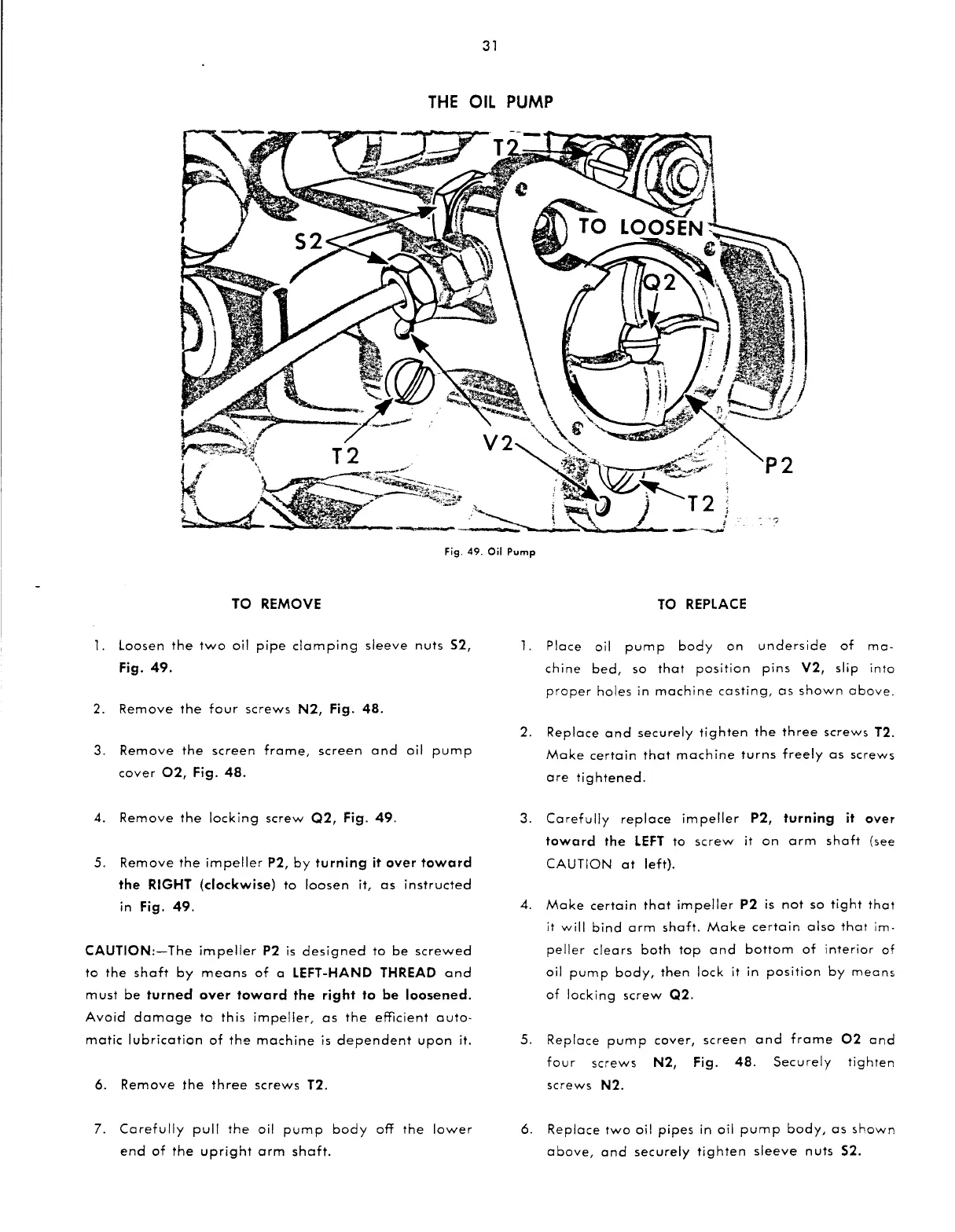
Fig. 49.
Oil
Pump
TO REMOVE
l.
Loosen
the
two
oil
pipe
clamping
sleeve
nuts
S2,
Fig.
49.
2.
Remove
the
four
screws
N2,
Fig.
48.
3.
Remove
the
screen
frame,
screen
and
oil
pump
cover
02,
Fig.
48.
4.
Remove
the
locking
screw
Q2,
Fig.
49.
5.
Remove
the
impeller
P2,
by
turning
it over
toward
the RIGHT (clockwise)
to
loosen
it,
as
instructed
in Fig.
49.
CAUTION:-The
impeller
P2
is
designed
to
be
screwed
to
the
shaft
by
means
of
a LEFT-HAND THREAD
and
must
be
turned over
toward
the right to be loosened.
Avoid
damage
to
this
impeller,
as
the
efficient
auto-
matic
lubrication
of
the
machine
is
dependent
upon
it.
6.
Remove
the
three
screws
T2.
7.
Carefully
pull
the
oil
pump
body
off
the
lower
end
of
the
upright
arm
shaft.
TO
REPLACE
1.
Place
oil
pump
body
on
underside
of
ma-
chine
bed,
so
that
position
pins
V2,
slip
into
proper
holes
in
machine
casting,
as
shown
above.
2.
Replace
and
securely
tighten
the
three
screws
T2.
Make
certain
that
machine
turns
freely
as
screws
are
tightened.
3.
Carefully
replace
impeller
P2, turning it over
toward
the
LEFT
to
screw
it
on
arm
shaft
(see
CAUTION
at
left).
4.
Make
certain
that
impeller
P2
is
not
so
tight
that
it
will
bind
arm
shaft.
Make
certain
also
that
im-
peller
clears
both
top
and
bottom
of
interior
of
oil
pump
body,
then
lock
it
in
position
by
means
of
locking
screw
Q2.
5.
Replace
pump
cover,
screen
and
frame
02
and
four
screws
N2,
Fig.
48.
Securely
tighten
screws
N2.
6.
Replace
two
oil
pipes
in oil
pump
body,
as
shown
above,
and
securely
tighten
sleeve
nuts
S2.

Related product manuals