EasyManua.ls Logo

Singer 5107 - Page 19

Singer 5107
43 pages
Print Icon
To Next Page IconTo Next Page
To Previous Page IconTo Previous Page
Loading...
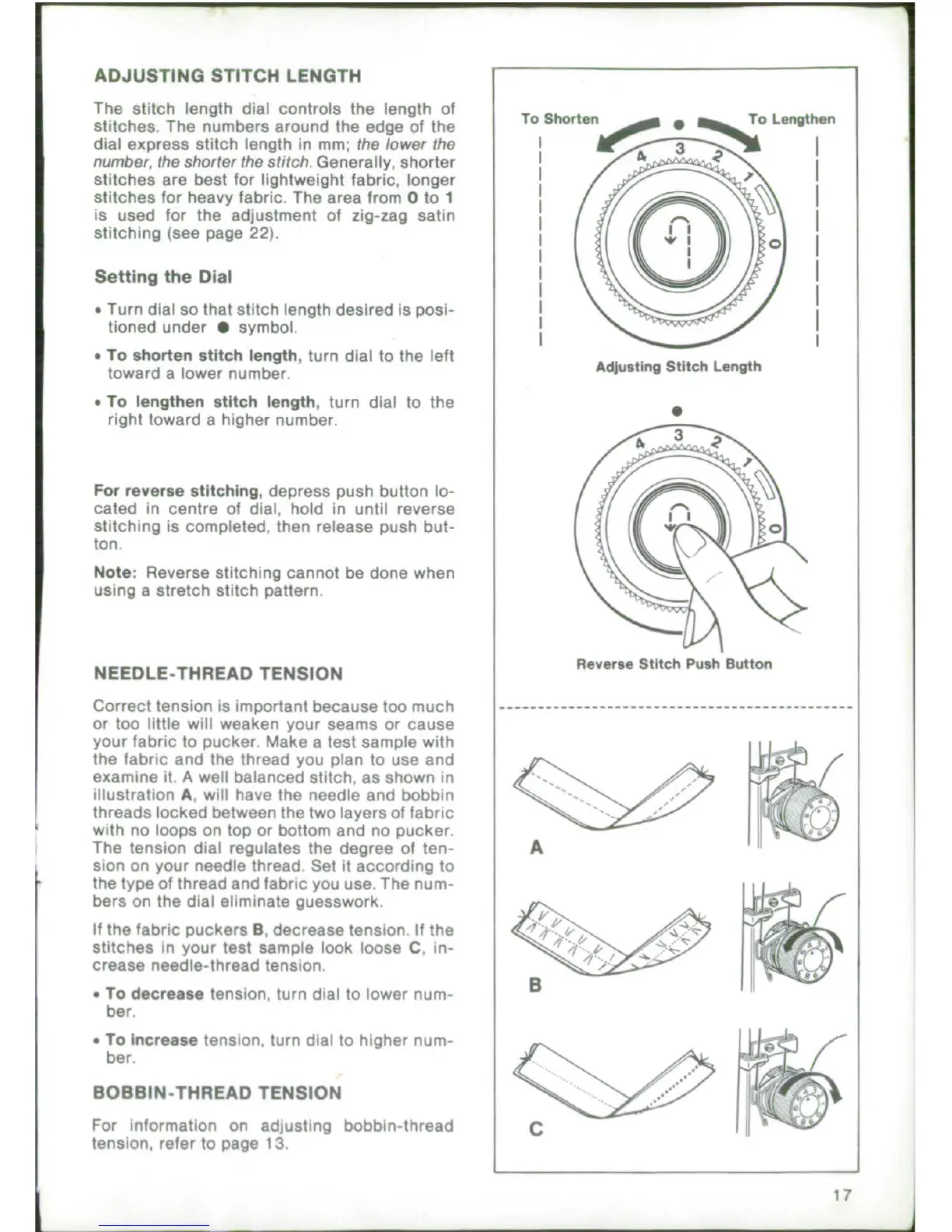
ADJUSTING
STITCH LENGTH
The
stitch
length
dial
controls
the
length
of
T
Shorten
To
Lengthen
stitches.
The
numbers
around
the
edge
of
the
dial
express
stitch
length
in
mm; the
lower
the
number,
the
shorter
the
stitch.
Generally, shorter
stitches
are
best
for
lightweight
fabric,
longer
stitches
for
heavy
fabric.
The area
from
0 to
1
is used
for
the
adjustment
of
zig-zag satin
stitching
(see
page
22).
Setting
the
Dial
.
Turn
dial
so
that
stitch
length
desired
is
posi-
tioned
under
*
symbol.
.
To
shorten
stitch
length,
turn
dial
to the
left
toward
a
lower
number.
Adjusting
Stitch
Length
*
To
lengthen
stitch
length,
turn
dial
to
the
right
toward
a
higher
number.
For
reverse
stitching,
depress
push
button
lo-
cated
in
centre
of
dial,
hold
in
until reverse
stitching
is
completed.
then
release
push
but-
ton.
Note:
Reverse
stitching
cannot
be
done when
using
a
stretch
stitch
pattern.
NEEDLE-THREAD
TENSION
Reverse
Stitch
Push
Button
Correct
tension
is
important
because
too
much
..
--------
or
too
little
will
weaken
your
seams
or
cause
your fabric
to
pucker.
Make
a
test
sample
with
the
fabric
and
the
thread
you
plan
to
use
and
examine
it.
A
well
balanced
stitch.
as shown
in
-
<.
illustration
A,
will
have
the
needle
and
bobbin
threads
locked
between
the
two
layers
of
fabric
with
no
loops
on
top
or bottom
and
no
pucker.
The
tension
dial
regulates
the
degree
of
ten-
A
sion
on
your
needle thread
Set
it
according
to
the
type
of
thread
and
fabric
you
use. The
num-
bers
on
the
dial
eliminate
guesswork,
If
the
fabric puckers
B,
decrease tension
If
the
§
.
'_4
stitches
in
your
test
sample
look loose
C.
in-
crease
needle-thread
tension
.
To
decrease
tension,
turn
dial
to
lower
num-
ber.
*
To
increase
tension,
turn
dial
to
higher
num-
ber.
BOBBIN-THREAD
TENSION
For
information
on
adjusting
bobbin-thread
C
tension,
refer
to
page
13
17

Related product manuals