EasyManua.ls Logo

Singer 620 - Page 10

Singer 620
26 pages
Print Icon
To Next Page IconTo Next Page
To Previous Page IconTo Previous Page
Loading...
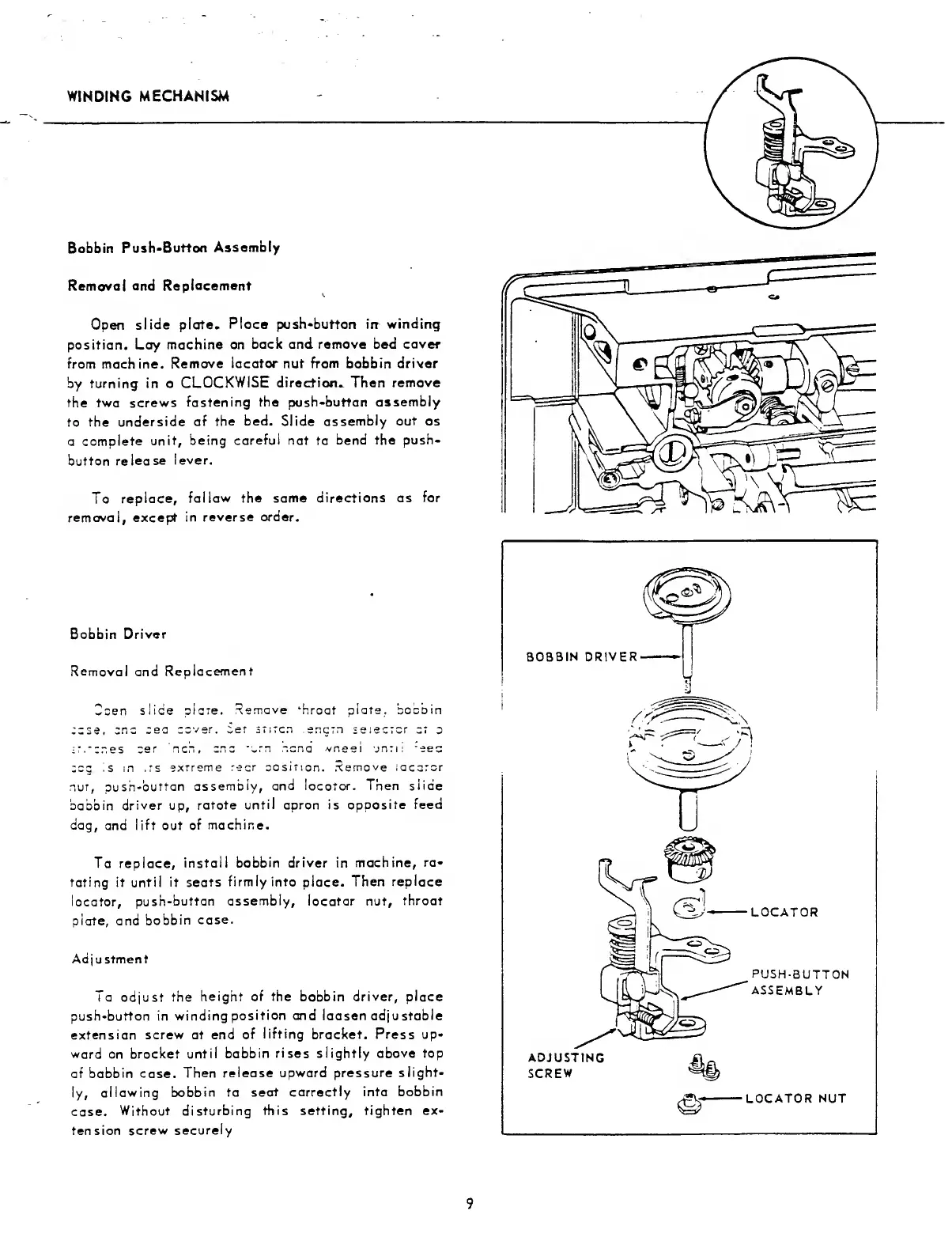
WINDING
MECHANISM
Bobbin
Push-Button
Assembly
Removal
and
Replacement
Open
slide
plate.
Place
push-button
irr
winding
position.
Lay
machine
on
back
and
remove
bed
cover
from
machine.
Remove
locator
nut
from
bobbin
driver
by
turning
in
a
CLOCKWISE
direction.
Then
remove
the
two
screws
fastening
the
push-button
assembly
to
the
underside
of
the
bed.
Slide
assembly
out
as
a
complete
unit,
being
careful
not
to
bend
the
push¬
button
release
lever.
To
replace,
follow
the
same
directions
as
for
removal,
except
in
reverse
order.
Bobbin
Driver
Removal
and
Replacement
Teen
slide
aiaTe.
Remove
‘hroat
plate,
bobbin
cose,
one
;ea
cover.
Per
stitch
enern
seiecrcr
ct
p
•r.'cnes
oer
nen,
one
-pm
non
a
-vneei
jnri:
eec
cog.
is
m
its
extreme
'ear
oosinon.
Remove
iocaror
nut,
pusn-button
assembly,
and
locator.
Then
slide
bobbin
driver
up,
rotate
until
apron
is
opposite
feed
dog,
and
lift
out
of
machine.
To
replace,
install
bobbin
driver
in
machine,
ro¬
tating
it
until
it
seats
firmly
into
place.
Then
replace
locator,
push-button
assembly,
locator
nut,
throat
piate,
and
bobbin
case.
Adjustment
To
adjust
the
height
of
the
bobbin
driver,
place
push-button
in
winding
position
and
loosen
adjustable
extension
screw
at
end
of
lifting
bracket.
Press
up¬
ward
on
bracket
until
bobbin
rises
slightly
above
top
of
bobbin
case.
Then
release
upward
pressure
slight¬
ly,
allowing
bobbin
to
seat
correctly
into
bobbin
case.
Without
disturbing
this
setting,
tighten
ex¬
tension
screw
securely
9

Related product manuals