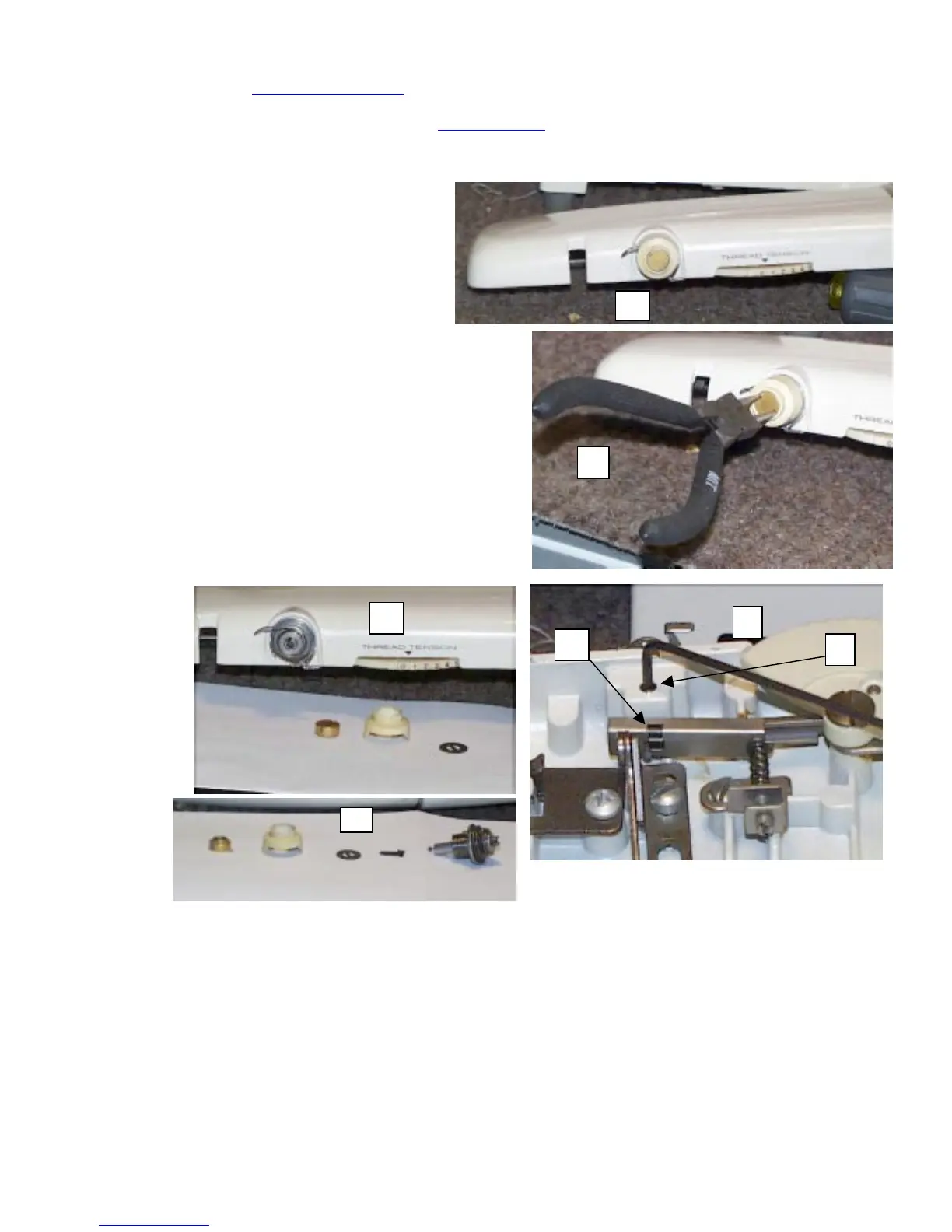
Top tension repair and adjustment:
On the web page, www.geocities.com/tf43, you’ll find a tension repair and adjustment guide, unless I’ve moved the page
to a new location, or have removed the file. If I’ve moved the page, I’d hope that I’m able to leave a redirect on the old
site to the new one. If not, you can email me at tf43@yahoo.com
and I can give you the new site, or file location. But to
help, I’ll redo that section here anyway.
As mentioned in other sections, be sure to lay your parts out in the order they come off. This will help avoid confusion
when you re-assemble the unit.
1. With the top removed, set the tension dial to
zero. (Fig 1)
2. Using your round noise pliers, or similar tool,
loosen and remove the lock nut by turning it
CCW. (Fig 2)
3. Remove the plastic tension cap and black
washer. (Fig 3)
4. Remove the tension releasing pin lock clip by lifting it
straight up. (Fig 4, item a)
5. Using a 5/64 Allen wrench, loosen the setscrew. (Fig 4,
item b)
6. Remove the tension unit. (Fig 5)
1
2
3
a


 To Next Page