EasyManua.ls Logo

Singer Quantum - Selecting a Sewing Pattern

Singer Quantum
30 pages
Print Icon
To Next Page IconTo Next Page
To Previous Page IconTo Previous Page
Loading...
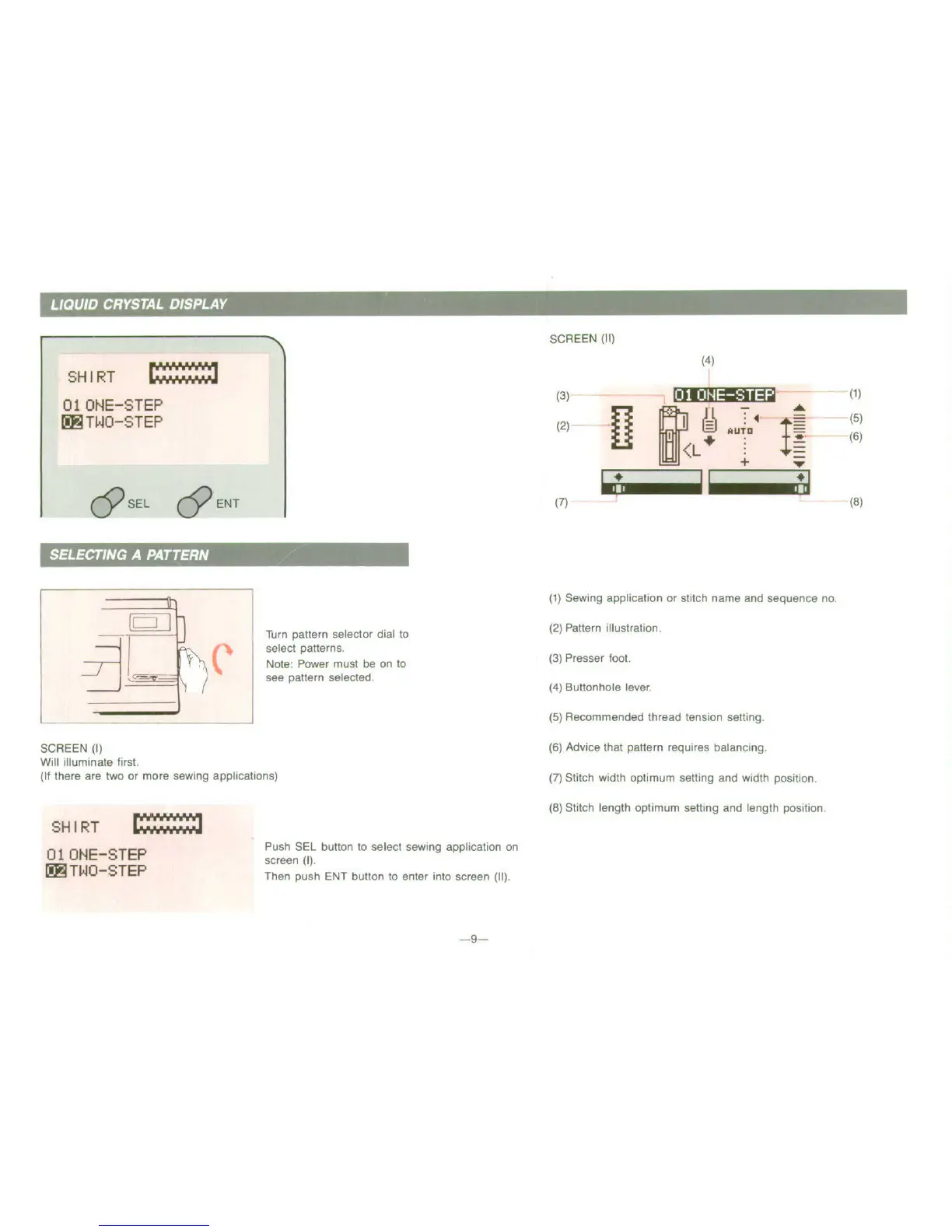
SCREEN
(1I)
SH
IRT
)
01
ONE-STEP
(3)
A- (t)
iK
TWO-STEP
(2)
"
A4UT.
Ii(6
~(1)
Sewing
application
or
stitch
name
and
sequence
no
S ! ,r
Turn
pattern
selector
dial
to
(2)
Pattern
illustration.
~select
patterns.
L~lNote:
Power
must
be
on,
to
(3)
Presser
loot.
J
/see
pattern
selected.
(4)
Buttonhole
lever
(5)
Recommended thread tension setting.
SCREEN
(I
(6)
Advice
that
pattern
requires
balancing.
Will
illuminate
first.
(It
there
are
two
or
more
sewing
applications)
(7)
Stitch width
optimum
setting
and
width
position.
~(8)
Stitch
length
optimum
setting
and
length position.
SHIRT
Push
SEt
button
to
select
sewing
application
on
01 ONE-STEP
screen
(I).
I'IITWOI-STEPF
Then
push
ENT
button
to
enter
into
screen
(II).
--

Related product manuals