1
2
3
4
5
6
7
Embroidery – 43
EMBROIDERY
Getting Started to Embroider
Embroidery Mode– Overview
To enter embroidery mode, slide on the embroidery unit. Make
sure that the area is clear so that the embroidery unit can cali-
brate when needed.
Note: You can not access the sewing mode while having the
embroidery unit on.
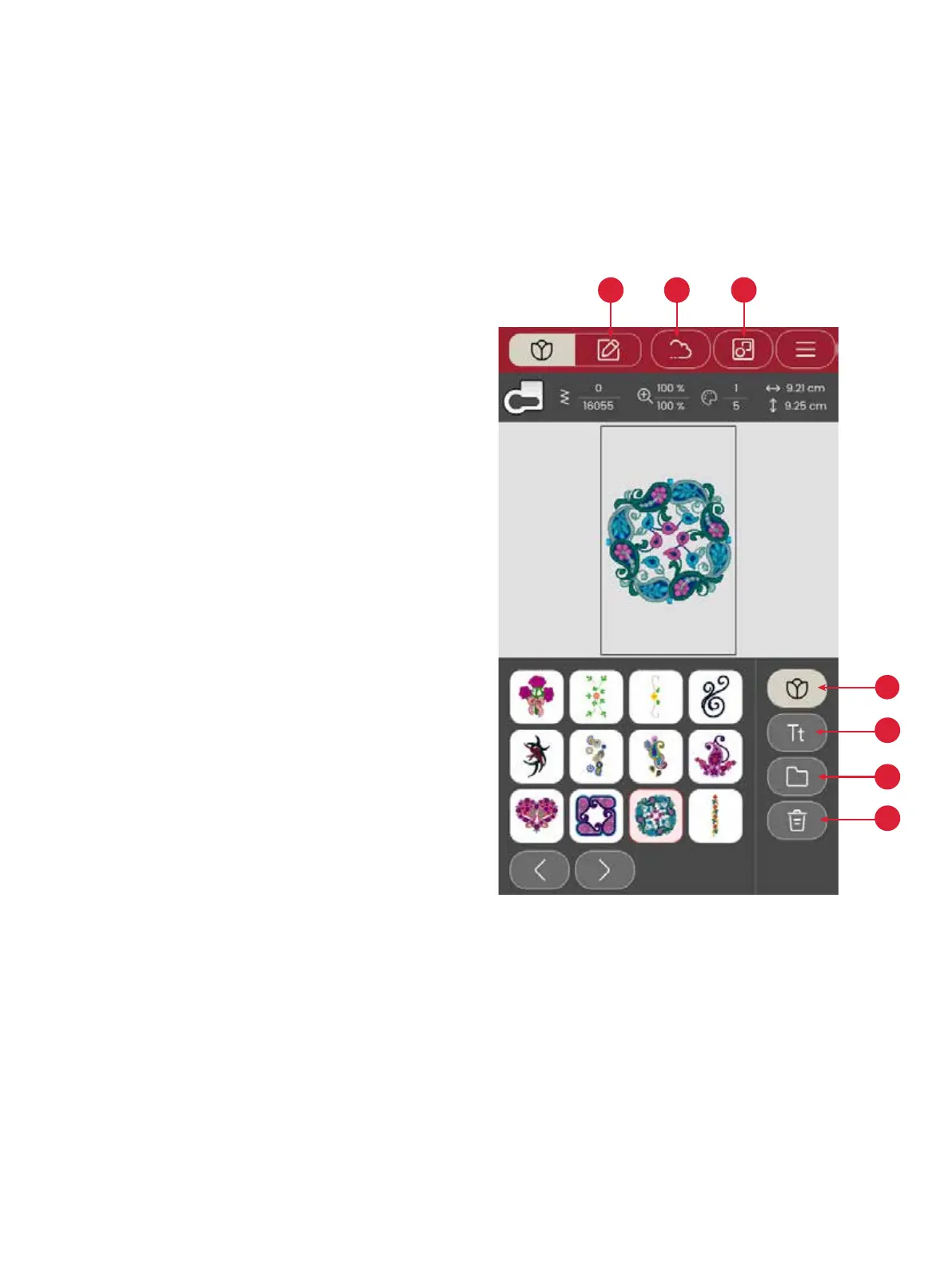
In embroidery mode you can select designs and fonts, manage
your saved les and access the mySewnet library.
1. Design menu
2. Font menu
3. File manager
4. Delete / remove design
5. Multi select
6. mySewnet (Only for models SE9180 and SE9185)
7. Embroidery edit
Load a Design
Touch a design to load it in the embroidery mode. To edit the
selected design, touch the embroidery edit icon.
Touch the left and right button in the selection area to browse
through the built in designs. When a design is selected, infor-
mation about the design will be shown in the top bar. Please
note that in order to load more than one design, you must have
the ‘multi-select’ option selected
Note: You can also load saved designs from the mySewnet
cloud folder and from a USB device in le manager.








 To Next Page