4
Step 5: Sing along!
The Singsation Classic comes with a microphone you can use to sing along
or make announcements!
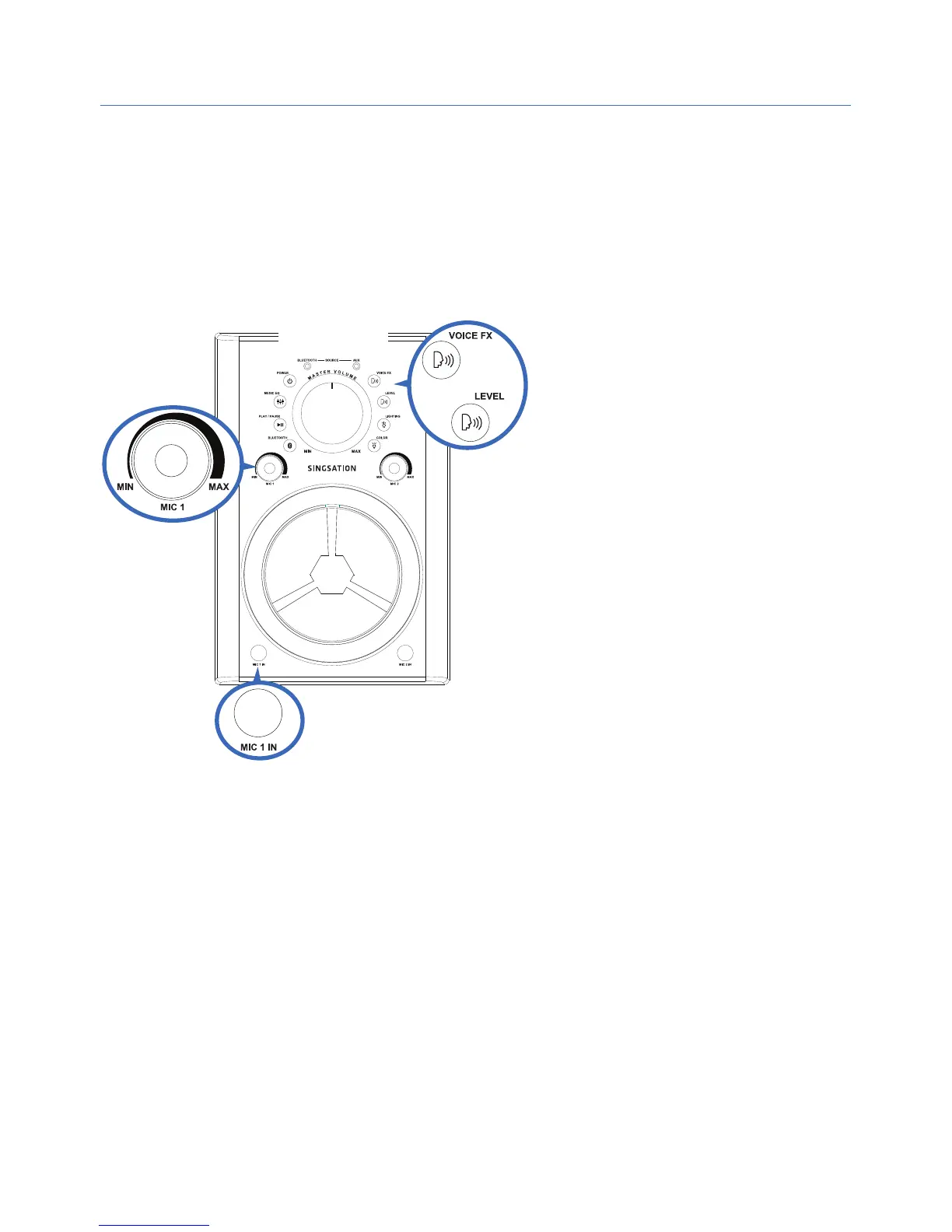
To sing along: Plug the provided microphone into the MIC 1 IN jack on
the front of the Singsation Classic. Start playing music on your Bluetooth
device and start singing!
Front
To adjust the volume of your
voice: Use the MIC 1 volume
knob on the Singsation
Classic.
To adjust the volume of
your music: Use the volume
controls on your Bluetooth
device.
To adjust the volume of
everything: Use the MASTER
VOLUME knob on the
Singsation Classic.
To use a second mic: Plug a second mic (not included) into the MIC 2 IN
jack on the front of the Singsation Classic. Use the MIC 2 volume knob to
control its volume.
Fun with Voice Eects
To change voice eects: Press the VOICE FX button. Keep pressing to try
all the eects!
To adjust the level of the current voice eect: Press the LEVEL button
just below the VOICE FX button. It cycles through six levels for the current
eect. Note: Eect number 4 (baby voice) does not have levels.


 To Next Page