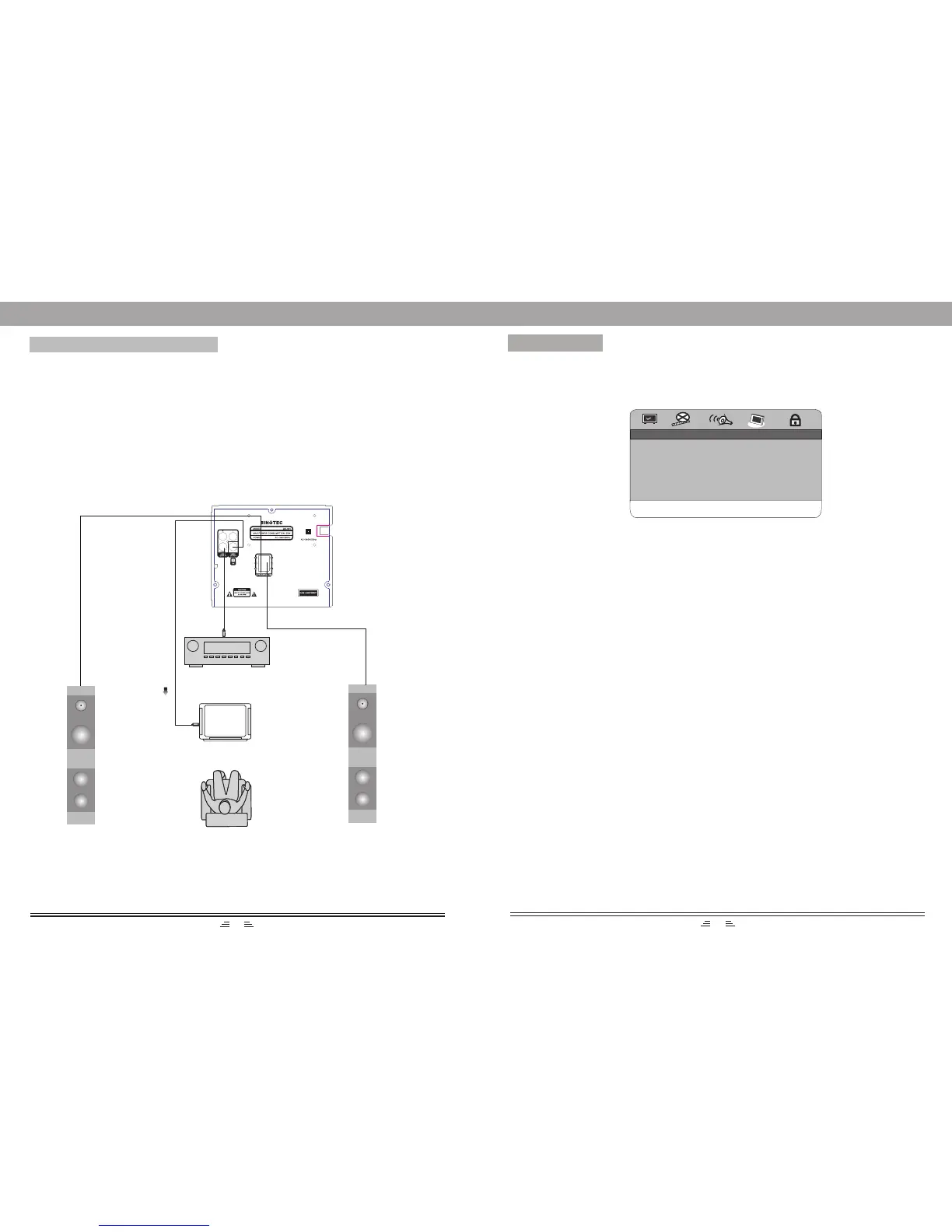
CONNECT TO AMPLIFIER
Digital audio output setting
Connect coaxial output of the player to the corresponding inputs of the amplifier.
When a disc is in play or stop mode, press the SETUP button on the remote control to
open the DVD MENUsetup. Use direction buttons to move to the audio setup page.
Move the cursor to DIGITAL AUDIO SETUP, select the digital output and set SPDIF/
RAW or SPDIF/PCM. Then press the ENTER button to save the selected value.
To exit the setup menu, press the SETUP button again.
Left speaker
Right speaker
Coaxial output
Connected to video output
TV
Dolby Amplifier
MENU SETUP
..GENERAL SETUP ..
GO TO GENERAL SETUP PAGE
4.General Setup
ANGLE MARK ON
CLOSE CAPTION OFF
SCREEN SAVER OFF
LAST MEMORY OFF
S/W VERSION
DEFAULT
1. Angle Mark
When the disc has multi-angle pictures, setting the Angle Mark displays a multi-angle
mark on the screen. This option has two settings:
ON: Display multi-angle mark
OFF: Multi-angle mark is not displayed
3. Screen Saver
To set screen saver on or off.
4. Last Memory
When the option is set to “ON”, the system remembers the played discs contents.
The disc content is not remembered when the “OFF” option is selected.
Note: It is only available for VCD/DVD disc.
2.Close Caption
When playing a DVD, set this option to OFF to close the caption, choose the ON option
to open the caption.
6. Default
While in “EJECT” or “NO DISC” status, this option is chosen to reset the DVD
player`s original setup.
5. Version (Software Version)
This option is used to display the model of this unit.
18
5


 To Next Page