one pro
/
General Aspects
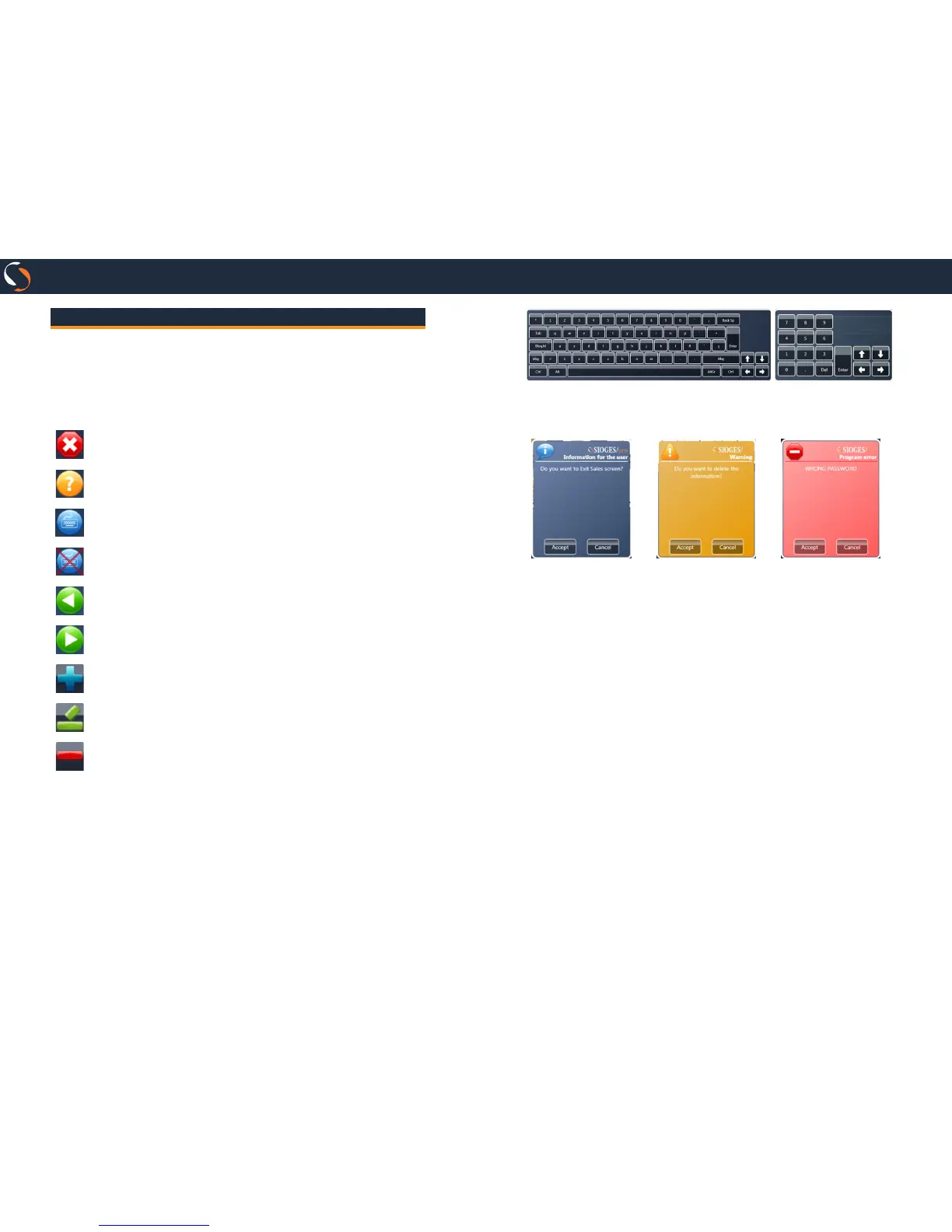
A) Action Buttons
In SIOGES you will nd a series of buttons that are repeated
on all screens:
Exit. This button allows you to go to the previous screen.
Help. This button displays the online help.
Keyboard ON. This button indicates that the onscreen
keyboard is active. Press to clear.
Keyboard OFF. This button indicates that the onscreen
keyboard is disabled. Press to activate.
Previous Page. Shows previous page.
Next Page. Shows next page.
Inserts new record.
Edit the selected record.
Delete the selected record.
B) Onscreen Keyboard
Whenever you have the keyboard button on, to be placed in a
text edit eld appears on screen virtual keyboard.
Depending on the type of information you can enter, display a
full keyboard or keypad.
C) NOTICE messages
Information mes-
sage.
Warning message.
User must correct
something.
Program error mes-
sage.
D) DATE Selector
If you click on the icon to the left of the lters by date, you can
select:
• No DATE lter
• Filter by year
• Filter by month
• Filter by day
• Filter between two dates
E) Screen grids
Clicking on a column header, you can sort the information by
the value of the selected column.
If you drag the column header to the upper grid data can be
grouped by the selected column.
Press the buttons above and below the scroll bar to move bet-
ween records and to display a menu allowing you to print and
export the information from the grid.


 To Next Page