Need help?
Do you have a question about the Siqura C-60 E-MC and is the answer not in the manual?
Overview of the manual's content and scope, including installation and operation.
Identifies the target readers and necessary knowledge for using the C-60 E-MC.
Essential safety precautions, EMC, and ESD measures for device operation.
Information regarding hazards associated with optical equipment and laser safety.
Instructions for unit care, maintenance, and responsible product disposal.
Official statement confirming compliance with relevant standards and regulations.
Lists the key capabilities and functionalities of the C-60 E-MC.
Describes the different available models in the C-60 E-MC series.
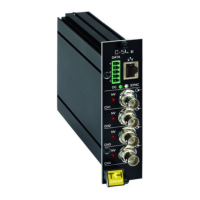
Details the components and indicators on the front panel of the device.
Step-by-step guide on how to supply power to the unit.
Instructions for connecting network, video, audio, and data cables.
Details the pin configurations for various connectors on the unit.
Guide to setting up the IP address and network link for the unit.
Steps to connect video, audio, data, and CC signals.
Explanation of port number assignments for various stream types.
Explains support for ONVIF and Siqura's Open Streaming Architecture.
Describes using the web interface for device settings and live video.
Overview of various communication protocols supported by the unit.
Explains the role of RTSP and RTP in media streaming sessions.
Details how media streams are transferred using UDP and TCP.
Lists prerequisites for accessing the unit's web interface.
Step-by-step guide to access the unit using a web browser.
Methods to discover and connect to the unit using UPnP or Device Manager.
Explains the navigation menu and its use for viewing/configuring settings.
Details user account types and their associated access levels.
Describes common UI elements like sections, buttons, tabs, and checkboxes.
Steps to enable the live video preview function.
Describes the components and controls on the Live Video page.
How to control PTZ cameras through the web browser interface.
How to view system states, including stream status.
Accessing general, network, and stream-specific measurement data.
Configuring IP address, subnet mask, and gateway for network connectivity.
Accessing advanced network options like DHCP and Ethernet mode.
Introduction to multicodec and multistreaming capabilities.
Core video settings applicable to all encoders.
Detailed configuration for individual video encoders and bit rate modes.
Configuration and usage of the Live View encoder for previews.
Configuring on-screen display text and graphics overlays.
Setup and configuration of video motion detection parameters.
Features for monitoring image quality and detecting camera tampering.
Steps to create and manage privacy masks for video streams.
Steps to enable or disable the unit's audio features.
How to set up audio streams for two-way communication.
Configuration options for audio input, output, encoding, and decoding.
Configuring basic data interface and UART parameters.
Establishing data links using transmitter and receiver settings.
Details on setting up the RS-232 serial communication.
Information on contact closure channels, their status, and alarms.
Steps to establish connections for contact closure signals.
How to enable and configure PTZ camera control via the interface.
Uploading and removing PTZ drivers for camera compatibility.
Setting up secure connections using HTTPS and SSL/TLS certificates.
Information on generating and installing certificates (CA-issued or self-signed).
Steps to establish and verify a secure HTTPS connection.
Routing events and alarms to CC outputs, streams, or FTP push.
Accessing identification, naming, and advanced settings for the device.
Configuring device logging and remote syslog server settings.
Procedures for firmware updates, backups, and restores.
Configuring SNMP, MX/IP, Auto Discovery, and ONVIF settings.
Managing user accounts, levels, and passwords for web access.
Setting and managing the Linux root password for system administration.
Setting the date, time, and time zone manually.
Configuring automatic time synchronization using an SNTP server.
Explanation of IP multicast and multicast group concepts.
Details on SSM techniques for efficient multicast traffic.
Guide to obtaining necessary video player software like QuickTime or VLC.
Instructions for installing QuickTime and VLC media players.
Lists NTCIP conformance groups supported by the C-60 E-MC.

 To Next Page
 General