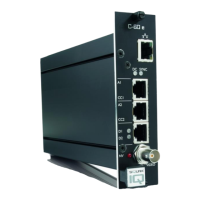
The S-54 E-MC is a field-hardened 4-channel multicodec video server designed for IP video monitoring applications, capable of operating in extreme outdoor conditions. It simultaneously streams MPEG-2, MPEG-4, and MJPEG video, and offers an independent bidirectional data channel.
Function Description:
The S-54 E-MC serves as a versatile solution for IP video surveillance. It can be housed in MC 10 or MC 11 power supply cabinets, or used as a stand-alone module (/SA version). An optional pluggable SFP slot allows for fiber optic cable connections (/SFP) using a range of multimode or single-mode XSNet™ SFP devices. Front panel LEDs provide status indications for network, stream (sync), data activity, video input, and DC power. All models include backup battery power for their internal clocks.
The unit supports multicodec and multistreaming capabilities, optimizing each stream for its specific purpose. For example, high-quality MPEG-2 can be used for live viewing, low-bandwidth MPEG-4 for storage, and low-resolution MJPEG for web applications and remote devices. Up to six copies per channel (three per independent MPEG-2, MPEG-4, or MJPEG video stream) can be transmitted to different unicast and/or multicast destinations using TKH Security's proprietary MX protocol. Source-specific multicast (SSM) is supported, and up to forty streams can be retrieved via RTSP. The Session Announcement Protocol (SAP) can also be used to transmit MPEG-2 and MPEG-4 streams to multicast destinations.
Each channel also features a Live View Encoder that converts analog video input signals to MJPEG format for streaming to web applications or remote devices via HTTP pull. JPEG images can be periodically uploaded to FTP servers using the FTP Push function, which can be triggered by external events, Video Motion Detection (VMD), Image Quality Monitor, or Tampering Detector.
The S-54 E-MC integrates streaming video with serial data over IP, providing the necessary interface for CCTV applications such as PTZ control and access control. Internal VMD can be used for automated security solutions or event-triggered storage.
Important Technical Specifications:
- Video Channels: 4-channel multicodec video server.
- Streaming Formats: MPEG-2, MPEG-4, MJPEG (simultaneous streaming).
- Data Channel: Independent bidirectional data channel.
- Network Connectivity: RJ-45 Ethernet socket (100/10 Mbit), optional SFP slot for fiber optic.
- Video Inputs: 4 BNC connectors for video input.
- Data Interface: 5-pin mini Combicon connector for RS-422/485 data in/out.
- Power: 12 Vdc (for stand-alone units).
- Protocols: MX protocol, RTSP, RTP, HTTP API, SNMP, SAP.
- Resolutions (PAL/NTSC):
- D1: 720x576 / 720x480
- 2/3 D1: 480x576 / 480x480
- 1/2 D1: 352x576 / 352x480
- 2CIF: 720x288 / 720x240
- CIF (top field only): 352x288 / 352x240
- QCIF: 176x144 / 176x120
- Additionally, VGA (640x480) and QVGA (320x240) are supported.
- Frame Rate: PAL: 1-25 fps; NTSC: 1-30 fps.
- Bit Rate: Range: [10…15000] kbit/s. Total output bandwidth for 4 video inputs should not exceed 60 Mb/s.
- UART Bit Rates: 1200, 2400, 4800, 9600, 19200, 38400, 57600, 115200 bit/s.
- Optical Safety: Class 1M lasers or LEDs, compliant with IEC 60825-1:1993+A1+A2 and IEC 60825-2:2004.
- EMC Compliance: Meets CE regulations for EMC and FCC Part 15 Class A device limits. Shielded cables (CAT5E SF/UTP or better) are required for signal cables, and unshielded three-wire cables (2p + PE) for power. Proper grounding and surge protection are essential.
- ESD Protection: Precautions against electrostatic discharge are necessary when opening the equipment.
- RoHS Compliance: Complies with the EU’s RoHS Directive (2011/65/EU).
Usage Features:
- Web User Interface: Access-controlled web interface for configuration, management, and live video viewing, eliminating the need for separate application software. Requires a PC with a web browser and an IP connection. JavaScript must be enabled in the browser for correct display.
- Live Video Page: Displays live images from connected video sources. Features matrix mode for an overview of video inputs and maximized mode for detailed observation.
- PTZ Camera Control: Integrated PTZ control panel on the Live Video page (in maximized mode) allows for pan, tilt, zoom, focus, and iris control of connected PTZ cameras. Presets can be managed (enter, save, recall, erase). PTZ drivers can be uploaded/removed.
- Image Quality Monitoring: Built-in functionality to detect if camera images are usable, blocked, or if the camera position has changed. Measures camera focus, exposure, contrast level, and SNR. Alarms can be configured and monitored.
- Video Motion Detection (VMD): Allows users to define specific screen areas for motion detection, masking regions of less interest. Generates alarms on picture changes.
- Tampering Detector: Detects camera position and scene changes (e.g., blocked view) by comparing current images to stored reference images. Up to 16 reference images can be stored for different day/night situations or PTZ preset positions.
- On-Screen Display (OSD): Programmable OSD facilities to display up to three text bars and one graphic. Text bars can show date, time, and measurements. Custom fonts and graphics can be uploaded.
- FTP Push: Configurable to upload JPEG images to one or two remote FTP servers, either continuously or triggered by events (VMD, Image Quality Monitor, Tampering Detector, etc.).
- Network Settings: Allows setting fixed IP addresses, subnet masks, and gateway IP addresses, or enabling DHCP. Advanced settings include Ethernet mode (Auto, 10 HDX/FDX, 100 HDX/FDX) and IGMP unsolicited reports.
- Data RS-422/485: Configurable data links with selectable wire modes (RS-422, RS-485 2-wire/4-wire) and UART settings (bit rate, word length, stop bits, parity mode). Supports TCP server settings for UART data streaming over TCP.
- Device Management: Provides administrative information, including device name (Label 1 and Label 2), and allows for firmware upgrades.
- User Management: Three-level access control (Admin, Operator, Viewer) for web pages. Allows adding, editing, and deleting user accounts. The 'root' account provides admin rights plus additional privileges and should always be password protected.
- Date and Time: Battery-supported real-time clock, adjustable manually or automatically via SNTP server. Supports Daylight Savings Time.
Maintenance Features:
- No Routine Maintenance: The encoder typically requires no maintenance.
- Environmental Protection: Prevent dust accumulation and exposure to moisture. Operate within the specified temperature range.
- Firmware Upgrades: The S-54 E-MC is field-upgradeable. Firmware can be updated via the web interface. Note that an error during upgrade will revert the unit to the fixed image, not a former upgrade image.
- Device Definitions Updates: EMX and MX Plug-in updates can be downloaded from the TKH Security website to ensure compatibility with application software.
- Product Disposal: Contains valuable materials for recycling. Lithium batteries on the printed circuit board require special attention during disposal but are safe for normal disposal due to low lithium content.
- Troubleshooting: Status page provides real-time information on stream states and measurements. FTP Push status messages aid in troubleshooting file upload issues.
- Reset Options: Reboot the unit without resetting variables, or perform a partial or complete factory reset (including network settings).

 Need help?

 To Next Page
 General