•
•
Displays current
temperature (F°)
Ready to Print
•
•
•
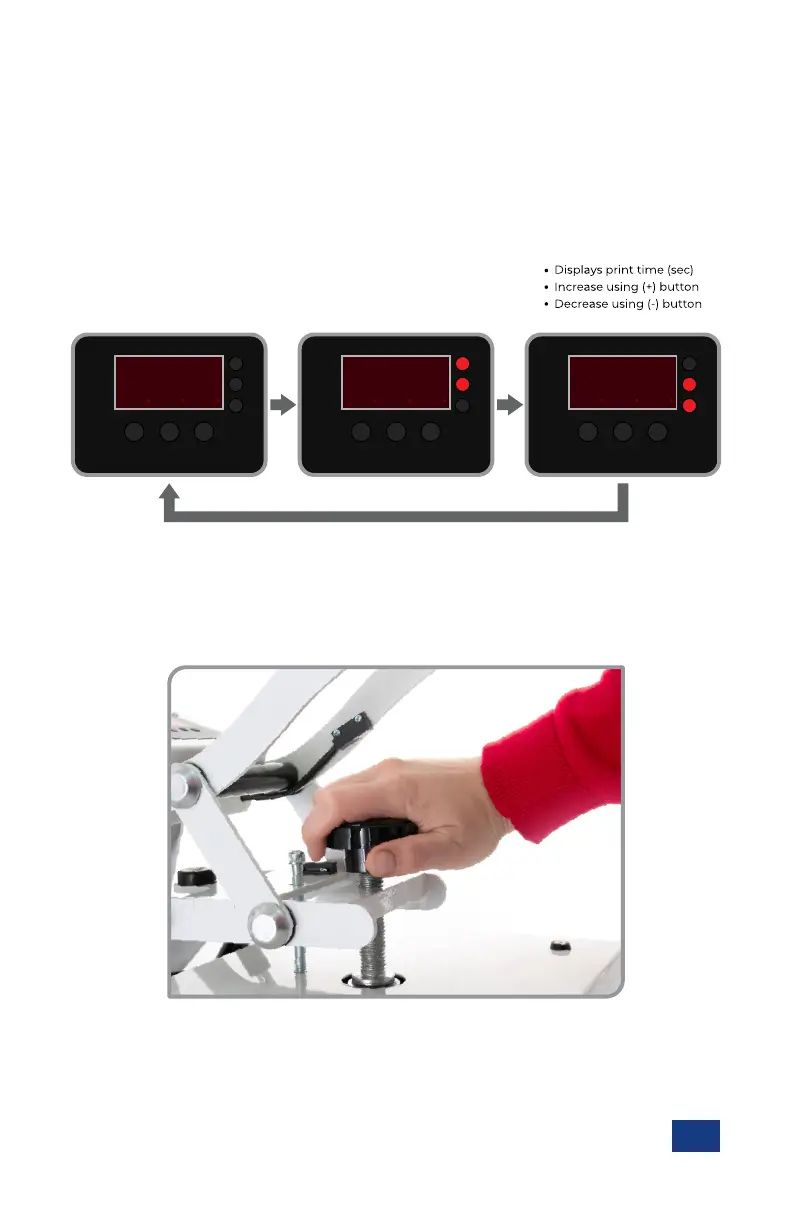
Displays print temperature
Increase using (+) button
Decrease using (-) button
8
2
80 80
TEMP
SET
TIME
MODE +-
8
3
85 80
TEMP
SET
TIME
MODE +-
8
0
81 80
TEMP
SET
TIME
MODE +-
En
Adjusting Temperature, Time and Pressure
Recommended settings vary based on the garment material and type of transfer product used.
Please consult the instructions or specifications that came with your transfer product for appropriate
temperature and time settings
With the press ON and the Lift Handle in the UP position, press the MODE button to cycle through setup modes:
Various transfer products will recommend using either “light”, “medium” or “heavy” pressure. Some trial and
error may be required to determine the best pressure setting, but once selected, your craft press will reliably
reproduce the same pressure, print after print.
With the Lift Handle in the DOWN position, rotate the patented Over-the-Center Pressure Adjustment Knob.
Ÿ Rotate counter-clockwise to decrease pressure
Ÿ Remember to allow for the thickness of your garment when adjusting pressure.
Ÿ Rotate clockwise to increase pressure
Ÿ WARNING: Structural damage caused by excessive pressure is NOT covered
under the limited warranty.


 To Next Page