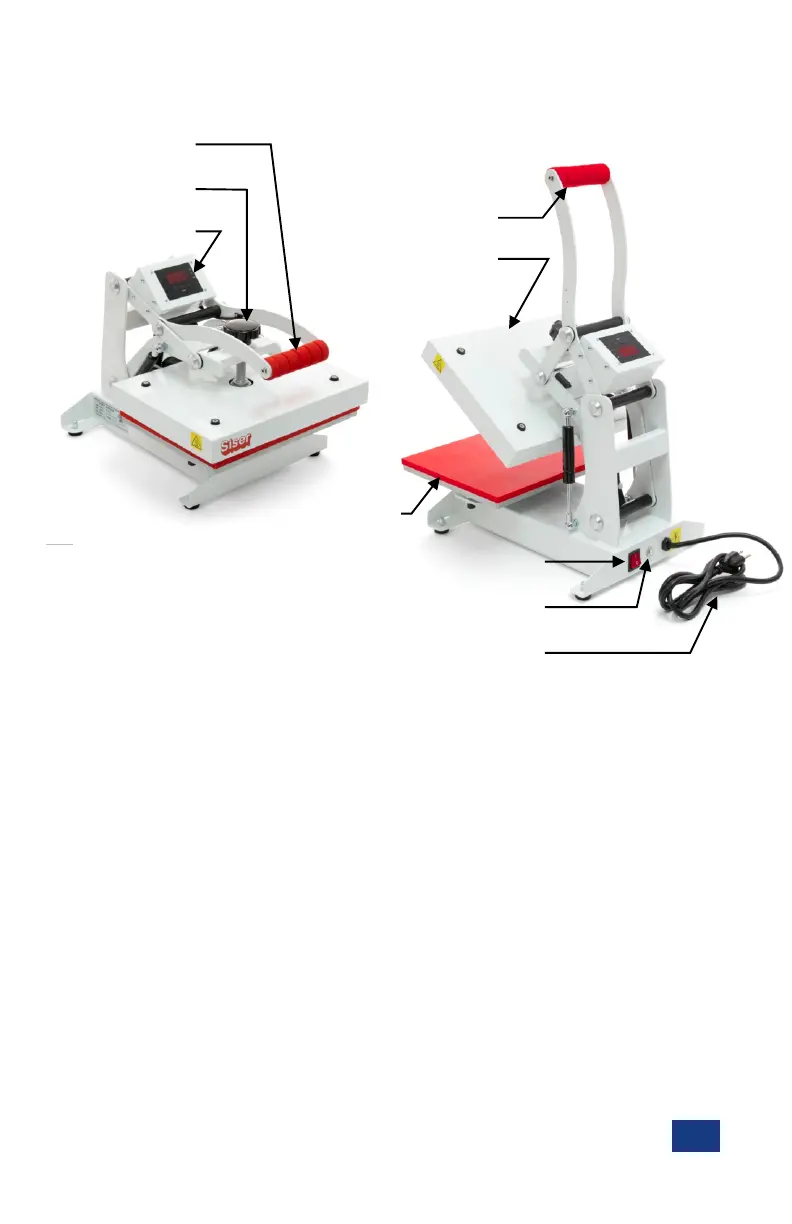
Part Identification
Pressure Knob
Lift Handle (Down)
Control Panel
En
1. Connect the power cord into a properly grounded 120 volt electrical outlet with a minimum 10 amp r ating.
- Power supply c ord must be disconnected before cleaning or servicing press.
3. Turn the Power Switch to the ON position.
Carefully follow the step-by-step instructions for best results.
2. Raise the lift handle to the UP position.
1. Erratic controller functions.
2. Inaccurate displays and slow heat-up.
3. The circuit breaker to disengage.
- When not in use, Lift Handle should remain in the UP position to extend the life of the gas springs.
- If used, a minimum 12-gauge extension cord is required. Short, heavy-duty cords are recommended.
- Circuits powering other high demand equipment should not be used.
CAUTION: Failure to follow these instructions will cause:
Initial Setup
General Guidelines:
Ÿ Keep hands clear of the upper platen of the press during lock down as the pressure may cause injury.
Ÿ Press should be placed on a sturdy, suitable stand at least 36” L x 24” W x 29” H.
Ÿ Work area must be kept clean, tidy and free of obstructions.
Ÿ To avoid burns, do not touch the heated platen during use.
Lift Handle (Up)
Upper Platen (Heater)
Lower Platen
Power Switch
Circuit Breaker
Power Cord


 To Next Page