WL-308 Gaming Router Full Manual
53
Click on the Apply button to store these settings.
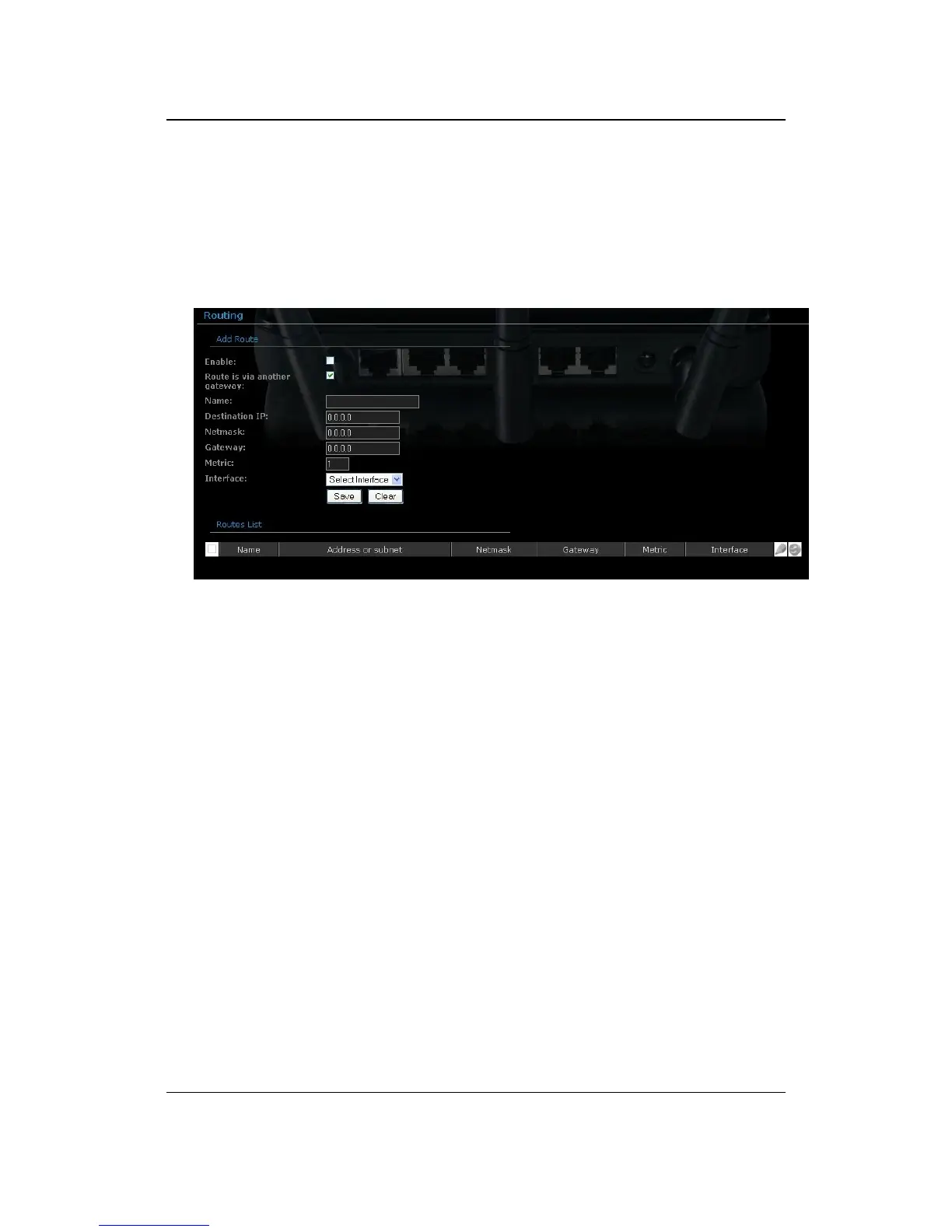
Routing
This section adds a new entry into the routing table.
Enable: Place a check in this box to enable the routing table entry.
Name: Specify a name for the rule.
Destination IP: Specify the destination IP address.
Netmask: Specify the subnet mask for the IP address.
Gateway: Specify the IP address of the gateway.
Metric: Specify the number of routing hops. The route metric is a value from
1 to 16 that indicates the cost of using this route. A value of 1 is the lowest
cost, and 15 is the highest cost. A value of 16 indicates that the route is not
reachable from this router. When trying to reach a particular destination,
computers on your network will select the best route, ignoring unreachable
routes.
Interface: Select the interface from the drop-down list.
Click on the Save button to insert the entry into the Routing table.



 To Next Page