LCB-[01]= 0.000V
LCB-AVG = 0.000V
LCB-MAX= 0.000V
LCB-MIN = 0.000V
11
Operating Instructions
END 030:00 00000
NC 100mA 10.75V
9. Completion display
10. Data display
11. Error messages
In order to move to the main display, press the Enter button.
INPUT = 12.00V
OUTPUT = 13.18V
ChgCAPA=00000mAh
DchCAPA=00000mAh
CHG PEAK = 12.00V
DCHG AVR = 13.18V
0.00 0.00 0.00V
0.00 0.00 0.00V
LCB-MAX = 0.000V
LCB-MIN = 0.000V
LCB-[01] = 0.000V
LCB-AVG = 0.000V
LCB-[02] = 0.000V
LCB-AVG = 0.000V
INC
INC
DEC
DEC
INC
DEC
INC
DEC
INC
DEC
INC
DEC
ENTER
INC
DEC
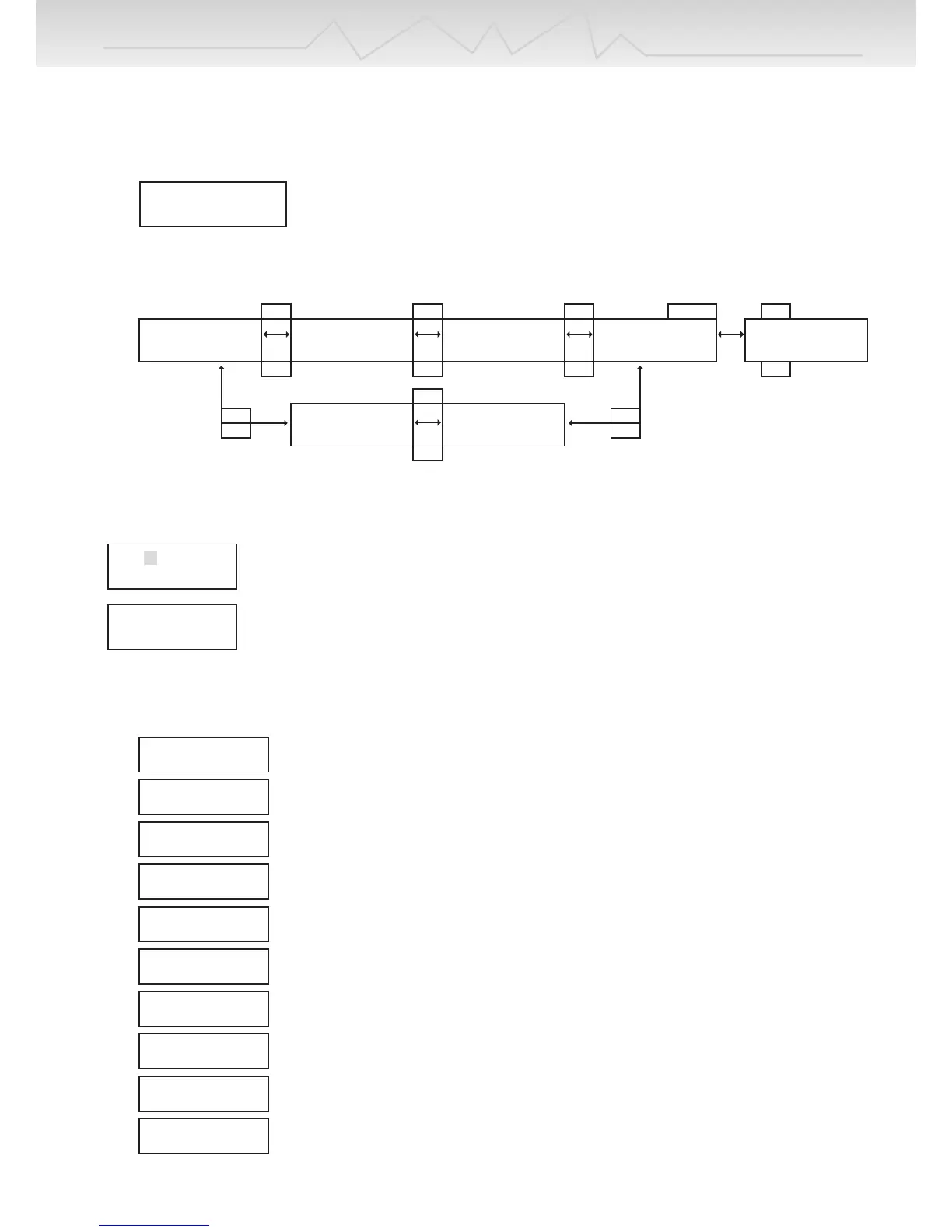
If the Battery type button is pressed for over 3 seconds, the Data view will be displayed as above.
Data displays can be scrolled left and right by INC & DEC buttons.
If the Battery type button is again pressed, those data view screen should be disappeared.
This screen is only shown if a balancing connector is connected.
Press the ENTER button then the “01” should flash, each cell voltage is shown by INC & DEC
buttons.
This screen is also only shown if a balancing connector is connected.
Its shows each maximum and minimum voltages on the screen.
INPUT BATTERY
VOLTAGE ERROR
When input voltage is below 11.0V or exceeds 15V.
NO BATTERY
When a battery is not connected to the charger’s output
OUTPUT BATTERY
REVERSE POLARITY
When a battery is connected to the output in reverse
OUTPUT CIRCUIT
PROBLEM
When the circuit of the charger has a problem
CHECK THE BATT.
OPEN CIRCUIT
When a battery becomes disconnected during an operation
CHECK THE BATT.
OVER VOLTAGE
If wrong voltages are set while charging lithium or Pb batteries.
CHECK THE BATT.
LOW VOLTAGE
If wrong voltages are set, or batteries are over discharged, while charging Lithium or Pb
batteries
BALANCER VOLTAGE
IS TOO HIGH
If voltage per cell is too high during balancing, this message should appear.
BALANCER VOLTAGE
IS TOO LOW
If battery cells are short-circuited during balancing, this message should appear.
DONT CHARGE LIXX
WITH THIS MODE
If the charger starts charging, discharging, or cycle for NiCd/MH, or Pb batteries with
connecting the balancing cable to the balancing port of the charger.


 To Next Page