Need help?
Do you have a question about the SJCAM FUNCAM and is the answer not in the manual?
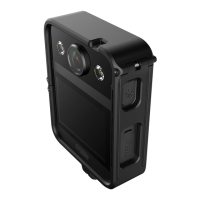
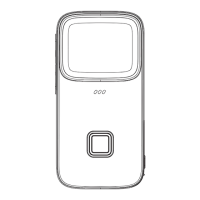
Includes Shutter, Lens, Flash, and Ports on the front of the camera.
Press and hold the power button for 3 seconds to activate the camera.
Click the shutter button to capture photos or record videos.
Placing the memory card into its designated slot.
Press and hold the power button for 3 seconds to turn off the camera.
Adult supervision required; not suitable for underwater use.
Avoid heat, direct sun, and prolonged charging; keep away from pets.
Store in a cool, dry place; handle with care.
Turn on/off, switch modes. Press for 3 seconds for on/off.
Resolution, Quality, Sharpness, White Balance, ISO, Exposure, Quick Review, Date Label.
Resolutions, loop recording, motion detection, audio, date label.
This document describes the SJCAM FunCam, a digital camera designed for ease of use, particularly for children, with features for both taking photos and recording videos.
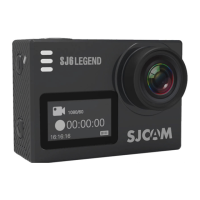
The SJCAM FunCam is a compact digital camera that allows users to capture both still images and videos. It is designed with a simple interface, making it accessible for young users. The camera includes a lens for capturing visuals, a flash for low-light conditions, and an LCD display for viewing content and navigating menus. It also features a speaker for audio playback and indicator lights to provide status information. The camera supports external storage via a MicroSD card.
Turning On/Off and Basic Operation: To turn the camera on, press and hold the Power Button for 3 seconds. The camera will initially start in Photo mode. To switch between Photo and Video modes, a short press of the Power Button is required while the camera is on. To turn the camera off, press and hold the Power Button again for 3 seconds.
Taking Pictures and Recording Videos: Once the camera is on, press the Shutter button (located on the top of the camera) to take a picture or start/stop recording a video.
Navigation and Selections: The back of the camera features several buttons for navigation and control:
Screen Icons: The LCD display shows important information:
Customization Features: The FunCam offers several customization options to enhance the user experience:
Charging the Camera: To charge the FunCam, first slide the cover on the side of the camera upward to reveal the charging port. Then, plug the charger into the port.
Inserting a Memory Card: To insert a MicroSD card, slide the cover on the side of the camera upward. Once the slot is visible, insert the MicroSD card into the designated slot.
Photo Options in Menu: When navigating the Photo Options menu (using the Previous and Next buttons to navigate and the OK button to set), users can adjust various settings:
Video Options in Menu: When navigating the Video Options menu (using the Previous and Next buttons to navigate and the OK button to set), users can adjust settings specific to video recording:
General Settings Options in Menu: When navigating the Settings Options menu (using the Previous and Next buttons to navigate and the OK button to set), users can adjust general camera settings:
Safety Guidelines for Grownups: The manual emphasizes several important safety and maintenance points for adult supervision:
 General
| Aspect ratio | 16:9 |
|---|---|
| Video resolutions | 640 x 480, 848 x 480, 1280 x 720 pixels |
| Maximum frame rate | 60 fps |
| Supported video modes | 720p, 1080p |
| Maximum video resolution | 1920 x 1080 pixels |
| Languages support | CZE, DAN, DEU, ENG, ESP, FRE, ITA, POR, RUS, SLV |
| Photo mode | Yes |
| Sensor type | CMOS |
| Total megapixels | 12 MP |
| Optical sensor size | 1/3 \ |
| Maximum image resolution | 4032 x 3024 pixels |
| Flip-out screen | - |
| Display diagonal | 2 \ |
| Storage media | Memory card |
| Compatible memory cards | MicroSD (TransFlash) |
| Maximum memory card size | 32 GB |
| Product color | Black |
| Battery capacity | 800 mAh |
 Weight and Dimensions
| Width | - mm |
|---|---|
| Weight | - g |


 To Next Page