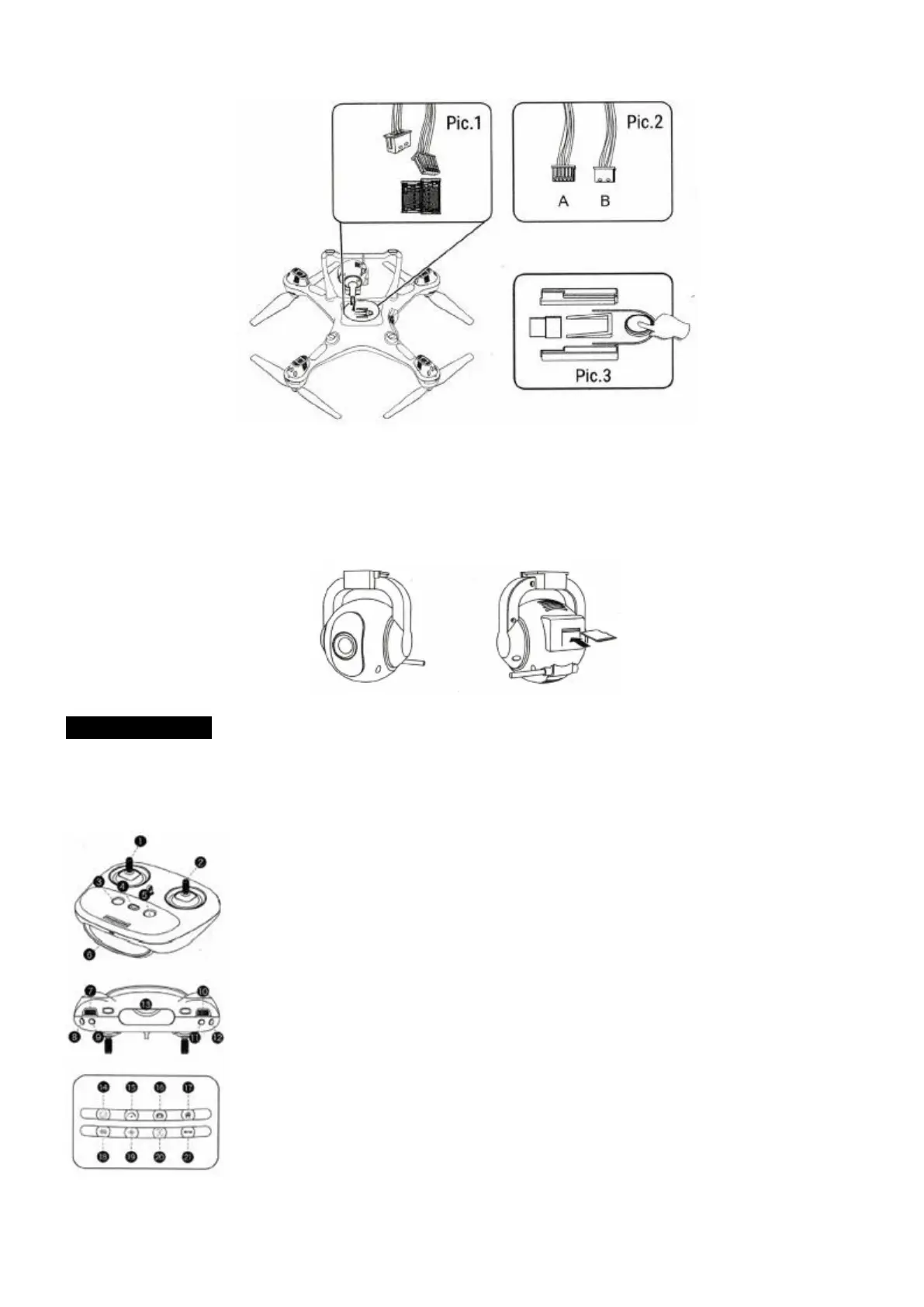
3. Remove camera by pressing the camera lock Pic. 3. on the bottom of the drone, and push the camera
out to disconnect the camera wire from the port.
4. Insert the TF Card into Camera port.
Insert the optional memory card (not included) into the webcam module's card channel which is on the
bottom of the quad-copier, connect the quad-copter's power, and sync quadcopter and remote control.
The blue indication light on the webcam module will constantly be on, and the camera is ready for photos
and videos. (Memory card available separately)
REMOTE CONTROL
1. Throttle joystick:
Click once to Low/Medium/High speed switch; Press the button to Trim mode, trim light flashing, press
the button to cancel the Trim mode.
2. Direction joystick: Hold the button for 2 seconds, cancel GPS mode.
3. Click once to RETURN HOME; Click again to cancel RETURN HOME. Hold the
button for 2 seconds to Headless mode.
4. ON / OFF
5. Double click to emergency stop/Click once one button take off with auto hover,
one button landing.
6. LED colorful screen.
7. Phone Holder
8. Follow Me
9. Click the button to take photo/Hold the button for 2 seconds to take video.
10. Camera up.
11. Camera down.
12. USB charging port.



 To Next Page