14
Setting 0: accurate cutting in all materials (straight and curved cuts).
Setting 1: fast cutting in metal (straight cuts only).
Setting 2: fast cutting in plastic (straight cuts only).
Setting 3: fast cutting in hard wood (straight cuts only).
NOTICE: Always make test cuts in scrap material rst to determine the best setting.
NOTICE: Always select “0” when sawing splinter-sensitive material.
NOTICE: In order to reach full orbital action. The blade must be facing straight forward, the
back of the blade must be resting in the groove of the roller, and the foot must be positioned
all the way forward. Orbital action is not detectable when the saw is running freely. The saw
must be cutting in order for orbital action to occur. The cutting speed is easier to see when
cutting thicker material.
WARNING
To reduce the risk of injury, always allow the jig saw to come to a complete
stop before changing the orbital function setting.
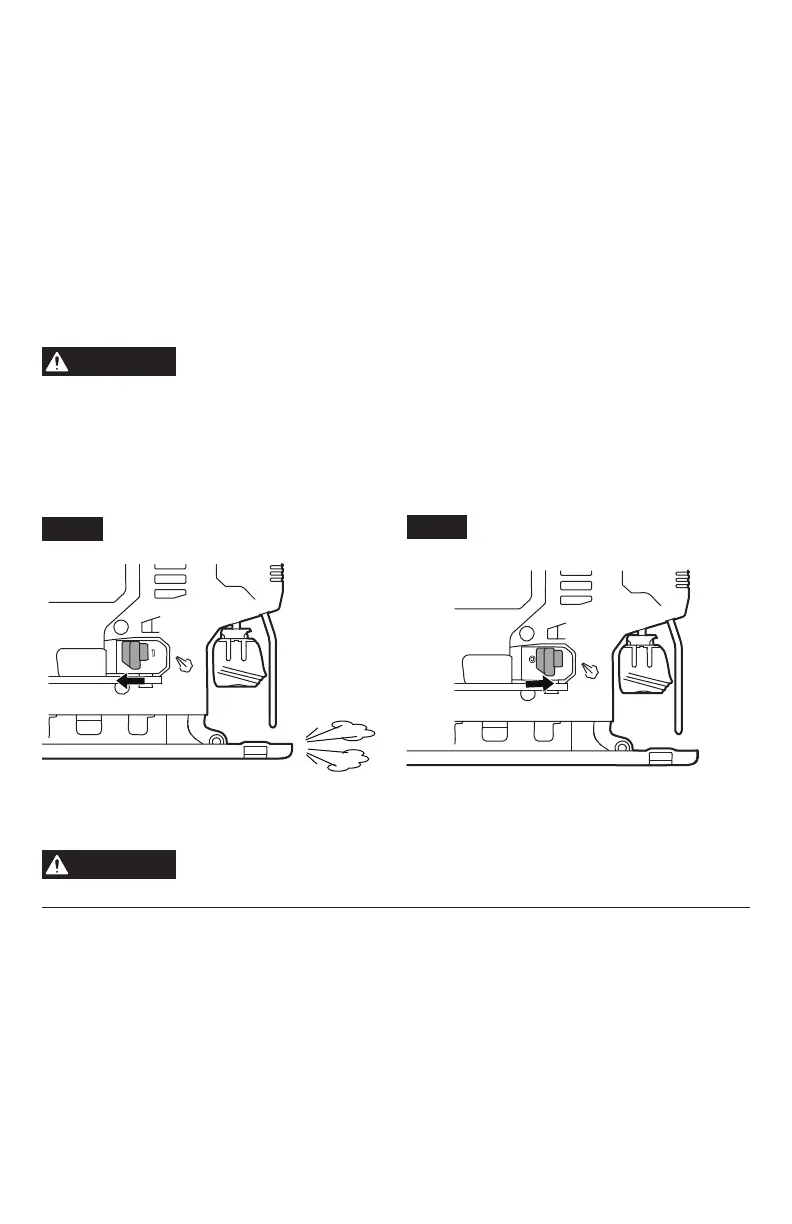
Dust-Blowing Slide Switch
To blow sawdust, move the switch to the blowing setting 0 (Fig.7).
To turn off the blowing function, move the switch to setting 1 (Fig.8).
WARNING
To reduce the risk of injury, always allow the jig saw to come to a complete
stop before changing the dust blowing setting.
Fig. 7
Fig. 8


 To Next Page