27
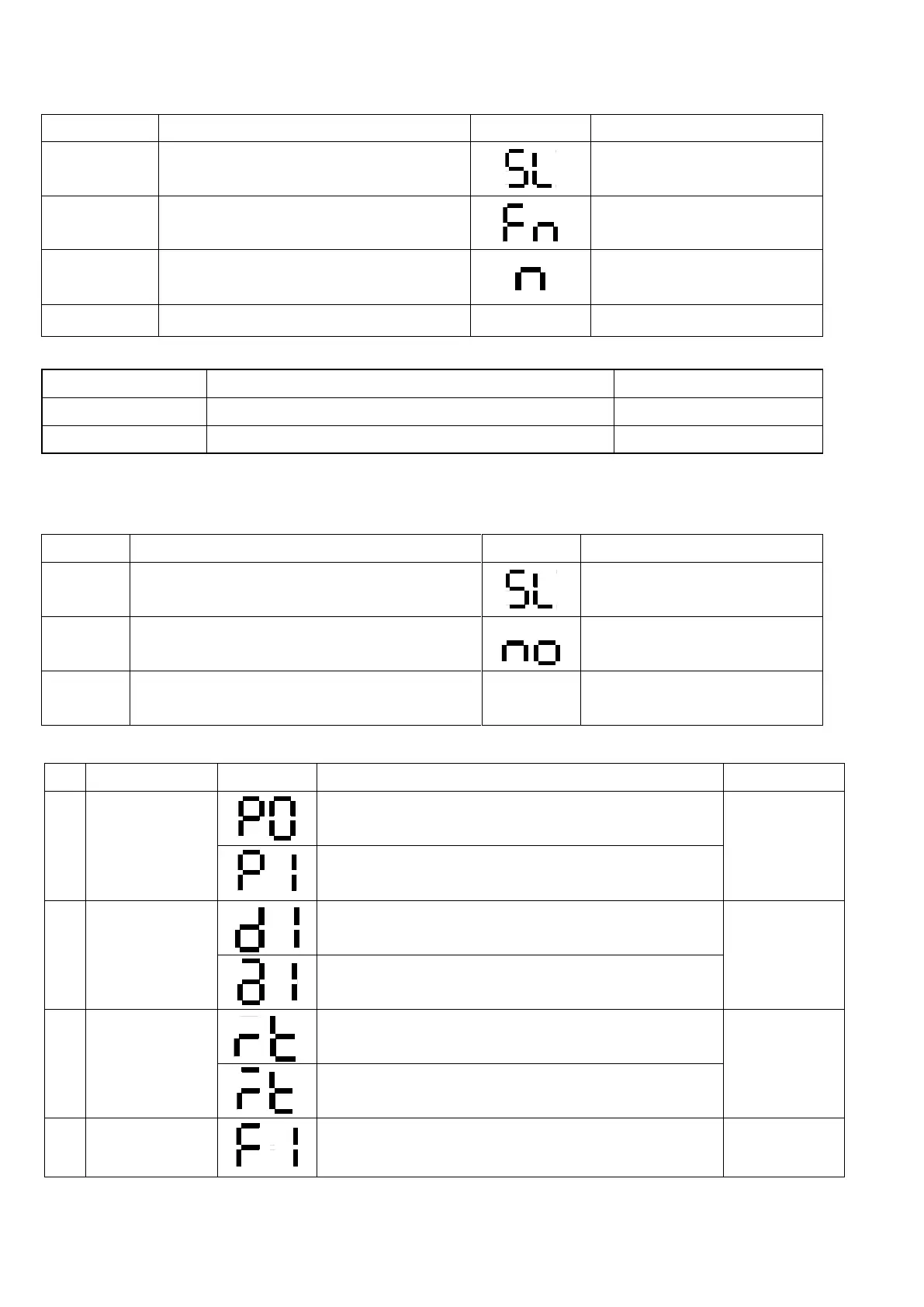
3-4-9. Control Eva fan motor
Push the ▼ ▲ button Five seconds.
Push the ▼button ninetime.
Now is the setting value.
Push the ▼ button When changed
Table 7
Eva motor is running with setting mode on Comp Off
Eva motor is keeping running even if Comp Off
3-4-10.Verify Error Code
Push the ▼ ▲ button Five seconds.
Push the ▼button fourtime.
If Bar LED will not display error,
it will indicate no
Push the ▼ button When changed
If there are lots of error, bar
LED will display error sequently.
☞Verify Error Code
- When sensor is short, or the temperature is above
65℃
- When sensor is open, or the temperature is lesser
than -50℃.
- When sensor is short, or the temperature is above
65℃
- When sensor is open, or the temperature is lesser
than -50℃.
- When sensor is short, or the temperature is above
65℃
- When sensor is open, or the temperature is lesser
than -50℃.
- (defrost 1) It will automatically stop after 80 minutes.



 To Next Page