This document describes the ŠKODA Radio Blues, an in-car audio system designed for ease of use and integration with vehicle functions. It serves as an addendum to the main vehicle owner's manual, providing detailed instructions for the radio, CD player, and external audio sources.
The Radio Blues is equipped with convenience anti-theft coding. Upon first operation, the safety code is automatically stored in both the radio and the vehicle's instrument cluster, eliminating the need for manual input under normal circumstances. If the battery is disconnected and reconnected, the ignition must be switched on with the key before the device can be turned on. Should the device be installed in another vehicle, a specialist garage will be required to enter the safety code. Incorrect code entry will block the unit for approximately one hour, with the cycle of two attempts followed by an hour block continuing if the code remains incorrect.
The device should only be operated when traffic conditions permit safe use, emphasizing driver concentration on the road. Volume should be adjusted to allow external acoustic signals (e.g., emergency vehicle sirens) to be heard. High volumes can cause hearing damage.
For screen care, solvents like benzine or turpentine should not be used as they can damage the surface. The screen should be treated with care, avoiding finger pressure or sharp objects that could cause dents and scratches. A soft cloth and alcohol can be used for cleaning.
Device Specification and Operation
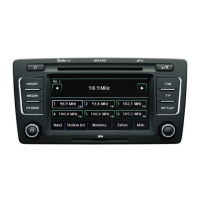
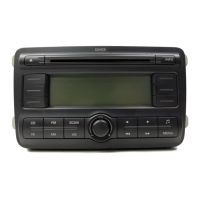
The unit features a setting knob (1) for switching the equipment on/off (press) and controlling volume (turn), as well as for other function settings in various menus. A MENU rocker switch (2) provides access to menus for setting device or CD player parameters. A rocker switch (3) is dedicated to sound adjustment. The AS rocker switch (4) automatically stores radio stations. The SCAN rocker switch (5) activates AM radio mode, enables fast search within the waveband, and allows scrolling through CD contents. A CD-eject button (6) is present, along with a CD case (7). The CD button (8) activates CD mode. The TP rocker switch (9) activates traffic report reception. The A/F rocker switch (10) switches between AM/FM wavebands. Rocker switches (11) are used for manual tuning, switching to next/previous preset radio stations, and track selection or fast forward/rewind in CD mode. The screen (12) displays information such as track selection in folders, function selection in Menu mode, and additional MP3 file information. Function buttons 1-6 (13) are used to select and store radio stations, view additional information (MP3 files), and enter codes.
Switching the Unit On and Off
The unit is switched on or off by briefly pressing the on/off knob (1). If the ignition key is removed while the unit is on, it will automatically turn off. It can be switched on again by pressing the on/off knob (1). If the ignition is off, the unit will automatically turn off after approximately one hour to protect the vehicle battery. If the device was switched off by removing the ignition key, it will switch back on when the ignition is turned on again.
Unit Set-up
Sound adjustments include Treble (TRE), Bass (BASS), Balance (BAL) for left/right volume ratio, and Fader (FAD) for front/rear volume ratio. These settings are adjusted by pressing the rocker switch (2) to select the desired setting and turning the settings knob (1).
Special functions are accessed via the MENU rocker switch. Individual menu functions are selected by pressing the MENU rocker switch or the or rocker switches, and the desired setting is chosen using the adjustment knob (1).
- REG AUTO / REG OFF: Some stations broadcast regional programs with different content. The unit initially attempts to set alternative frequencies for the selected station. If signal quality is poor, it accepts "related" frequencies to avoid "program loss." REG AUTO allows changing to a regionally-related station only when there's a risk of losing the current station. REG OFF allows unlimited access to regionally-related stations.
- GALA: Automatically adjusts volume based on vehicle speed; higher setting values result in a stronger volume increase.
- LOUD: Boosts bass and treble frequencies at lower volume levels.
- BEEP: Switches on/off the tone signal when storing radio stations.
- ONVOL: Stores the last volume set before switching off. If this value is higher, the volume is reduced to the ONVOL parameter's value when the device is switched on again.
- PHONE: If the vehicle has a hands-free system, this function enables switching monophone calls on/off via the loudspeakers.
- PDC AT: If the vehicle has a "parking aid," the volume is automatically decreased to a pre-defined value when the parking aid is active. Options include PDC ATO (no volume restriction), PDC AT1 (middle level restriction), PDC AT2 (low level restriction), and PDC AT3 (mute).
- AUX: Sets the input sensitivity for external audio sources (AUX LEV 1 for notebooks, AUX LEV 2 for cassette/CD players, AUX LEV 3 for MP3 players). Each setting change is stored when moving to another menu point.
Radio
The device receives radio reception in FM and AM analogue frequency ranges. The frequency range is changed by pressing and holding the A/F rocker switch. Two storage groups (FM1/FM2 and AM1/AM2) are available for each range, with 6 memory slots per group. Storage groups are changed by briefly pressing the A/F rocker switch.
- Manual search: Set the desired frequency by pressing the rocker switch or.
- Automatic station search: The radio searches for the next station in the selected waveband by pressing the or rocker switch.
- Function SCAN: Briefly plays (10 seconds) each station of the current waveband by pressing the SCAN rocker switch. This function ends by pressing SCAN again.
- Store station: Press and hold function button (13) until the station briefly switches off and a short signal sounds.
- Automatic station finding with storing radio stations: Press the AS rocker switch. The 6 strongest stations in FM2 and/or AM2 memory levels are stored. "STORE" will be displayed. This applies only to FM2 and AM2 wavebands. Stored stations can be recalled using selection buttons (13). The stored radio stations of the current waveband are updated and stored again by repetitively pressing the AS rocker switch.
RDS Function
Certain radio stations transmit additional text information, known as radio text. This information may not be available from all stations, and loading time may vary depending on signal quality.
Traffic News Function
- Switching on/off: Press the TP switch to activate. The TP icon indicates functional readiness. Pressing TP again deactivates it.
- Activating/deactivating traffic reports: In Media mode, the last selected radio station supporting traffic news continues to be received in the background. If no traffic news station has been set recently, the most appropriate one is automatically set. "TP SEEK" is displayed during search. If the station does not broadcast traffic news, "NO TP" is displayed. An incoming traffic report automatically interrupts playback, displaying "INFO" and the station name. After the report, the device returns to the original playback mode. Some radio stations may misleadingly identify themselves as traffic programs, which is not a device error if no traffic news is broadcast.
CD Player
The internal drive plays CD-ROM, CD-R, and CD-RW discs. Insert a CD with the labelled side facing up into CD slot (7) until it is automatically drawn in. Playback starts automatically. To remove a CD, press the eject button (6). If an ejected CD is not taken out within 10 seconds, it will be retracted for safety.
- Buttons for controlling audio source: The arrow buttons or always affect the current audio source.
-
- Briefly pressing within 5 seconds of song playback returns to the previous track; after 5 seconds, it returns to the start of the current track/chapter.
-
- Briefly pressing changes to the beginning of the next title/chapter; repeated pressing moves to subsequent titles/chapters.
- For quick playback, press and hold or. Playback continues after releasing the button.
- Changing between audio sources: Press the CD button to select CD (internal drive), EXT (CD changer), or AUX.
Important Technical Specifications and Usage Features for CD Player
The CD player is a Class 1 laser product. The laser is restricted to the inside of the unit, and removing the housing could expose users to a higher class laser, posing a risk.
- Only use standard CDs; avoid "Do not insert in drives without a drawer" or Eco Discs.
- There is a few-second delay after pressing the eject button before the CD is ejected. Wait for the CD to fully eject before inserting a new one to prevent damage.
- Dirty, damaged, unreadable, or incorrectly inserted CDs can cause playback problems (jumping, non-playback). Check the CD and insert it properly. If problems persist, try another CD or visit a specialist garage.
- Extreme temperatures (too high or too low) can temporarily disable the unit. The changer has a thermostat to protect the CD and laser. If the internal temperature is too high, no CDs will be accepted, and the unit will switch to the last active operating mode.
- Do not use liquids (gasoline, paint thinner, record cleaner) to clean the CD surface, as this can cause damage.
- Do not expose CDs to direct sunlight.
- Only write on CDs with appropriate pens.
- Do not stick anything to CDs.
- Poor road surfaces and severe vibrations can cause CDs to jump.
- Dampness (condensation) in cold weather or after showers can affect CD playback. Wait for moisture to evaporate.
- If a CD is dirty, clean it from the inside out with a soft, lint-free cloth. For heavy stains, use a commercially available CD cleaner and allow it to dry.
- Copyright-protected or homemade CD-R/CD-RWs may not play or may play only under certain circumstances.
- The CD player does not contain user-serviceable parts. For defects, visit a specialist garage.
- If an ejected CD is not taken out, it will be retracted for safety.
- If a TP station was set before changing to CD mode, CD playback will be interrupted by traffic news, and the device will switch to radio mode. CD playback resumes after traffic news ends.
Function SCAN (CD Player)
Plays the first 10 seconds of every track. Press SCAN and select:
- CD: Browsing of the CD's contents begins.
- FOLDER: Browsing of the current folder begins.
To return to normal operation, press SCAN again. To select the previous or next track, press the rocker switch or.
MIX function (CD Player)
Accessed via the MENU rocker switch in the Setup menu. Use function keys to select MIX, then the adjustment knob (1) to set the desired setting.
- MIX OFF: Inactive.
- MIX CD: Random playback of tracks on a CD.
- MIX FLD: Random playback of tracks in a specific folder.
- MIX PLS: Playback of the playlist (folder of selected tracks from individual folders, stored on the CD). Only displayed when a playlist is created.
- Requirements for MP3 data and data carrier: CD-ROM, CD-R, CD-RW with 650 MB and 700 MB capacity. CDs must conform to ISO 9660 Level 2 standard and Joliet data system (single and multi-session). Data names must not exceed 64 characters. The list structure is limited to 8 levels deep. Artist, album, and title information (ID3 tags) will be displayed if available; otherwise, directory or data name is shown.
- Bit rate: Supports MP3 data with bit rates from 32 to 320 KB/s, as well as variable bit rates. Indicated playing time with variable bit rates is not reliable.
Selection buttons 1-6 display additional MP3 file information:
- (1): Folder and track number.
- (2): Track name.
- (3): Performer name.
- (4): Album name.
- (5): File name.
- (6): Folder name.
If a folder structure exists on the CD, navigation is as follows:
-
- Briefly returns to the previous file in the selected folder.
-
- Briefly moves to the next file in the selected folder.
-
- Briefly returns to the previous track/playlist.
-
- Briefly moves to the next track/playlist.
- For fast forwarding or rewinding, press and hold the or rocker switch. Playback continues upon release.
External Sources
An external audio source connected to the AUX input can be played through the car speakers. These sources cannot be controlled via the device. A different audio source can be selected at any time, and the external source remains active in the background if not switched off. Refer to the specific manufacturer's manual for operating the external audio source.
Conditions for a Successful Connection
External audio sources connect via the AUX input using a 3.5 mm standard jack plug. An adapter is needed if the external source lacks this plug.
- Only USB devices with specification 2.0 can be connected.
- File allocation table (FAT) version must be FAT16 (<2 GB) or FAT32 (>2 GB).
- Large data volumes or complicated folder structures on hard disk drives (HDDs) can cause time delays when reading music data overviews.
- Folder structure depth is limited to 8 levels. One folder must not contain more than 1000 data.
- USB extension cables or USB distributors (HUBs) should not be used.
Adapter
An adapter for connecting USB devices, Mini USB output devices, or iPods is recommended, available from an authorised ŠKODA Service Partner.
Adjust the Play Function Volume of the External Audio Source
The playback volume of the external audio source can be adjusted via the volume control on the device. The output volume on the external audio source can also be changed. Input sensitivity of the external audio source (AUX LEV, page 4) can be adjusted to match other audio sources or avoid distortions.
Important Safety and Usage Notes for External Sources
- Never place external sources on the console panel; they could be thrown into the passenger compartment during sudden driving manoeuvres, causing injury.
- Never place external sources near airbags; they could be thrown into the passenger compartment if airbags deploy, causing injury.
- Never hold external sources in hand or on knees while driving; they could be thrown into the passenger compartment during sudden driving manoeuvres, causing injury.
- Always route the connection cable for the external source to avoid restricting driving.
- The AUX input is only for audio sources.
- Refer to the external source's owner's manual for operating instructions.
- If an external audio source with an adapter for external power supply is connected via AUX, the audio signal may be disrupted depending on adapter quality.
- Vehicle loudspeakers are designed for a device power output of 4x20 W. For equipment sound systems, loudspeakers are matched to an amplifier output of 4x40 W + 6x20 W.
The AUX input for external audio sources is located below the armrest of the front seats and is marked with the AUX symbol. The AUX input is activated by pressing CD. Continued pressing of CD will select the external AUX input as the playback source. Playback starts automatically after connecting the source. External audio sources connected via the AUX input cannot be controlled via the device.

 Need help?
 General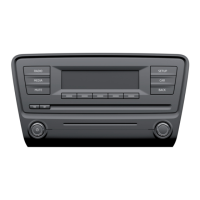







 To Next Page