14
Operation
User Manual
SKOPE Centaur Series
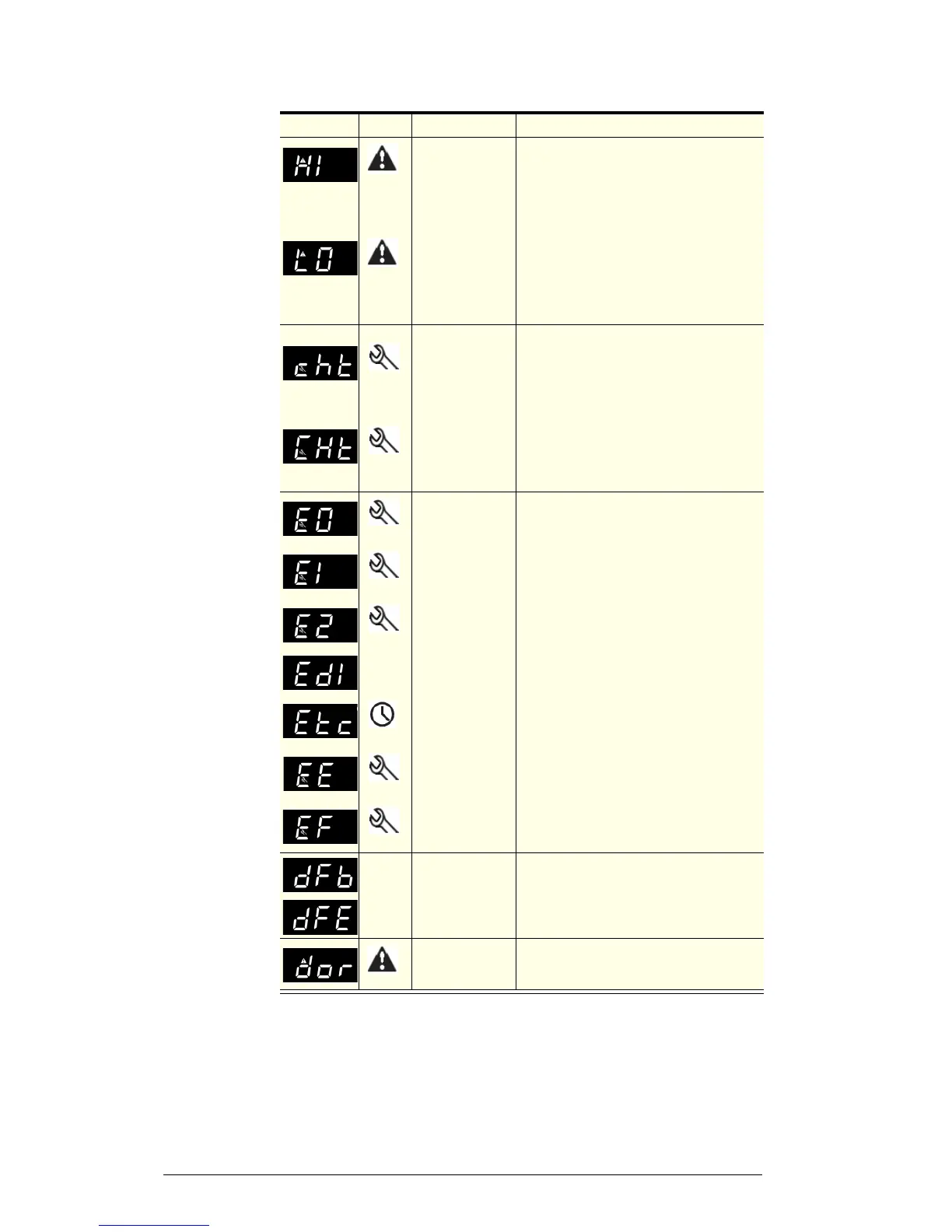
CAREL ir33 messages and alarms
Code Display Alarm Action
Flashing
Product HIGH
temperature alarm
(auto reset)
1. Check the cabinet product loading to ensure
ventilation slots are not blocked, and that
product does not overhang the shelves.
Ensure the doors are closed.
2. Ensure the cabinet is installed with good
refrigeration unit ventilation.
3. Check and clean the condenser coil (see
page 15).
4. If immediate alarm recovery is required -
unplug the cabinet from the power supply for
1 minute, then reconnect to power supply. If
alarm persists, contact SKOPE.
Flashing
Product LOW
temperature alarm
(auto reset)
Flashing
Refrigeration
system high
temperature
pre-warning (auto
reset)
1. Clean the condenser coil (see page 15).
2. Check refrigeration ventilation. Ensure clear
airpath in front of the cabinet.
3. Ensure the cabinet is installed in a suitable
environment.
4. To reset the ‘CHt’ alarm - unplug the cabinet
from the power supply for 1 minute, then
reconnect to power supply. If alarm persists,
contact SKOPE.
Flashing
Refrigeration
system and
cabinet high
temperature
shutdown (manual
reset)
Flashing
Ambient probe
fault (also flashes
‘rE’)
To reset alarm - unplug the cabinet from the
power supply for 1 minute, then reconnect to
power supply.
1. If alarm persists, contact SKOPE.
Flashing
Evaporator probe
fault
Flashing
Condenser probe
fault
None
Defrost over-time
limit
Flashing
Real-time clock
fault
Flashing
Controller E prom
error
Flashing
Controller E prom
error
None
Start defrost
request
None
None
End defrost
request
Flashing
Door open alarm
Check that a door or drawer has not been left
open. Note: The audible alarm buzzer cannot
be turned off manually.


 To Next Page