11
SKOPE Centaur Series
Operation
User Manual
Electronic Controller
Introduction Depending on the model, the cabinet will be fitted with a CAREL Easy
electronic controller or a CAREL ir33 electronic controller (refer to faceplate
below to identify the type of electronic controller.
The electronic controller is visible through a cut-out in the front panel. It
controls and displays the cabinet interior temperature and signals
temperature alarms. It uses temperature probes around different areas of
the refrigeration system to collect data and runs the cabinet accordingly .
The electronic controller is pre-programmed and requires no initial setup or
additional programming. SKOPE does not recommend that the settings be
changed unless it is absolutely necessary.
Faceplate Because the electronic controller plays such an important role, it’s helpful to
know the parts of the faceplate you may use.
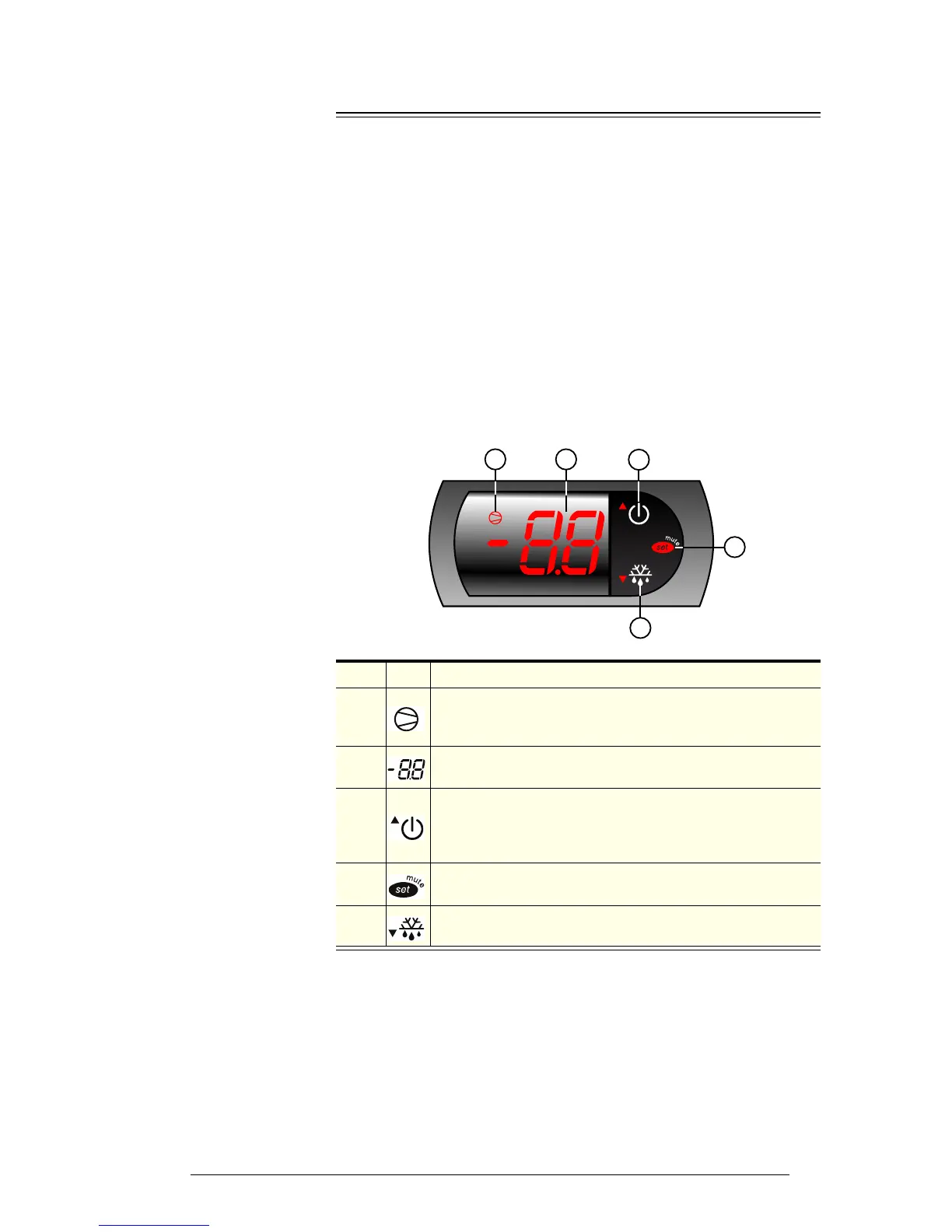
CAREL Easy electronic controller
Item Icon Function
1
Compressor indicator: ON when the compressor and
condenser fan starts. Flashes when activation of the compressor
is temporarily delayed.
2
Display: Shows the cabinet temperature. Flashes when the door
is open.
3
Stand-by (up) button: Turns stand-by mode on and off. To scroll
settings up (in program mode).
Note: This is not an isolation switch.
4
Mute (set) button: Mutes the audible alarm (buzzer) and
deactivates the alarm relay, and used in program mode.
5
Manual defrost button: Press for more than 5 seconds to initiate
manual defrost. To scroll settings down (in program mode).


 To Next Page