Need help?
Do you have a question about the Skullcandy Uproar and is the answer not in the manual?
Instructions for connecting a new Bluetooth device.
Details on how to activate the device's pairing mode.
Press the volume up button to increase audio volume.
Press the volume down button to decrease audio volume.
Press the MFB once to play or pause audio.
Press and hold the volume up button to skip to the next track.
Press and hold the volume down button to skip to the previous track.
Press the MFB once to answer or end a call.
LED indicators for charging and battery status.
Statement regarding FCC rules and interference.
Statement regarding Industry Canada license-exempt standards.
 General
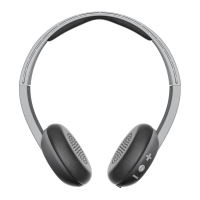
| Type | On-Ear |
|---|---|
| Battery Life | 10 hours |
| Microphone | Yes |
| Driver Size | 40 mm |
| Frequency Response | 20 Hz - 20 kHz |
| Impedance | 32 ohms |
| Charging Time | 2.5 hours |
| Bluetooth Version | Bluetooth 4.1 |
| Connectivity | Bluetooth |
| Controls | On-ear |
| Wireless Range | 33 feet (10 meters) |
| Sensitivity | 97.5 dB |


 To Next Page