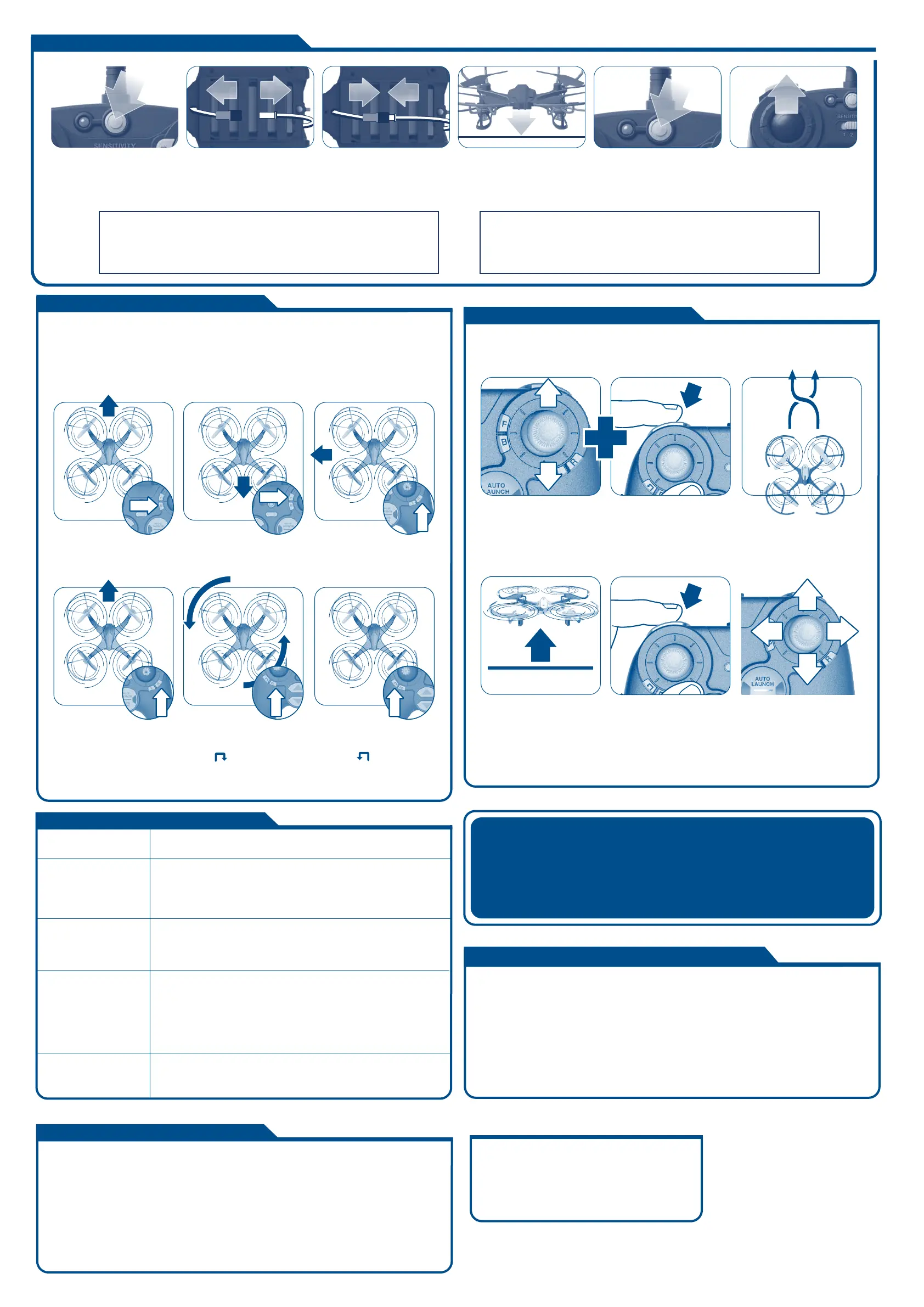
If the drone drifts in any direction while hovering (and you are not pressing the
direction stick), you may need to make trim adjustments.
Press the recommended trim button as described below to make adjustments.
Tip 1: When the remote LED flashes 3 times quickly, the trim will revert back to middle of trim range.
Tip 2: If you are uncomfortable trimming the drone in flight, you can land onto a flat surface and make
your trim adjustments.
If the drone drifts forward
– Press B button
If the drone drifts backwards
– Press F button
If the drone drifts left
– Press R button
If the drone drifts right
– Press L button
If the drone spins counter-clockwise,
when viewed from the top
– Press button
If the drone spins clockwise,
when viewed from the top
– Press button
ONE TOUCH STUNTS
BARREL ROLL
While flying forward (or reverse),
tap the stunt button.
NOTE:
Once a stunt has been initiated, DO NOT adjust Throttle or press
any other controls until the stunt has been completed.
NOTE: The remote will beep/flash 3 times when trim adjustment is set to the neutral position
(the middle of the trim range) and beep once when it has reached the end of it’s range.
FLIP
1 Bring the drone to a mid-air
hover without flying in any
direction. Remove finger
from the direction stick.
2 While hovering, tap and
hold the stunt button.
3 Then quickly tap the
direction stick in the
direction you want the
drone to flip.
CAUTION!
The drone should be flying at least 6 feet in the air with a minimum clearance of 6 feet in all directions
before attempting stunt functions.
TRIM ADJUSTMENTS
MORE STUNTS!
For flying tips and instructions on how to perform more
one-touch stunts, please visit www.skyviper.com
TROUBLESHOOTING
• Drone’s blade may have been installed incorrectly. Reinstall and
remember that the GREEN blades point forward.
• Adjust the trim controls until drifting ceases.
• Ensure that drone is flying a minimum distance of 6 feet from the
ground with a minimum 6 feet clearance in all directions.
Drone is
unresponsive
All blades spin, but drone
will not fly properly or
crashes immediately
Drone crashes when
attempting stunt
functions
PROBLEM SOLUTION
Drone drifts in any
direction during flight
without direction from
the remote
• Ensure the remote has fresh batteries and the LiPo battery is
fully charged.
• Drone may be miscalibrated by launching from an un-level surface. Turn
the remote off. Turn off the drone then turn them back on and try again
from a flat, level launching surface.
• Inspect drone for any possible damage.
Before each use, an adult should check this product and the LiPo battery to ensure no damage or
hazards exist. Drone has rotating blades that move at high speed, posing danger of damage and
injury. Pilots are responsible for any actions that result in damage or injury from the improper
operation of drone. Adequate flying space is required. Avoid flying near interior fans and/or vents as
they may make flying difficult to control. Keep a safe distance away from streets, public thorough-
fares and power lines. Never attempt to retrieve drone from any location higher than your reach
(such as rooftops or trees) or from any location that poses a safety hazard. Never fly drone at night.
Keep drone in sight at all times during operation. Discontinue operation immediately if drone flies out
of your field of view. Do not fly near spectators or animals. Keep spinning rotors away from fingers,
hair, eyes and other body parts. Always launch from a flat surface. Never leave drone unattended
while it is turned on. Read all enclosed information before operating.
ADULT SUPERVISION REQUIRED
Blade guards are great for beginners and are highly recommended
when first learning how to fly a drone. Blade guards add weight and
reduce the drone’s agility. For maximum flight and stunt
performance, blade guards should be removed. When flying in Flight
Sensitivity Mode 3, blade guards should be removed.
FOR BETTER STUNT PERFORMANCE
Online Video
Instructions & Flying
Tips available now at
SKYVIPER.COM
CALIBRATING AND LAUNCHING
1 Press to turn OFF
Remote Control.
2 Unplug the Drone LiPo
battery. Disconnect by
pulling connectors
apart—Do not pull wires.
3 Reconnect Drone
LiPo battery.
4 Quickly place Drone on
FLAT LEVEL SURFACE.
5 Press to turn Remote
Control ON.
6 Slowly push remote
control THROTTLE STICK
UP until Drone lifts into
the air.
IMPORTANT: YOU ONLY HAVE A FEW SECONDS AFTER THE LIPO
BATTERY IS PLUGGED IN TO PLACE DRONE ON A LEVEL SURFACE FOR
PROPER CALIBRATION. IF DRONE DOES NOT RISE TO A STABLE HOVER
OR FLIES ERRATICALLY, REPEAT STEPS 1 THROUGH 6.
CAUTION: NEVER APPROACH DRONE WHILE THE PROPELLER BLADES
ARE STILL SPINNING. THROTTLE DOWN UNTIL THE BLADES STOP THEN
TURN OFF REMOTE BEFORE ATTEMPTING TO HANDLE DRONE.



 To Next Page
 Loading...