- 5 -- 4 -
2. Quick Start Guide
Power on.
1
4
5
6
7
8
9
14
15
13
12
11
10
2
3
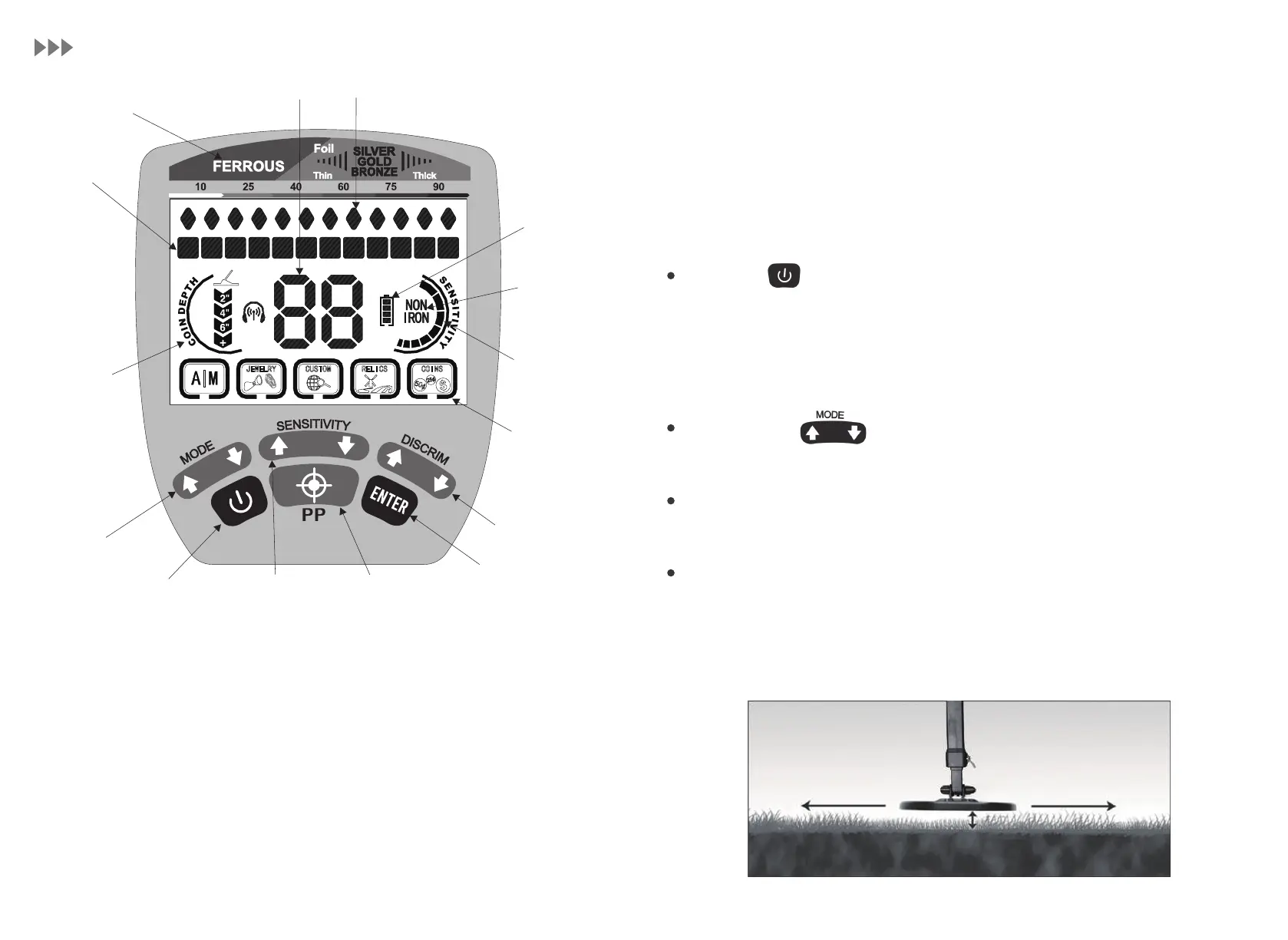
1. Target Metal Value: Indicate metal types
2. Double Digits/P-P
3. Target Metal Cursor: Indicate the target metal
4. Discriminated Metal Cursor: Indicate the metal, for which is eliminated or
detected
5. Coin Depth Indicator: Indicate the depth of coin-sized targets
6. Battery Indicator
7. Non Iron: Exclude irons
8. Sensitivity Indicator
9. Mode Indicator
10. MODE Button: Select a detection mode (i.e. discrimination mode)
11. Power Button: Press to power the detector on or off
12. SENSITIVITY Button: Increase or decrease the sensitivity
13. P-P/PINPOINT Button: Press to precisely locate a target
14. DISCRIM Button: Press to eliminate target metals
15. ENTER Button: Press to set or cancel the discrimination of target metals
Press the Power ON/OFF button and the metal detector powers on in the
mode used last time. It will automatically adjust for ground minerals and be
ready to be used for searching metals. The detector operates with four (4) AA
batteries.
Use the MODE button to select the desired detection mode.
Adjust settings of the sensitivity or discrimination if needed.
Lower the search coil to a distance of 0.78 to 1.18 inches above the ground and
sweep the search coil from side to side at a speed of approximately 2.23 mph.
The search coil must be in the motion mode for target detection, but it can be
in non-motion during the PINPOINT mode.
Select modes.
Adjust settings.
Begin scanning.
2.23 mph 2.23 mph
0.78-1.18 inches


 To Next Page