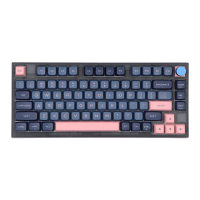
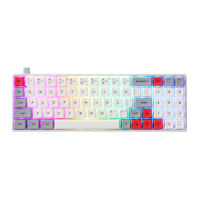
The GK75 is a versatile mechanical keyboard designed for users seeking a multi-mode connectivity solution with customizable features and RGB backlighting. It supports three connection modes: USB wired, Bluetooth (BT), and 2.4g wireless, offering flexibility across various devices and operating environments.
Function Description:
The GK75 keyboard features a standard layout with a dedicated function row (F1-F12), navigation keys, and a numeric row. A notable feature is the inclusion of a multi-functional knob, which by default controls volume (turn left for V-, turn right for V+, press for Mute). This knob is replaceable with other switches and its function can be customized via the keyboard's driver software, allowing for alternative uses such as picture zoom in/out.
Connectivity Modes:
- USB Wired Mode: This is the default mode when connected via a USB cable. It also serves as a quick switch to USB mode from BT or 2.4g wireless modes.
- Bluetooth (BT) Mode: To activate BT mode, slide Switch 2 to the "BT" position. The keyboard can pair with up to two Bluetooth devices.
- Pairing BT1: Long press FN + 1! until the red and blue LEDs of the 1! keycap flash. The keyboard will then be ready to pair with the first Bluetooth device. To connect or disconnect, simply press FN + 1!.
- Pairing BT2: Long press FN + 2@ until the red and blue LEDs of the 2@ keycap flash. The keyboard will then be ready to pair with the second Bluetooth device. To connect or disconnect, simply press FN + 2@.
- 2.4g Wireless Mode: To activate 2.4g mode, slide Switch 2 to the "2.4" position.
- Pairing 2.4g: Long press FN + 3# for 3 seconds. The red and green LEDs of the 3# keycap will flash, indicating a 20-second search period for the dongle. Once paired, the 3# light will turn green for 2 seconds, then return to the current light effect. To connect or disconnect, simply press FN + 3#.
- The keyboard will go to sleep if no other connection is established in 2.4g mode.
Mode Switching:
- Win/Mac Mode: Switch 1 allows users to toggle between Win mode and Mac mode. "Win" is for Windows operating systems, and "Mac" is for macOS. This switch alters the functionality of certain keys to align with the respective operating system's conventions.
- Wireless/USB Mode: Plugging in the USB cable in BT or 2.4g mode will quickly switch the keyboard to USB wired mode. This is convenient for charging or for environments where wireless connectivity is not preferred.
Backlight Settings (Non-modifiable via hardware, but configurable via software):
The GK75 features RGB backlighting with several control options:
- FN + 9(: Toggles backlight ON/OFF.
- FN + 0): Pauses/plays the light effect.
- FN + -_: Cycles through backlight modes 1-5.
- FN + =+: Cycles through backlight modes 6-9.
- FN + ↑: Increases backlight brightness.
- FN + ↓: Decreases backlight brightness.
- FN + ←: Decreases backlight effect speed.
- FN + →: Increases backlight effect speed.
Special Function Keys:
- FN + Home: Activates the "End" function.
- FN + Backspace: Activates the "Del" function.
- FN + Del: Activates the "Insert" function.
- FN + Win: Locks/unlocks the Win key, preventing accidental presses during gaming.
- FN + Pgup: Activates the "Pgdn" function.
- FN + 4$: Toggles the charging indicator/low voltage alarm ON/OFF.
- FN + L-Ctrl: Configures backlight and wireless sleeping time settings. LED on F1 corresponds to 5 minutes, F2 to 10 minutes, up to F9 for 45 minutes. F10 indicates never sleep.
Knob Functionality:
The default knob settings are for volume control:
- Turn left: Volume down (V-)
- Turn right: Volume up (V+)
- Press: Mute
The knob function can be customized via the driver software. For example, it can be configured for picture zoom:
- Turn left: Zoom out (ZOOM-)
- Turn right: Zoom in (ZOOM+)
- Press: ESC
Mode Function Settings (Customizable via Driver):
The keyboard's function keys (F1-F12) have different default behaviors in Win mode and Mac mode, which can be further customized using the driver software.
Win Mode (Layer 1):
- F1-F4: Standard F1-F4 functions.
- F5: Standard F5 function.
- F6: Standard F6 function.
- F7: Previous track (FN+F7=F7).
- F8: Play/Pause (FN+F8=F8).
- F9: Next track (FN+F9=F9).
- F10: Mute (FN+F10=F10).
- F11: Volume down (FN+F11=F11).
- F12: Volume up (FN+F12=F12).
- Ctrl: Ctrl.
- Win: Win.
- Alt: Alt.
Mac Mode (Layer 2):
- F1: Screen brightness down (FN+F1=F1).
- F2: Screen brightness up (FN+F2=F2).
- F3: Mission Control (for Mac) (FN+F3=F3).
- F4: Launchpad (for Mac) (FN+F4=F4).
- F5: One-click call Siri for Mac (FN+F5=F5).
- F6: Screenshot for Mac (FN+F6=F6).
- F7: Previous track (FN+F7=F7).
- F8: Play/Pause (FN+F8=F8).
- F9: Next track (FN+F9=F9).
- F10: Mute (FN+F10=F10).
- F11: Volume down (FN+F11=F11).
- F12: Volume up (FN+F12=F12).
- Ctrl: control.
- Win: option.
- Alt: command.
The keyboard also provides alternative keycaps for Ctrl, Win, and Alt to match Mac conventions (control, option, command).
Maintenance Features:
- Wireless Pairing Troubleshooting: If wireless pairing times out or fails, users should re-pair the device. If Bluetooth pairing is successful but the keyboard doesn't work, it's recommended to delete the keyboard from the Bluetooth list on the PC or mobile device, turn off Bluetooth, restart the keyboard, and then re-pair.
- Driver Software: The GK75 supports driver software for both Windows and Mac, allowing users to customize key functions, knob settings, and potentially other features.
- Win Driver download address: http://www.jikedingzhi.com/downloadlist?driverID=41
- Mac APP download address: http://www.jikedingzhi.com/downloadlist?driverID=90
Important Technical Specifications (Implied):
- RGB Backlighting: The keyboard features customizable RGB lighting with various modes and speed adjustments.
- 3-Mode Connectivity: USB, Bluetooth, and 2.4g wireless.
- Operating System Compatibility: Windows and macOS, with dedicated mode switches.
- Power Management: Includes a low voltage alarm and configurable sleep settings for wireless modes.
- Customizable Knob: The knob is replaceable and its function can be remapped via software.
- Programmable Keys: Many keys, especially the F-row, have functions that can be customized through the driver.

 Need help?

 To Next Page
 General