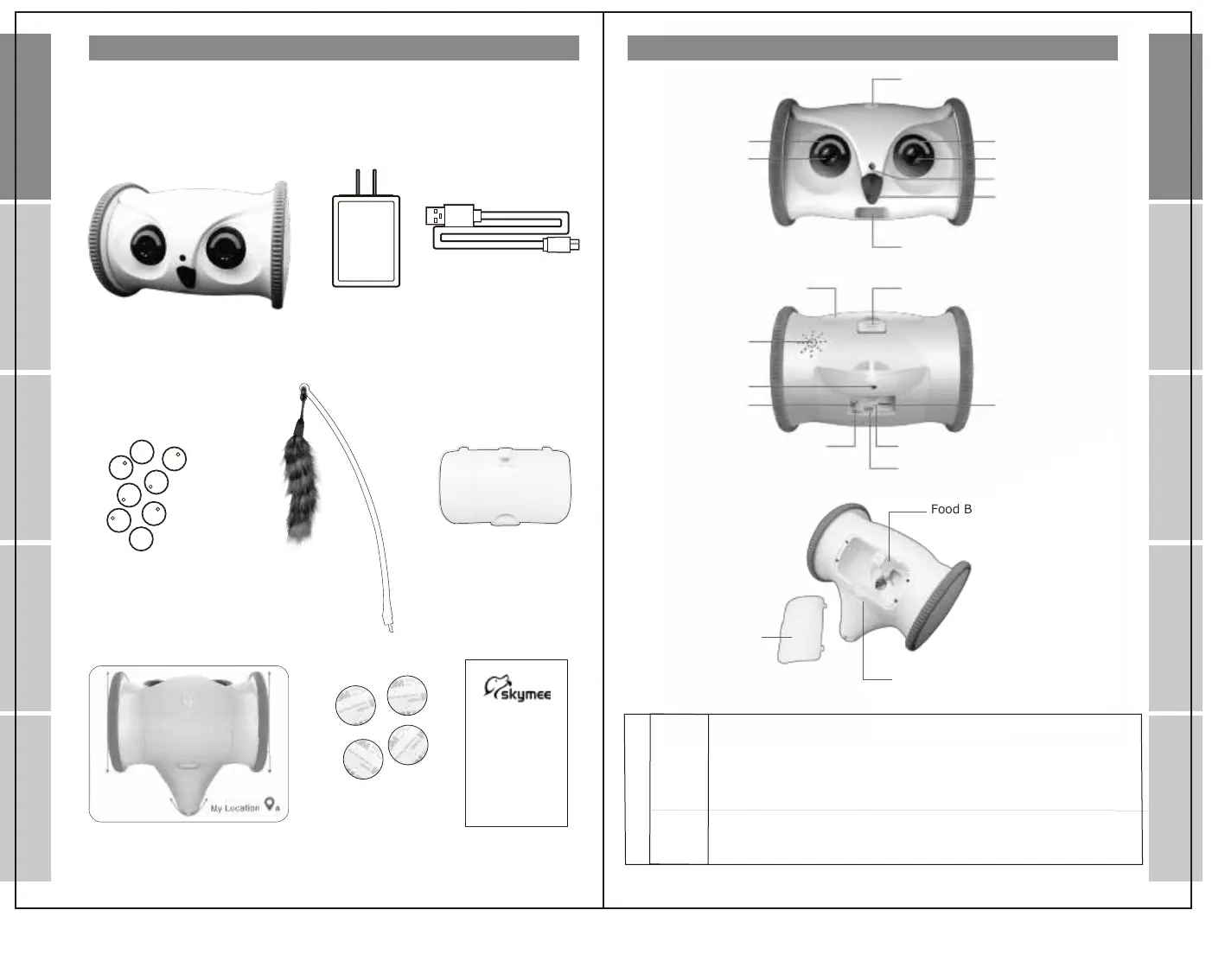
Power
Status Indicator
Camera
PIR
Microphone
Grain Falling Mouth
Status Indicator
Photoreceptor
Food Bin
Food Storage Facility Switch
TF-CARD
Speaker
Universal Wheel
Mode Switch
Reset Switch
Charging Indicator
Power Interface
Main Engine * 1
Power Adapter *1
Charging Cable *1
Universal wheel *8
Cat Sticker *1
Granary Cover *1
Positioning Card *1
Positioning card
Fixed seal *4
Instruction *1
Status indicator display
Red Light
The Red indicator light on during charging, and off after charging.
The red indicator flashes when the voltage is overcharged or the battery
does not match.
Slow flash: indicating abnormal equipment, grain blockage and insufficient
surplus grain Flash: Short of power.If the user turns on the device when
the power is too low, the red light flashes fast for 1 minute, and then turns off again
Blue Light
Part Description
Packaging
Food Bin
Food Storage Facility Switch
Granary Cover
Flash: Indicates that the network state can be configured, or connecting network;
Slow flash: in AP mode;
"Always on: Indicates normal network connection."
Introduction
Introduction
App registration
Setting
Operation
Q&A
Q&A Setting
App registration
Operation


 To Next Page
 Loading...