Download and install app
③Enter the verification code in the "Enter password" field.
④ Tap “Send” .
If the operation was successful, proceed to the password
setting screen.
If you cannot go to the password setting screen,
Please perform "Enter" and "Send" again.
※The authentication code is valid for 30 minutes after
issuance.If the operation is not possible within 30 minutes,
the cell phone number of ① again
Start from the place where you enter the issue number
or email address
please fix this.
①
②
③
Create an account
④
③
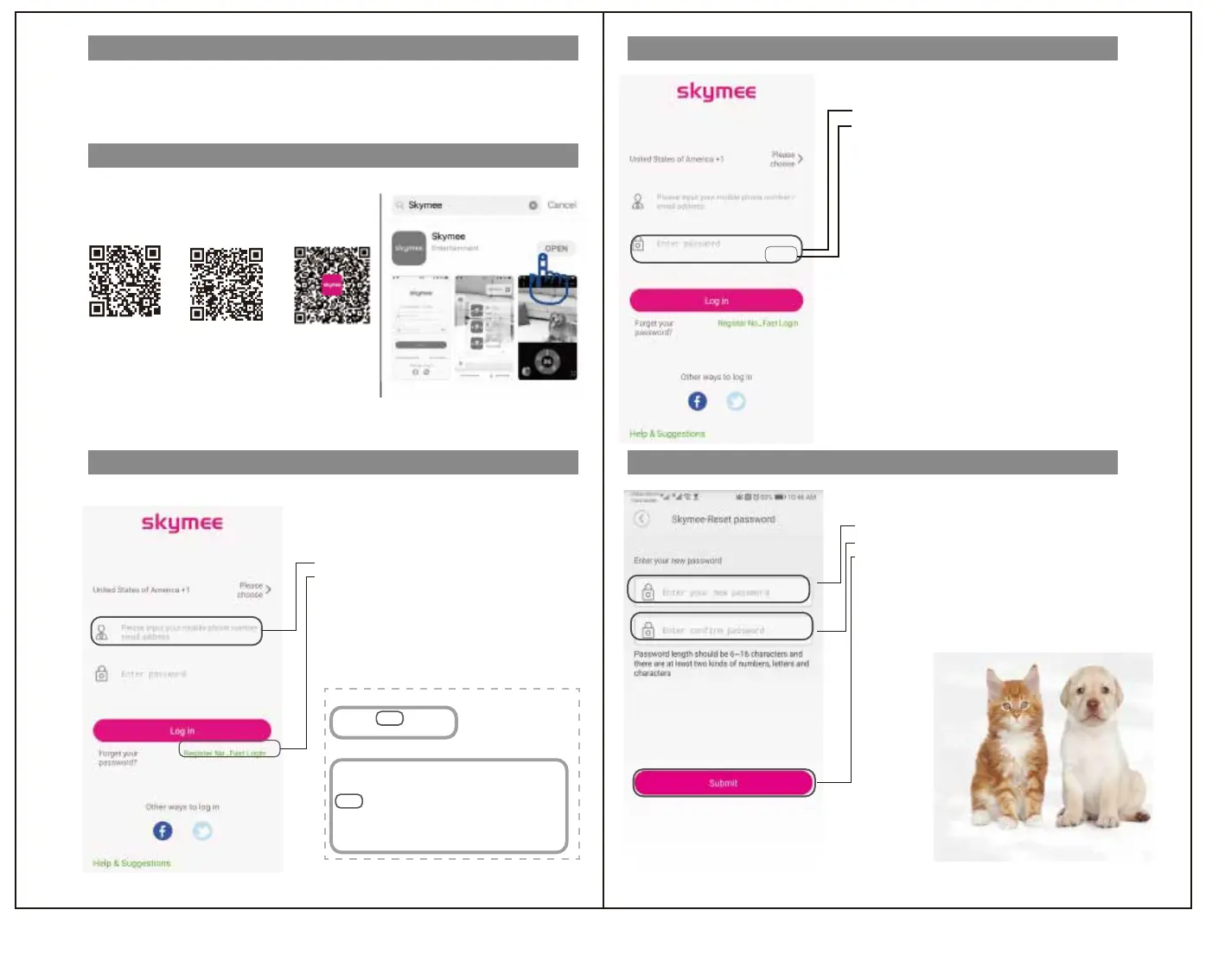
① Enter the password.
② Enter the same password for reconfirmation.
③ Tap “Submit” .
*The password length is 6 to 16 digits.
Please set the two types in combination.
* A password must be set when using a large number of mobile devices
such as smartphones (up to 8).
*Only one mobile terminal can operate at the same time.
Password setting
Use the included dedicated adapter and charging cable to fully charge.
(When the battery is charged normally, the charging lamp near the charging port lights red.)
The mobile phone scans the QR code or logs on the website
to download and install the app.
Or search for "skymee" in the following app store.
IOS "App Store"
Android "Google Play"
If you couldnʼ t find in scans the QR code
AppStore
GppglePlay
①Please enter your mobile number or email address.
②Tap "Create account” .
↓
①To the telephone number or email address you filled in
Authenticate code will be sent.
Launch the installed "Skymee" app.
*Please operate in a stable network
Dearusers:
Hello!youusetheemail"XXXXXXX0@XXX.com"toapplytologinthe
『Skymee』platform,andyourverificationcodeisasfollows:
803449
Pleaseloginwithin30minutes.Ifyouhavenotsubmittedarequestfor
logginginwithverificatiocode,pleaseignorethismessage.
Thisisthesystememail,pleasedonotreplydirectly.
Yourpinis123456.Usethispinfor
AppSkymee.
Ifyouenteryourphonenumber,youwillreceiveashortmessage
Ifyouenteryouremailaddress,youwillreceiveanemail
※Authenticationcodetransmissionexample,
inthefollowingcase"123456"istheauthenticationcode.
Registered
①
②
Before using
はじめに
はじめに
アプリ登録
アプリ登録
無線LAN接続
操作方法
操作方法
安全のために
安全のために
無線LAN接続
Skymee



 To Next Page
 Loading...