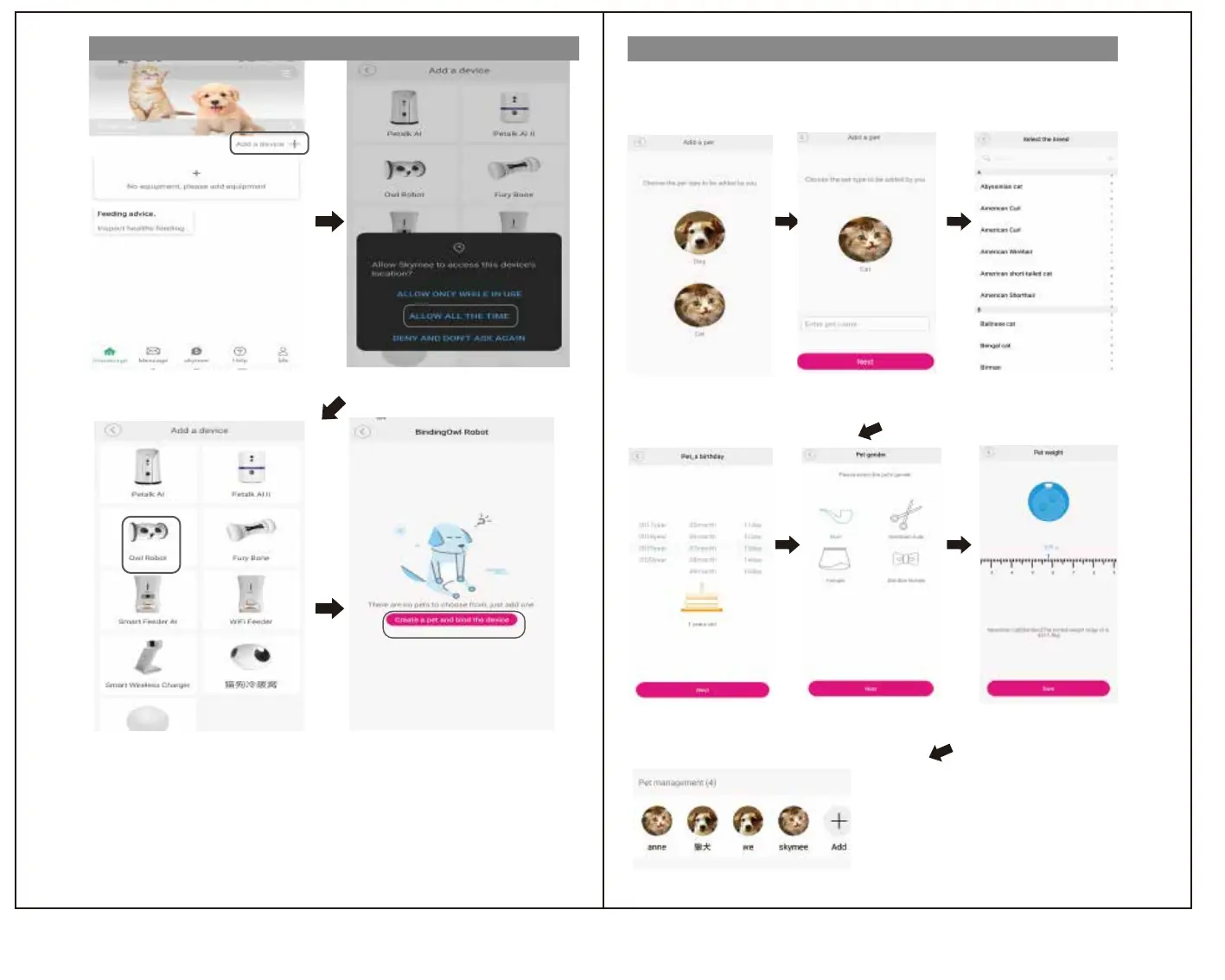
Add device
Pet registration
Starttheinstalled"Skymee".
①TapAdddevice.
Dog icon for dogs, cat icon for cats
Please tap.
① Swipe the screen and tap to select.
② Tap "Next".
① Swipe and tap to select your date of birth.
② Tap Next.
① Enter the name of your pet.
② Tap "Next".
AllowSkymeetoaccessthisdeviceʼ slocation.
②ALLOWALLTHETIME
③TaptheOwlRobot ④Tap“Createapetaandbindthedevice”
①
②
③
④
* With this product, you can register the weight of your dog or cat, etc.,
but this is for the purpose of health management and is not guaranteed.
The ideal weight also depends on the breeding environment, etc., and there are individual differences.
Please manage in consultation with your vet.
① Select the applicable item by tapping.
② Tap Next.
② Swipe to select.
② Tap Save.
*Additions and corrections are possible later.
Pet registration completed
はじめに
はじめに
アプリ登録
アプリ登録
無線LAN接続
操作方法
操作方法
安全のために
安全のために
無線LAN接続
②


 To Next Page