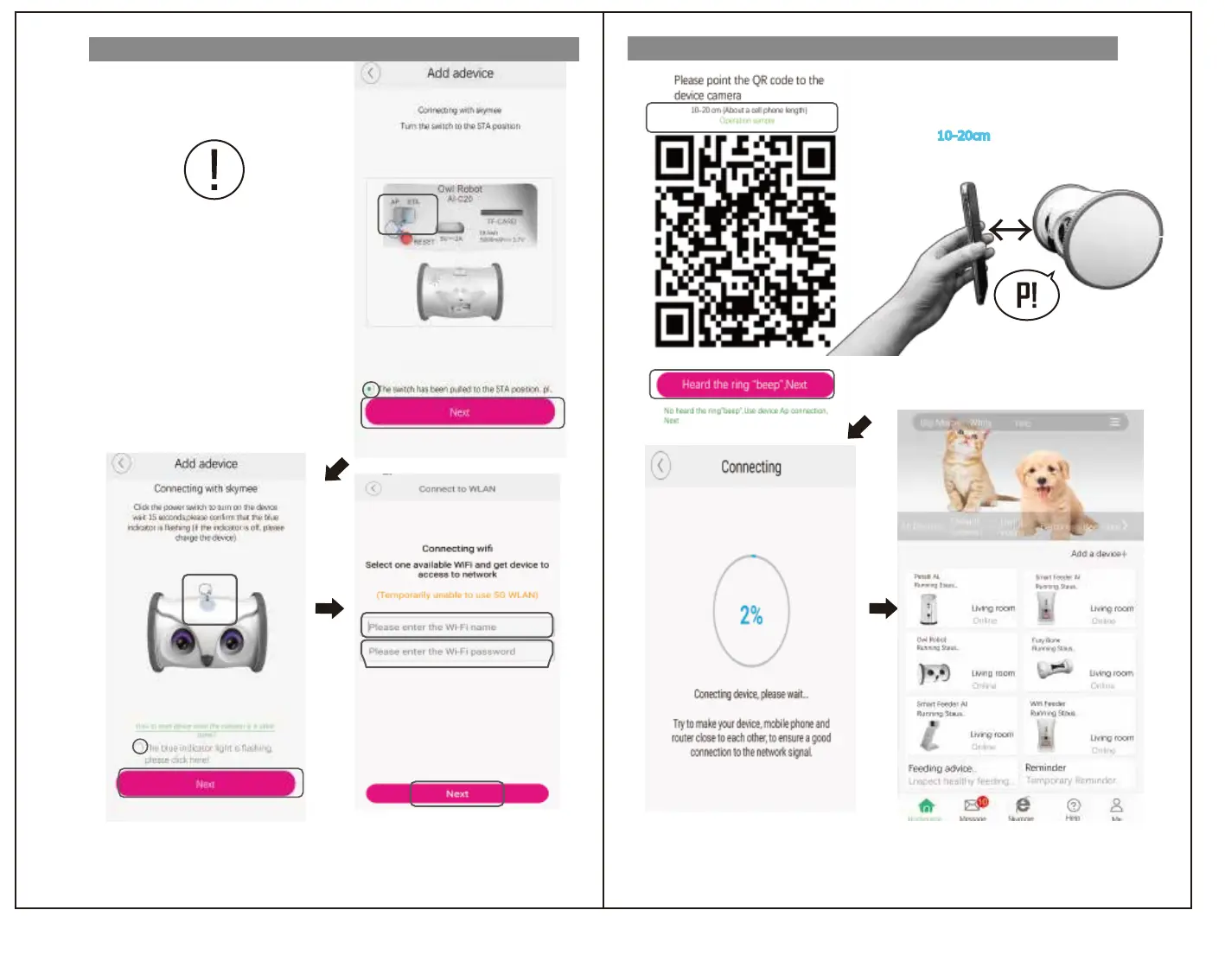
Wi-Fi connetion①
10~20cm
⑩Keep a distance
10-20cm
(about the length of one mobile
phone),stay still for about 5 seconds,and if you do not hear
the “beep” ,try to move to make the camera scan the QR code
⑪ Tap "I heard a beep, the next step".
The Wi-Fi connection of this product
is completed and linked to the mobile device.
Wi-Fi connetion②
①
②
③
⑦
⑧
⑨
⑤
⑥
④
⑩
⑪
"Wi-Fi password" is required for Wi-Fi
connection.
If you are uncertain, check the instruction manual of the
device you are using or contact the manufacturer directly.
① Set the switch on the back of this unit to "STA".
② Tap ○ to add ✓.
③ Tap “Next” .
⑦ Available network names are displayed.
⑧ Enter the Wi-Fi password.
Tap "Next".
④Press the power switch to start this product.
*Check the blinking of the blue lamp
⑤ Tap ○ to add ✓.
⑥ Tap “Next” .
⑫
⑫ When it connect to 100%,
Pls tap “Confirm”
はじめに
はじめに
アプリ登録
アプリ登録
無線LAN接続
操作方法
操作方法
安全のために
安全のために
無線LAN接続


 To Next Page
 Loading...